1. Introduction
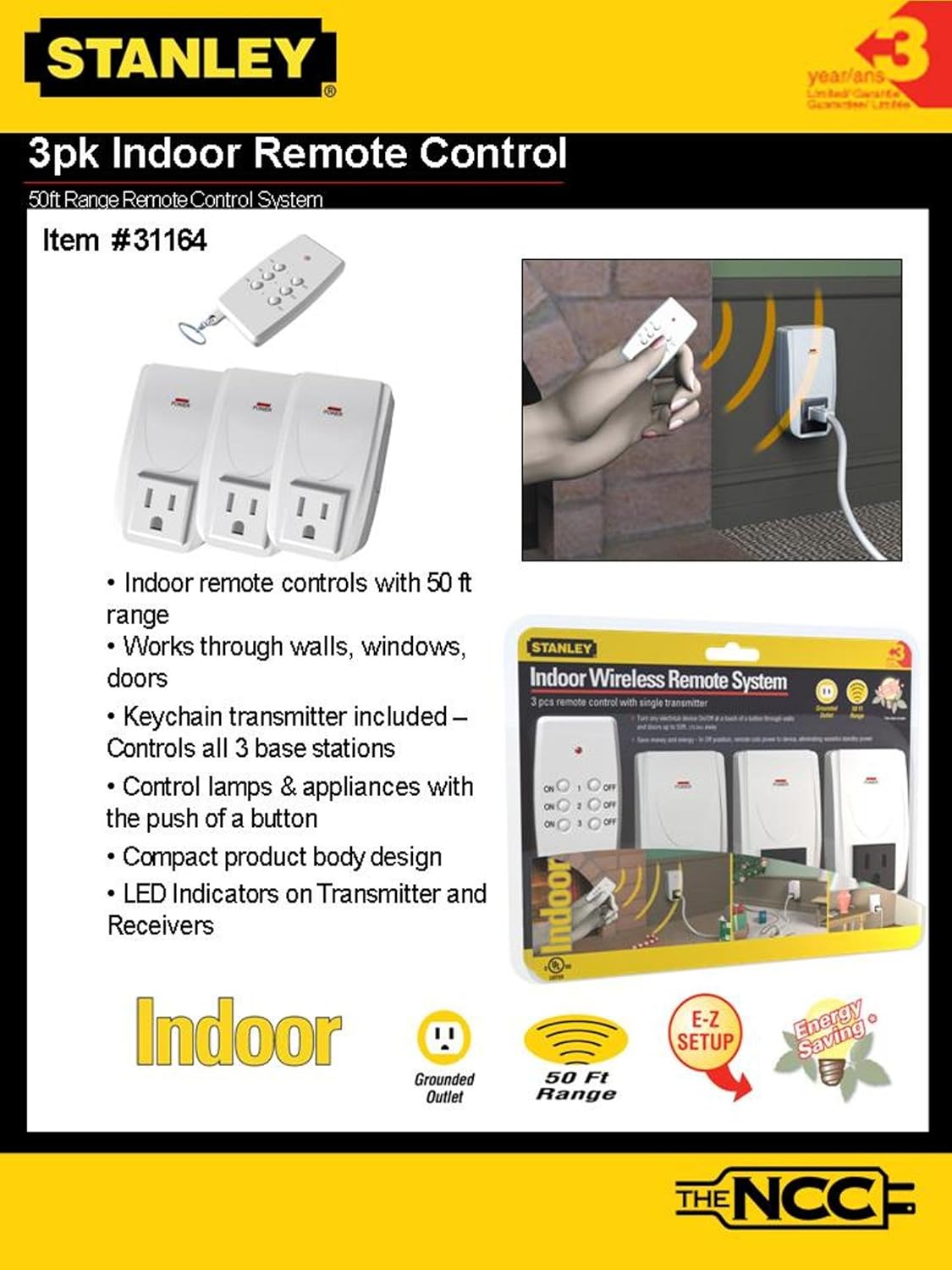
This manual provides instructions for the installation, operation, and maintenance of your Stanley 31164 Indoor Wireless Remote Control System. This system allows you to remotely control up to three electrical devices using a single transmitter, offering convenience for hard-to-reach appliances and energy management.
The system operates by transmitting signals through walls, doors, and glass, with an effective range of up to 50 feet.
2. Package Contents
- 1 x Wireless Remote Control Transmitter
- 3 x Wireless Remote Control Receivers (Grounded Outlets)
- 1 x Keychain for Transmitter
- Batteries for Transmitter (pre-installed or included)

3. Specifications
| Feature | Detail |
|---|---|
| Model Number | 31164 |
| Brand | STANLEY |
| Operating Range | Up to 50 feet (through walls, doors, glass) |
| Number of Receivers | 3 (Grounded Outlets) |
| Transmitter Channels | A, B, C (corresponding to receivers 1, 2, 3) |
| Electrical Rating | UL/CUL 8A/125V/1000W Resistive, 5A/625W Tungsten |
| Batteries | Required and Included |
| Item Weight | Approximately 12 ounces (total package) |
4. Setup Instructions
- Unpack Components: Carefully remove all items from the packaging.
- Transmitter Battery Installation: The transmitter typically comes with batteries pre-installed. If not, open the battery compartment (usually on the back) and insert the required batteries, observing polarity.
- Receiver Placement: Plug each wireless receiver into a standard 125V AC grounded wall outlet. Ensure the outlet is easily accessible.
- Connect Device: Plug the electrical device (lamp, fan, etc.) you wish to control into the grounded outlet on the receiver. Ensure the device's power switch is in the "ON" position for remote control functionality.
- Pairing (if necessary): The units are usually pre-paired from the factory. Each receiver corresponds to a numbered button (1, 2, or 3) on the transmitter. Test functionality by pressing the corresponding "ON" and "OFF" buttons on the remote. If a receiver does not respond, refer to the "Troubleshooting" section for re-pairing instructions.
5. Operating Instructions
The Stanley 31164 system is designed for simple operation.
- Turning Devices ON: Press the "ON" button corresponding to the receiver (1, 2, or 3) you wish to activate. The connected device will power on.
- Turning Devices OFF: Press the "OFF" button corresponding to the receiver (1, 2, or 3) you wish to deactivate. The connected device will power off.
- Power Indicator: Each receiver has a "POWER" indicator light (typically red) that illuminates when the receiver is supplying power to the connected device.
- Range: The remote operates effectively up to 50 feet from the receiver, even through walls, doors, and glass. Optimal performance may vary based on environmental factors and interference.
Note: In the "OFF" position, the timer cuts power to the device, which can help eliminate wasteful standby power and save energy.
6. Maintenance
- Cleaning: Clean the transmitter and receivers with a soft, dry cloth. Do not use liquid cleaners or solvents.
- Battery Replacement: If the remote control's range decreases or it becomes unresponsive, replace the battery in the transmitter. Refer to the battery compartment for the correct battery type and polarity.
- Storage: Store the system in a cool, dry place when not in use for extended periods.
7. Troubleshooting
| Problem | Possible Cause | Solution |
|---|---|---|
| Device does not turn ON/OFF. |
|
|
| Reduced operating range. |
|
|
Re-syncing Transmitter and Receiver:
If a receiver is not responding to its corresponding button on the transmitter, follow these steps:
- Unplug the unresponsive receiver from the wall outlet.
- Wait approximately 5 seconds.
- Plug the receiver back into the wall outlet.
- Within 5 seconds of plugging it in, press and hold the "ON" button for the desired channel (1, 2, or 3) on the transmitter until the receiver's power indicator light flashes or responds.
- Test the connection by pressing the "ON" and "OFF" buttons for that channel.
8. Warranty and Support
STANLEY products are manufactured to high-quality standards. For warranty information, technical support, or to inquire about replacement parts, please refer to the product packaging or visit the official STANLEY website. Keep your purchase receipt as proof of purchase.
Manufacturer: Stanley
Date First Available: April 15, 2009


