
1. Introduction
This manual provides essential information for the safe and efficient operation of your Astron RS70A 70 Amp Power Supply. Please read these instructions thoroughly before installation and use. Retain this manual for future reference.
The Astron RS70A is a high-quality, solid-state electronically regulated DC power supply designed to provide a stable and reliable 13.8 VDC output, with an internally adjustable range of 11-15 V. It features a continuous amperage output of 57A and an ICS (Surge) amperage output of 70A, making it suitable for various demanding applications.
2. Safety Information
WARNING: Failure to follow these safety instructions may result in electric shock, fire, or serious injury.
- Electrical Shock Hazard: Do not open the power supply casing. There are no user-serviceable parts inside. Refer all servicing to qualified personnel.
- Ventilation: Ensure adequate ventilation around the unit. Do not block ventilation openings. Overheating can damage the unit and pose a fire risk.
- Indoor Use Only: This power supply is designed for indoor use in a dry environment. Do not expose to rain, moisture, or excessive humidity.
- Proper Grounding: Always connect the power supply to a properly grounded AC outlet.
- Correct Voltage: Verify that the input voltage matches the power supply's requirements before connecting to an AC source.
- Load Connection: Connect the load to the DC output terminals only after the power supply is turned off. Ensure correct polarity.
- Overload Protection: The unit features fold-back current limiting to protect against excessive current and continuous shorted output. However, avoid prolonged overload conditions.
3. Product Overview
The Astron RS70A power supply is built with robust features for reliable performance.
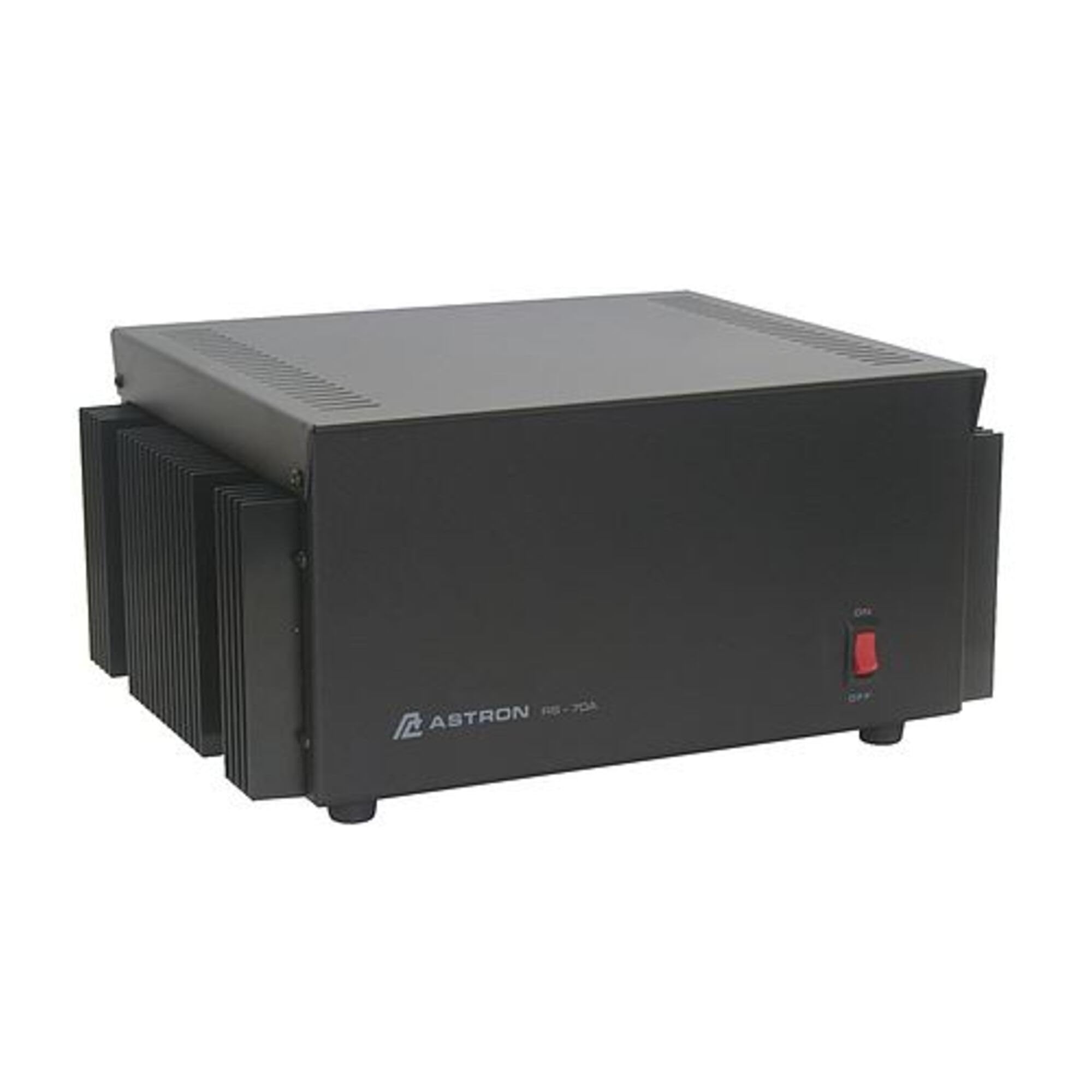
Figure 1: Front view of the Astron RS70A 70 Amp Power Supply, showing the main casing and output terminals.
Key Features:
- Output Voltage: 13.8 VDC, internally adjustable (11-15 V).
- Continuous Amperage Output: 57A.
- ICS (Surge) Amperage Output: 70A.
- Regulation: Solid State Electronically Regulated.
- Protection: Fold-Back Current Limiting and Crowbar Over Voltage Protection.
- Cooling: Heavy duty heat sink.
- Maintains regulation and low ripple at low line input voltage.
4. Setup
- Unpacking: Carefully remove the power supply from its packaging. Inspect for any signs of damage during transit.
- Placement: Place the power supply on a stable, level surface. Ensure there is at least 6 inches (15 cm) of clear space around all ventilation openings for proper airflow. Do not place it near heat sources or in direct sunlight.
- AC Power Connection: Ensure the power supply's main power switch is in the OFF position. Connect the AC power cord to the power supply's AC inlet, then plug the other end into a grounded AC outlet. Verify the outlet voltage matches the power supply's requirements.
- DC Load Connection: With the power supply OFF, connect your DC load to the output terminals.
- Connect the positive (+) terminal of your load to the red (+) terminal on the power supply.
- Connect the negative (-) terminal of your load to the black (-) terminal on the power supply.
- Ensure all connections are secure and tight to prevent arcing or poor contact.
5. Operating Instructions
- Power On: After ensuring all connections are secure and correct, switch the main power switch to the ON position. The power supply should now be active.
- Voltage Adjustment (if applicable): The RS70A has an internally adjustable voltage range of 11-15 V. This adjustment is typically performed by qualified technicians and is not intended for routine user adjustment. The factory setting is 13.8 VDC.
- Monitoring: Observe your connected load for proper operation. The power supply will maintain a stable output voltage within its specified limits.
- Overload Protection: If the current draw exceeds the unit's capacity (70A surge, 57A continuous), the fold-back current limiting feature will activate to protect the power supply. This may result in a reduction of output voltage. Reduce the load to restore normal operation.
- Power Off: To turn off the power supply, first disconnect the load if possible, then switch the main power switch to the OFF position.
6. Maintenance
Regular maintenance ensures the longevity and reliable performance of your power supply.
- Cleaning: Disconnect the power supply from the AC outlet before cleaning. Use a soft, dry cloth to wipe the exterior. Do not use liquid cleaners or solvents.
- Ventilation: Periodically check that the ventilation openings are free from dust and obstructions. A build-up of dust can impede airflow and lead to overheating.
- Connections: Periodically check all AC and DC connections to ensure they remain tight and secure.
- Internal Servicing: Do not attempt to open the power supply for internal cleaning or servicing. This should only be performed by qualified service personnel.
7. Troubleshooting
This section addresses common issues you might encounter with your power supply.
| Problem | Possible Cause | Solution |
|---|---|---|
| No output voltage / Unit does not power on. |
|
|
| Low or fluctuating output voltage. |
|
|
| Unit gets excessively hot. |
|
|
8. Specifications
| Feature | Detail |
|---|---|
| Model Name | RS70A |
| Brand | Astron |
| Output Voltage | 13.8 VDC (Internally Adjustable 11-15 V) |
| Continuous Amperage Output | 57A |
| ICS (Surge) Amperage Output | 70A |
| Wattage | 200 watts (Note: This might refer to AC input or a specific component, not DC output power) |
| Cooling Method | Air (Heavy duty heat sink) |
| Item Dimensions (L x W x H) | 12.13 x 13.75 x 6 inches |
| Power Supply Design | Non-Modular |
| Maximum Input Voltage | 13.8 Volts (AC) - Note: This likely refers to the nominal AC input voltage, not DC output. |
| Minimum Input Voltage | 13 Volts (AC) - Note: This likely refers to the nominal AC input voltage, not DC output. |
| UPC | 656403100146 |
| Mfr Part Number | RS-70A |
Note: Some specifications like "Wattage", "Maximum Input Voltage", and "Minimum Input Voltage" might be listed in the source data with values that are typically associated with computer internal power supplies (e.g., 200 watts, 13.8V AC input). For a dedicated DC power supply like the RS70A, the primary input is AC mains voltage (e.g., 120V AC or 240V AC), and the output is 13.8V DC. Please refer to the product label for precise AC input voltage requirements. The 200 watts might refer to the power consumption or a specific component rating rather than the total DC output power capability (which would be closer to 13.8V * 57A = ~786 watts).
9. Warranty and Support
According to available product information, this product is sold with "No Warranty". For any technical support, service inquiries, or questions regarding the operation of your Astron RS70A Power Supply, please contact the manufacturer directly or your authorized dealer.
Always refer to the official Astron website or product documentation for the most current support information.