
Proto J6025
Proto J6025 1-inch Drive Fixed Head Micrometer Torque Wrench User Manual
Model: J6025
Introduction
This manual provides essential instructions for the safe and effective use, maintenance, and storage of your Proto J6025 1-inch Drive Fixed Head Micrometer Torque Wrench. This precision instrument is designed for applying specific torque values within the range of 400-2000 ft-lbs. Please read this manual thoroughly before operating the tool to ensure proper function and to prevent damage or injury.
Safety Information
- Always wear appropriate personal protective equipment (PPE), such as safety glasses, when operating this tool.
- Ensure the workpiece is securely fastened before applying torque.
- Do not exceed the maximum torque capacity of 2000 ft-lbs.
- Never use the torque wrench as a breaker bar or for loosening fasteners.
- Keep the tool clean and free from oil, grease, or other contaminants that could affect grip or accuracy.
- Store the torque wrench in a dry, clean environment, protected from extreme temperatures and humidity.
- Regular calibration is essential to maintain accuracy. Refer to the Maintenance section for details.
Product Overview
The Proto J6025 is a robust 1-inch drive micrometer torque wrench designed for high-torque applications. It features a fixed head and a micrometer-style adjustment for precise torque setting.
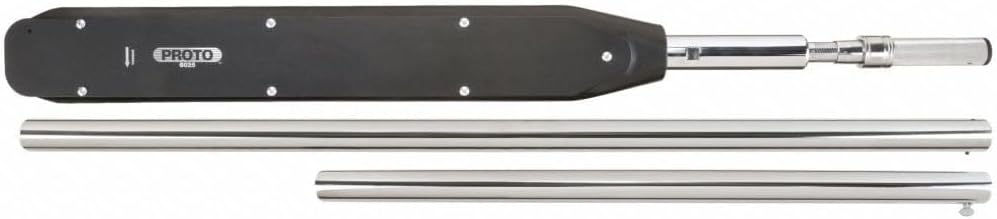
Figure 1: Proto J6025 1-inch Drive Fixed Head Micrometer Torque Wrench. This image displays the main body of the torque wrench, which is black, with a silver handle and extension bars. The Proto logo and model number J6025 are visible on the black body. Two separate silver extension bars are shown below the main wrench body.
Components:
- Wrench Body: The main housing containing the torque mechanism.
- Drive Head: Fixed 1-inch square drive for sockets.
- Micrometer Scale: Used for precise torque setting.
- Adjustment Handle: Rotated to set the desired torque value.
- Locking Mechanism: Secures the torque setting.
- Extension Bars: (If included) For increased leverage and reach.
Setup
- Unpacking: Carefully remove the torque wrench and any accessories from its packaging. Inspect for any signs of damage.
- Familiarization: Identify the main components as described in the Product Overview section.
- Cleaning: Wipe down the tool with a clean, dry cloth to remove any manufacturing residues.
- Attachment: Select the appropriate 1-inch drive socket for your fastener and securely attach it to the wrench's drive head.
Operating Instructions
- Unlock the Handle: Locate the locking mechanism (usually a knurled ring or collar) near the adjustment handle. Rotate or pull it to unlock the handle for torque adjustment.
- Set Desired Torque:
- Rotate the adjustment handle until the desired major torque value aligns with the main scale line.
- Further rotate the handle until the minor torque value on the micrometer scale aligns with the main scale line. For example, to set 500 ft-lbs, align '500' on the main scale, then adjust the micrometer scale to '0' if it reads in increments of 10.
- Lock the Handle: Once the desired torque is set, engage the locking mechanism to prevent accidental changes during operation.
- Apply Torque:
- Place the socket onto the fastener.
- Apply a slow, steady pull to the handle. Avoid jerky movements.
- Continue pulling until you feel and hear a distinct "click" or "break" in the wrench mechanism. This indicates that the preset torque has been reached.
- Immediately stop applying force once the click is felt/heard.
- Reset (Optional): For optimal spring life, it is recommended to return the torque setting to its lowest value (but not below the minimum specified range) after each use, especially for long-term storage.
Maintenance
- Cleaning: After each use, wipe the wrench clean with a soft, dry cloth. Do not use solvents or harsh chemicals, as these can damage the finish or internal components.
- Storage: Store the torque wrench in its protective case (if provided) or a clean, dry place. Always set the torque to the lowest setting before storage to relieve tension on the internal spring.
- Lubrication: The internal mechanism is factory-lubricated and generally does not require user lubrication. If the wrench feels stiff or performs inconsistently, it may require professional servicing.
- Calibration: Torque wrenches are precision instruments that require periodic calibration to maintain accuracy. It is recommended to have your Proto J6025 calibrated annually or after any significant impact or misuse. Contact an authorized Proto service center for calibration services.
Troubleshooting
| Problem | Possible Cause | Solution |
|---|---|---|
| Wrench does not click | Torque setting too high for application; Wrench used as breaker bar; Internal mechanism damage. | Verify correct torque setting; Do not use for loosening; Seek professional service. |
| Inaccurate torque readings | Out of calibration; Improper technique; Damaged internal components. | Calibrate the wrench; Ensure steady pull; Seek professional service. |
| Handle difficult to adjust | Locking mechanism engaged; Dirt or debris in mechanism. | Disengage locking mechanism; Clean the adjustment area; Seek professional service if persistent. |
For issues not listed above, or if solutions do not resolve the problem, contact Proto customer support or an authorized service center.
Specifications
| Model Name | J6025 |
| Brand | Proto |
| Drive Size | 1 inch |
| Torque Range | 400-2000 ft-lbs |
| Head Style | Fixed Square |
| Operation Mode | Mechanical |
| Material | Blend |
| Finish Type | Brushed |
| Item Length | 34.25 Inches |
| Item Weight | 56.3 Pounds |
| UPC | 662679130213 |
Warranty
For detailed warranty information regarding your Proto J6025 torque wrench, please contact the vendor or Proto customer service directly. Warranty terms and conditions may vary and are subject to the manufacturer's policy at the time of purchase.
Support
If you require further assistance, have questions about the operation or maintenance of your Proto J6025 torque wrench, or need to arrange for service or calibration, please visit the official Proto website or contact their customer support department. Always refer to the model number J6025 when seeking support.
Proto Official Website: www.protoindustrial.com