
Introduction
The Walimex 15763 Photography Table is designed for professional product photography, offering a versatile and stable platform for capturing high-quality images. Its translucent diffusion surface allows for various lighting setups, including illumination from below, to minimize shadows and achieve clean, isolated product shots.
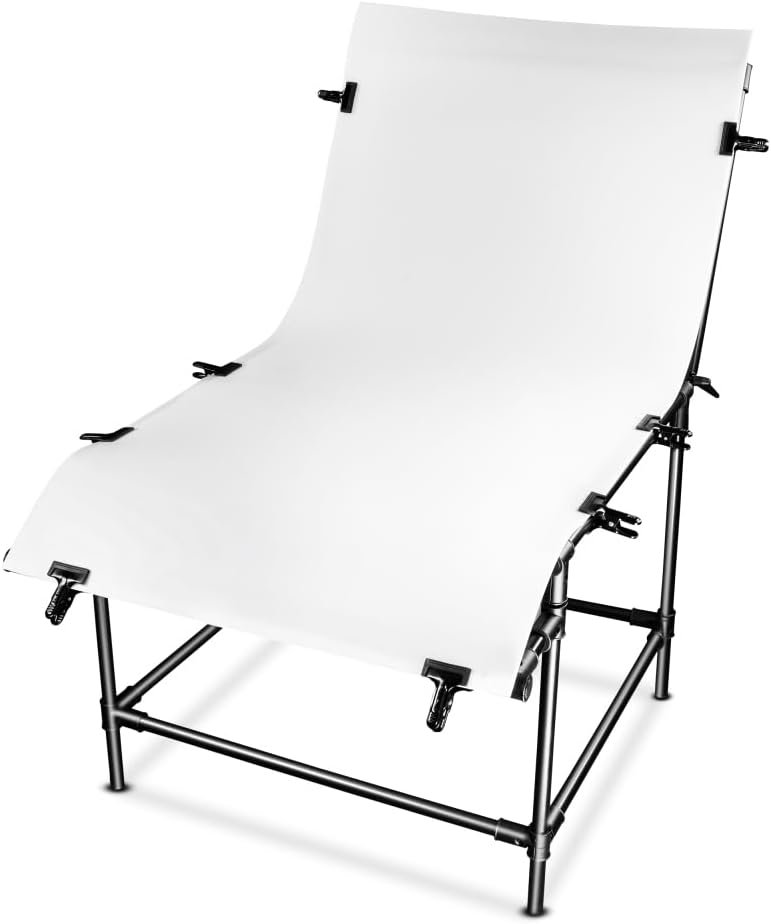
Image: The Walimex 15763 Photography Table, fully assembled, featuring its white translucent shooting surface and black frame.
Package Contents
Before assembly, ensure all components are present:
- 1x Walimex Pro Basic L Shooting Table Frame
- 1x Diffuser Plate (100 x 200 cm)
- 8x Studio Clips
- 2x Studio Clamps with Spigot

Image: All components included in the Walimex 15763 Photography Table package, laid out for inspection.
Setup Instructions
Follow these steps to assemble your Walimex 15763 Photography Table:
- Unpack Components: Carefully remove all parts from the packaging. Inspect for any damage.
- Assemble the Frame: Connect the aluminum tubes to form the base and upright supports. Ensure all connections are secure. Refer to any included diagrams for correct orientation.
- Attach the Diffuser Plate: The diffuser plate is designed to be flexible but may be stiff initially. Gently unroll the plate. Position it onto the assembled frame, ensuring it covers the entire shooting area.
- Secure the Plate with Clips: Use the provided studio clips to firmly attach the diffuser plate to the frame. Distribute the clips evenly to maintain tension and a smooth, seamless surface.
- Adjust the Back Panel: The rear section of the table is adjustable. Use the adjustment mechanisms to set the desired angle for your background, allowing for various shooting perspectives.

Image: Close-up view of the adjustable back panel mechanism, demonstrating its range of motion for setting background angles.
Operating the Photography Table
The Walimex 15763 Photography Table is optimized for various product photography techniques:
- Shadow-Free Photography: The translucent diffusion surface allows light to pass through, enabling illumination from below. This technique effectively minimizes shadows, creating clean, isolated product images ideal for e-commerce.
- Product Isolation: The seamless background created by the curved diffuser plate is ideal for isolating products from their environment, suitable for catalog or creative photography.
- Adjustable Background: Utilize the adjustable back panel to achieve different background angles, providing flexibility for various product sizes and desired perspectives.

Image: A product photography setup utilizing the Walimex table, illustrating how light can be directed from underneath for soft, even illumination.

Image: Example of cosmetic products professionally photographed on the Walimex 15763 table, showcasing the clean background and professional lighting.
Maintenance
Proper care will extend the lifespan of your photography table:
- Cleaning: Wipe the diffuser plate and frame with a soft, damp cloth. Avoid abrasive cleaners, solvents, or harsh chemicals that could scratch or damage the surfaces.
- Storage: When not in use, disassemble the table and store it in its original packaging or a protective bag to prevent dust accumulation and damage. The diffuser plate can be carefully rolled for compact storage.
- Inspection: Periodically check all frame connections and clips for tightness and wear. Replace any damaged components to ensure the table remains stable and safe for use.
Troubleshooting
- Diffuser Plate Not Lying Flat: The diffuser plate may be stiff, especially when new or after prolonged storage. Allow it to warm up slightly in a room-temperature environment. Ensure it is properly tensioned and secured with all clips. If the plate remains excessively warped, gently apply pressure to flatten it over time, or consider using additional clamps if available.
- Unstable Frame: Ensure all frame connections are fully inserted and tightened. Verify that the table is placed on a flat, stable surface. Uneven surfaces can cause instability.
- Difficulty Assembling: Refer to the setup instructions and diagrams. Assembly may require two people due to the size and initial stiffness of the diffuser plate. Do not force connections; ensure proper alignment.
Specifications
| Feature | Detail |
|---|---|
| Brand | Walimex Pro |
| Model Number | 15763 |
| Dimensions (Assembled, L x W x H) | Approx. 200 x 100 x 165 cm |
| Shooting Surface Dimensions | 100 x 200 cm |
| Shooting Height | 80 cm |
| Product Weight | 15.5 kg |
| Load Capacity | Up to 15 kg |
| Material | Plastic (diffuser plate), Aluminum (frame) |
| Color | Black (frame), White (diffuser plate) |

Image: Diagram illustrating the key dimensions of the Walimex 15763 Photography Table, including height, width, and depth.
Warranty and Support
For information regarding warranty coverage, technical support, or spare parts, please contact your retailer or the manufacturer, Walimex Pro, directly. Retain your proof of purchase for any warranty claims.
Compatibility
The Walimex 15763 Photography Table is designed to be compatible with a wide range of studio lighting equipment and accessories. This includes various light stands, softboxes, and LED lights, allowing for flexible and professional studio setups.

Image: The Walimex 15763 Photography Table integrated into a studio setup, demonstrating compatibility with various lighting accessories.