
Introduction
The Vessel TD-80 T-Type Ratchet Driver Set is a versatile hand tool designed for efficient tightening and loosening of screws. Its unique T-handle and ratchet mechanism allow for quick and easy operation, reducing wrist fatigue by eliminating the need to reposition your grip. This manual provides comprehensive instructions to ensure safe and effective use of your new tool.
Key Features
- T-Handle Design: Ergonomic T-handle allows for comfortable, single-handed operation without needing to change grip.
- Ratchet Mechanism: Smooth ratcheting action enables continuous turning without lifting the tool, enhancing speed and efficiency.
- Speed Ring: Equipped with a convenient speed ring for rapid, free-spinning rotation, ideal for quickly running screws in or out.
- Replaceable Bits: Compatible with standard 6.35mm hex bits, offering versatility for various screw types and sizes.
- Compact Bit Storage: Includes a bit belt for compact and organized storage of the included bits.

Figure 1: Product packaging illustrating key features and operational diagrams.
Components
The Vessel TD-80 T-Type Ratchet Driver Set typically includes the following components:
- Vessel TD-80 T-Type Ratchet Driver
- Assorted 6.35mm Hex Bits (e.g., Phillips #1, #2, #3; Slotted #4, #6)
- Bit Belt (for bit storage)

Figure 2: The Vessel TD-80 T-Type Ratchet Driver and its accompanying bit set.

Figure 3: Close-up view of the driver and bits, showing bit type and size markings.
Setup
- Select the Correct Bit: Identify the appropriate bit (e.g., Phillips, Slotted) for the screw you intend to work with.
- Insert the Bit: Firmly insert the selected 6.35mm hex bit into the magnetic bit holder at the end of the driver shaft until it clicks or feels secure.
- Verify Bit Security: Gently tug on the bit to ensure it is securely seated and will not fall out during use.
Operating Instructions
Adjusting Ratchet Direction
The TD-80 features a three-position ratchet mechanism:
- Tighten (Clockwise): Rotate the collar on the driver shaft to the position indicated for tightening. This allows the driver to turn clockwise while ratcheting freely counter-clockwise.
- Loosen (Counter-Clockwise): Rotate the collar to the position indicated for loosening. This allows the driver to turn counter-clockwise while ratcheting freely clockwise.
- Locked (Fixed): Rotate the collar to the center position to lock the shaft, preventing any ratcheting action. This is useful for initial breaking loose of tight screws or for final tightening.
Using the Speed Ring
For rapid rotation of screws, especially when they are not under high torque, utilize the speed ring:
- Hold the T-handle firmly.
- Place your index finger and thumb on the knurled speed ring located just below the T-handle.
- Rotate the speed ring with your fingers to quickly spin the bit and drive the screw without engaging the ratchet mechanism. This is ideal for fast, low-torque applications.
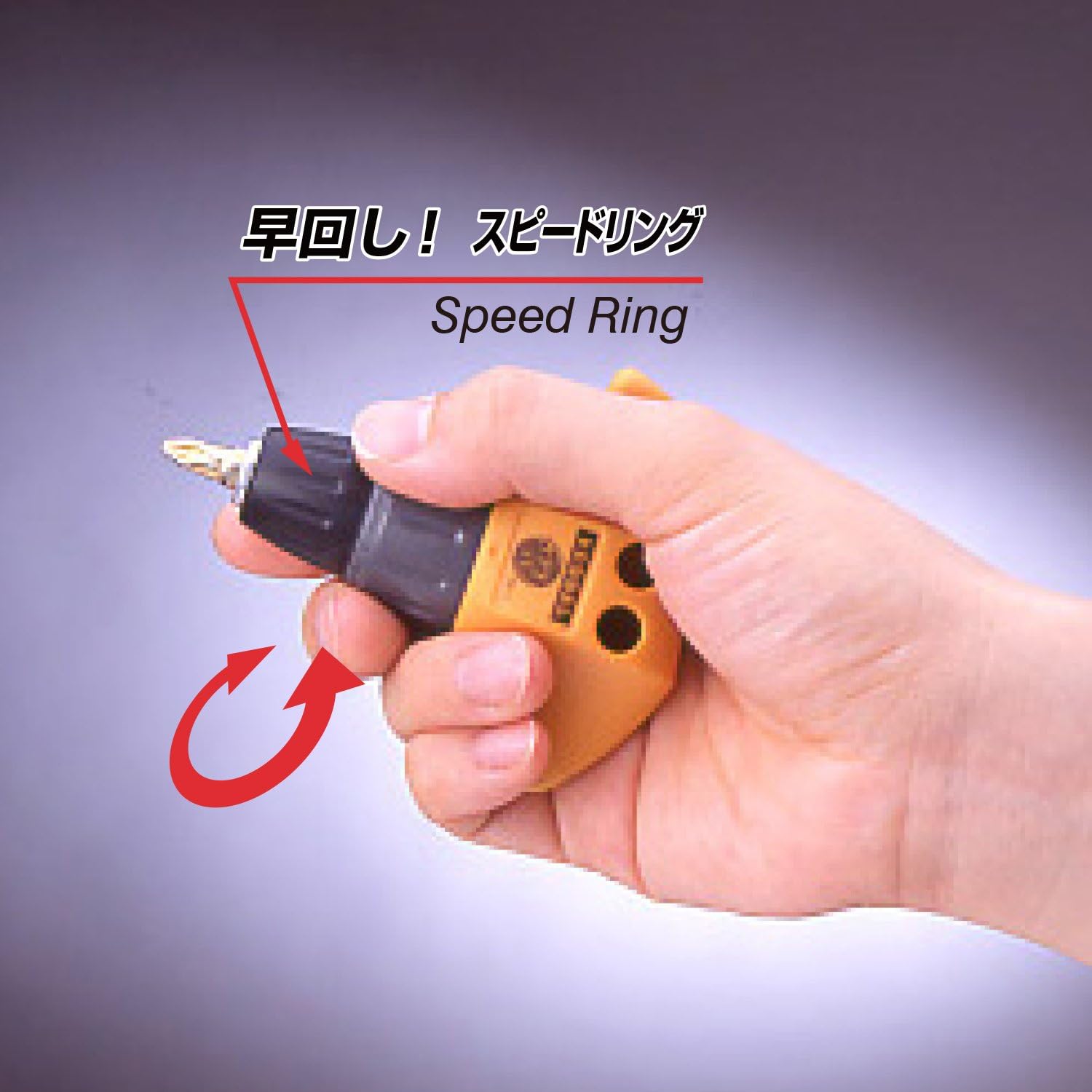
Figure 4: Illustration of how to use the Speed Ring for quick rotation.
Maintenance
- Cleaning: Wipe the driver and bits clean with a dry cloth after each use to remove dirt, dust, and debris. Avoid using harsh chemicals or abrasive cleaners.
- Lubrication: The internal ratchet mechanism is designed for long-term, maintenance-free operation. Do not attempt to lubricate or disassemble the ratchet head.
- Storage: Store the driver and bits in a dry, cool place, away from direct sunlight and moisture, to prevent rust and corrosion. Utilize the included bit belt for organized storage of bits.
- Bit Inspection: Periodically inspect bits for wear or damage. Replace worn or damaged bits to ensure optimal performance and prevent damage to screw heads.
Troubleshooting
- Bit Slipping: Ensure the correct size and type of bit is used for the screw head. Verify the bit is fully inserted into the magnetic holder. If the bit is worn, replace it.
- Ratchet Not Engaging: Check that the ratchet direction collar is fully engaged in either the tightening or loosening position, not in the locked position or between settings.
- Difficulty Turning Screws: Ensure the ratchet direction is set correctly for tightening or loosening. For very tight screws, use the locked position to apply initial torque, then switch to ratchet mode.
Specifications
| Attribute | Value |
|---|---|
| Brand | VESSEL |
| Model Name | TD-80 |
| Head Style | Phillips |
| Material | Alloy Steel, Polypropylene |
| Color | Multicolor |
| Item Weight | 5.3 ounces |
| Package Dimensions | 6.57 x 4.13 x 1.42 inches |
| Special Feature | T-handle, ratchet mechanism, bits replaceable |
| Manufacturer | VESSEL (ベッセル) |
| UPC/JAN | 4907587346131 |
Safety Information
- Proper Use: Always use the tool correctly and for its intended purpose. Improper use or forcing the tool can lead to screw damage or personal injury.
- Electrical Safety: This tool is NOT insulated. Do not use this tool with live electrical current. Using it on live circuits can cause short circuits, electric shock, and serious injury.
- Avoid Overload: Do not apply excessive force or overload the tool, as this can damage the tool and lead to malfunction.
- Storage: Keep this tool out of reach of children. Store it safely in a secure location when not in use.
- Eye Protection: Always wear appropriate eye protection when using hand tools to prevent eye injuries from flying debris.
Warranty and Support
For warranty information, technical support, or inquiries regarding your Vessel TD-80 T-Type Ratchet Driver Set, please contact VESSEL customer service directly. Refer to the product packaging or the official VESSEL website for the most current contact details and warranty terms.


