
Introduction
Thank you for purchasing the Amewi 22032 Torche 2.4 GHz 1:10 RTR Monster Truck. This vehicle is designed for off-road performance with its 4WD system, oil-filled shock absorbers, and durable Lexan body. This manual provides detailed instructions to ensure safe operation, proper setup, and effective maintenance of your new RC monster truck. Please read this manual thoroughly before operating the vehicle.

Image: The Amewi 22032 Torche Monster Truck in blue and black, showcasing its robust design.
Safety Precautions
- Always operate the vehicle in open areas away from people, pets, and obstacles.
- Do not operate near public roads or in crowded areas.
- Keep small parts away from children to prevent choking hazards.
- Ensure batteries are charged correctly and handled with care.
- Avoid contact with moving parts during operation.
- Do not expose the vehicle or remote control to water or extreme temperatures.
Package Contents
Verify that all components are present in the package:
- Amewi 22032 Torche Monster Truck (1:10 scale)
- 2.4 GHz Remote Control
- 7.2V 1800mAh Ni-MH Battery Pack
- Battery Charger
- User Manual
Setup
1. Charging the Vehicle Battery
Connect the included 7.2V 1800mAh Ni-MH battery pack to the charger. Plug the charger into a standard wall outlet. The charging indicator light will show the charging status. A full charge typically takes approximately 8 hours. Do not overcharge the battery.
2. Installing Batteries in the Remote Control
Open the battery compartment on the back of the 2.4 GHz remote control. Insert 1 AA battery (included) according to the polarity markings. Close the battery compartment securely.
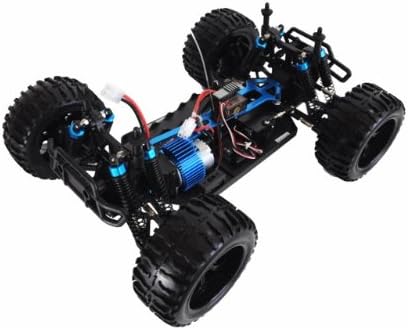
Image: The 2.4 GHz remote control for the Amewi Torche Monster Truck.
3. Installing the Vehicle Battery
Remove the body clips and lift the Lexan body shell from the chassis. Locate the battery compartment on the chassis. Insert the fully charged 7.2V Ni-MH battery pack and connect it to the vehicle's power connector. Secure the battery within its compartment, then reattach the body shell with the clips.

Image: View of the Amewi Torche Monster Truck chassis, showing the internal electronics and battery placement area.
Operating Instructions
1. Powering On
- Turn on the remote control first. The indicator light should illuminate.
- Next, turn on the power switch on the monster truck. The vehicle's electronics will initialize.
- Wait for the remote control and vehicle to establish a connection (usually indicated by a solid light on both).
2. Basic Controls
- Throttle Trigger: Pull the trigger to accelerate forward. Push the trigger forward to brake or reverse.
- Steering Wheel: Turn the wheel left or right to steer the vehicle.
- Steering Trim: Use the steering trim dial on the remote control to adjust the steering so the vehicle drives straight when the steering wheel is centered.
3. Driving Tips
- The vehicle features 4-wheel drive (4WD) for excellent traction on various terrains.
- Maximum speed is approximately 35 km/h.
- The included battery provides up to 12 minutes of run time, depending on driving conditions.
- Avoid prolonged full-throttle operation to prevent overheating.
- Practice in an open area to familiarize yourself with the controls before attempting advanced maneuvers.
4. Powering Off
- Turn off the power switch on the monster truck first.
- Then, turn off the remote control.
- Disconnect the battery from the vehicle after each use.
Maintenance
Regular maintenance ensures the longevity and performance of your Amewi Torche Monster Truck.
- Cleaning: After each use, especially in dirty or dusty conditions, clean the vehicle. Use a soft brush or compressed air to remove dirt and debris from the chassis, suspension, and drivetrain. Avoid using water directly on electronics.
- Inspecting Components: Regularly check for loose screws, damaged parts, or worn tires. The chassis features ball bearings and adjustable oil-filled shock absorbers; ensure these are functioning smoothly.
- Tire Care: Inspect the rubber off-road tires for punctures or excessive wear. Ensure they are securely mounted.
- Battery Storage: Store batteries in a cool, dry place. For Ni-MH batteries, it is recommended to discharge them before long-term storage and recharge them before use.
- Body Shell: The Lexan body shell is impact-resistant, but inspect it for cracks after heavy impacts.

Image: An overhead view of the Amewi Torche Monster Truck chassis, highlighting the suspension and drivetrain components.
Troubleshooting
If you encounter issues with your monster truck, refer to the following common problems and solutions:
| Problem | Possible Cause | Solution |
|---|---|---|
| Vehicle does not respond to remote control. |
|
|
| Vehicle drives slowly or has short run time. |
|
|
| Steering issues (e.g., not turning, turning only one way). |
|
|
| Unusual noises or vibrations. |
|
|
Specifications
| Feature | Detail |
|---|---|
| Model Number | 22032 |
| Scale | 1:10 |
| Dimensions (L x W x H) | 43 x 30 x 21 cm |
| Weight | 2.5 kg (5.51 lbs) |
| Drive System | 4-Wheel Drive (4WD) |
| Motor Type | Brushed Motor |
| Radio System | 2.4 GHz |
| Vehicle Battery | 7.2V 1800mAh Ni-MH |
| Remote Control Battery | 1 x AA (included) |
| Max Speed | Approx. 35 km/h |
| Run Time | Up to 12 minutes (approx.) |
| Charging Time | Approx. 8 hours |
| Material | Metal and Plastic (Lexan body) |
| Special Features | Oil-filled shock absorbers, 4-wheel drive |
Warranty and Support
For warranty information, please refer to the documentation provided at the time of purchase or contact your retailer. Amewi products are designed for durability and performance.
If you require technical assistance or have questions not covered in this manual, please contact Amewi customer support or your authorized dealer for further assistance.