
1. Introduction
The Coleman 2000024041 Quad LED Lantern is a versatile lighting solution designed for both indoor and outdoor use. This unit combines a central area light with four detachable LED panels, offering flexible illumination options. Each panel functions independently, providing portable light when needed, while the main base delivers broad area lighting. This manual provides essential information for the safe and effective use of your lantern.
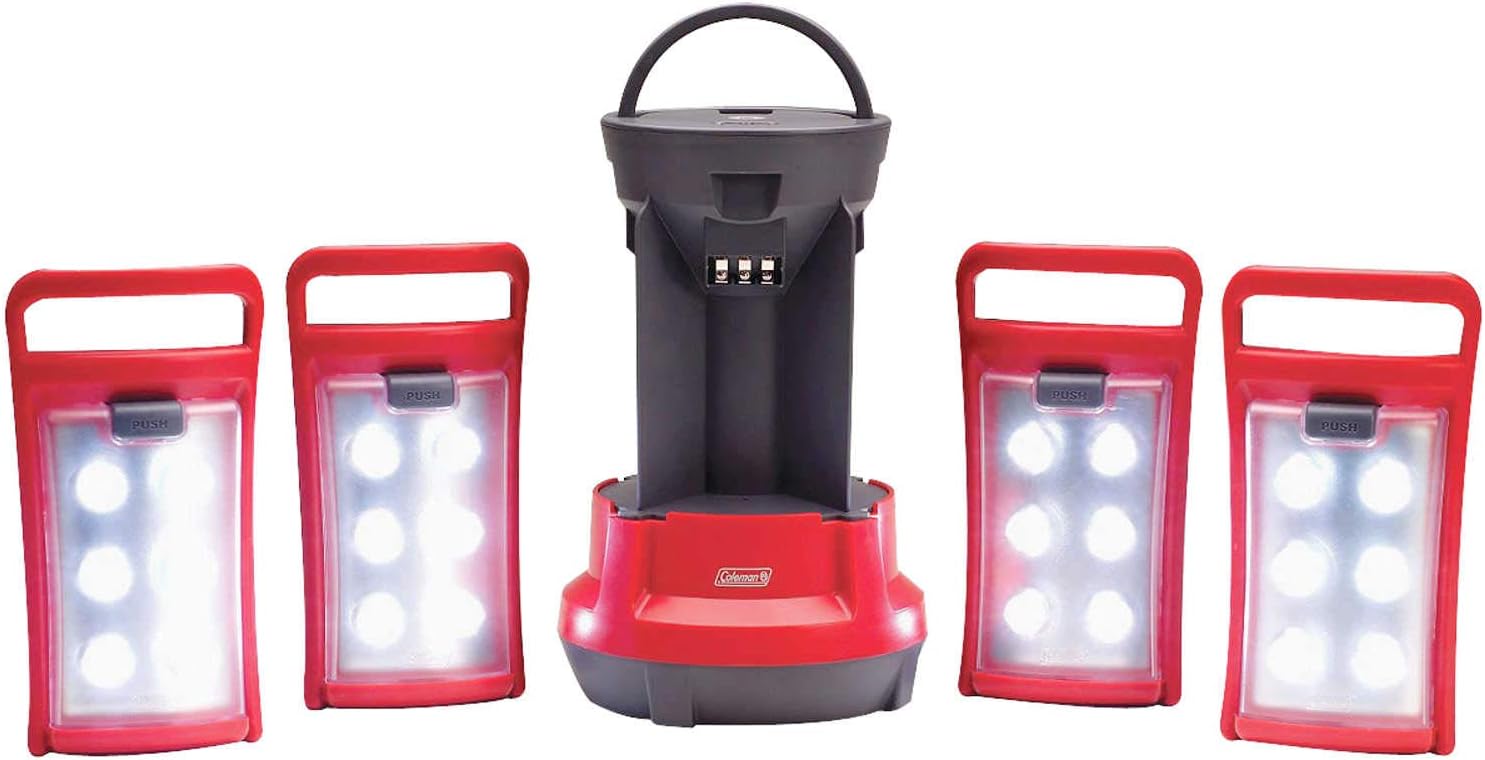
Image: The Coleman Quad LED Lantern with its four individual LED panels detached and arranged around the main lantern base, illustrating its modular design.
2. Setup
2.1. Battery Installation (Main Lantern Base)
- Ensure the lantern is turned off.
- Locate the battery compartment on the bottom of the main lantern base.
- Twist the battery compartment cover counter-clockwise to open.
- Insert eight (8) D-cell batteries (not included) according to the polarity indicators (+/-) inside the compartment.
- Replace the battery compartment cover and twist clockwise to secure it.
2.2. Initial Charging (Detachable LED Panels)
- Each detachable LED panel contains a rechargeable NiMH battery.
- For initial use, ensure all four LED panels are securely attached to the main lantern base.
- The NiMH batteries in the panels will recharge automatically when stored in the lantern base, provided the D-cell batteries in the base have sufficient power.
- Allow adequate time for the panels to fully charge before independent use.
3. Operating Instructions
3.1. Main Lantern Operation
- To turn on the main lantern (with all panels attached), locate the main on/off switch on the top of the lantern.
- Press the switch to cycle through light modes (if applicable) or to turn the lantern on/off.
- The main lantern provides 190 total lumens of light when all panels are attached and active.
3.2. Detaching LED Panels
- Each LED panel has a release button or mechanism.
- Press the "PUSH" button located at the top of each panel to release it from the main lantern base.
- Gently pull the panel away from the base.
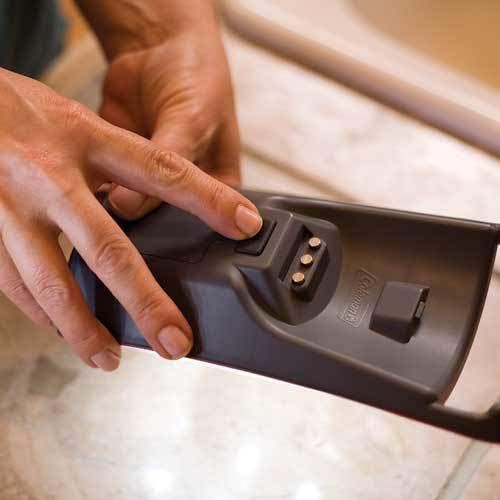
Image: A hand demonstrating how to press the release button on one of the LED panels to detach it from the main lantern unit.
3.3. Using Individual LED Panels
- Each detached panel has its own independent on/off switch.
- Press the switch on the individual panel to turn it on or off.
- Each panel provides up to 1.5 hours of light on its own when fully charged.
- Utilize the top handle on each panel for carrying or hanging as a portable light source.
3.4. Reattaching LED Panels
- Align the panel with its corresponding slot on the main lantern base.
- Gently push the panel into place until it clicks securely.
- Ensure the panel is firmly attached to allow its NiMH battery to recharge.
4. Maintenance
4.1. Cleaning
- Wipe the lantern and panels with a soft, damp cloth.
- Do not use abrasive cleaners or solvents, as these may damage the finish or electronic components.
- Ensure the lantern is completely dry before storage or next use.
4.2. Battery Care
- D-cell Batteries: Replace the 8 D-cell batteries in the main base when the overall light output diminishes. Always replace all batteries at once with new ones of the same type.
- NiMH Panel Batteries: The NiMH batteries in the detachable panels are designed to recharge when docked in the main lantern base. For optimal performance, store panels in the base when not in use. If a panel's light output significantly decreases even after charging, the NiMH battery may need replacement. Refer to Coleman's official support for replacement battery information.
- Remove all batteries if the lantern will not be used for an extended period to prevent leakage and damage.
5. Troubleshooting
- Lantern Not Turning On:
- Check if the 8 D-cell batteries in the main base are correctly installed with proper polarity.
- Ensure the D-cell batteries are fresh and not depleted.
- Verify the main on/off switch is fully engaged.
- Individual Panel Not Lighting Up:
- Ensure the panel's individual on/off switch is engaged.
- Confirm the panel was securely docked in the main lantern base to allow its NiMH battery to charge.
- If the panel's light is dim, allow it to charge longer in the main base. If issues persist, the NiMH battery may need replacement.
- Dim Light Output:
- Replace the D-cell batteries in the main lantern base.
- Ensure detachable panels are fully charged by docking them in the main base.
6. Specifications
| Feature | Detail |
|---|---|
| Model Number | 2000024041 |
| Light Source Type | LED (Light Emitting Diode) |
| Total Lumens | 190 Lumens |
| Number of LED Panels | 4 (detachable) |
| Main Lantern Power Source | 8 D-cell batteries (not included) |
| Main Lantern Run Time | Approx. 75 hours |
| Detachable Panel Power Source | Rechargeable NiMH battery (per panel) |
| Detachable Panel Run Time | Up to 1.5 hours (per panel, fully charged) |
| Light Range | 26 feet |
| Item Weight | 2.2 Pounds |
| Material | Plastic |
| Voltage | 0.21 Volts |
| Wattage | 3.5 watts |
7. Warranty Information
This Coleman Quad LED Lantern comes with a limited five-year warranty. For specific details regarding warranty coverage, terms, and conditions, please refer to the warranty documentation included with your product or visit the official Coleman website. The manufacturer warranty description is "As labelled."
8. Support
For further assistance, technical support, or inquiries regarding your Coleman Quad LED Lantern, please contact Coleman customer service. You can typically find contact information on the Coleman official website or within the product packaging.