
Regza SD-P73DTW
TOSHIBA Portarou 7V Wide LCD Portable DVD Player
Model: SD-P73DTW
Introduction
This instruction manual provides essential information for the safe and efficient operation of your TOSHIBA Portarou SD-P73DTW Portable DVD Player. Please read this manual thoroughly before using the product and keep it for future reference.
The SD-P73DTW is a versatile portable media device featuring a 7V wide LCD screen, DVD playback capabilities, and One-Seg digital TV reception with recording functionality to an SD memory card. It also supports playback of various media formats including MP3, WMA, and JPEG files from an SD card.
Safety Information
Always observe the following safety precautions to prevent electric shock, fire, or injury.
- Do not expose the unit to rain or moisture.
- Do not block ventilation openings.
- Use only the specified power adapter.
- Avoid placing the unit on unstable surfaces.
- Do not open the casing; refer all servicing to qualified personnel.
- Keep away from direct sunlight, heat sources, and excessive dust.
Package Contents
Verify that all items listed below are included in your package:
- TOSHIBA SD-P73DTW Portable DVD Player Unit
- AC Power Adapter
- Remote Control
- AAA Batteries for Remote Control (x2)
- AV Cable
- Car Adapter (DC 12V)
- Indoor Antenna for One-Seg TV
- Instruction Manual (this document)
Product Overview
Familiarize yourself with the various parts and controls of your portable DVD player.
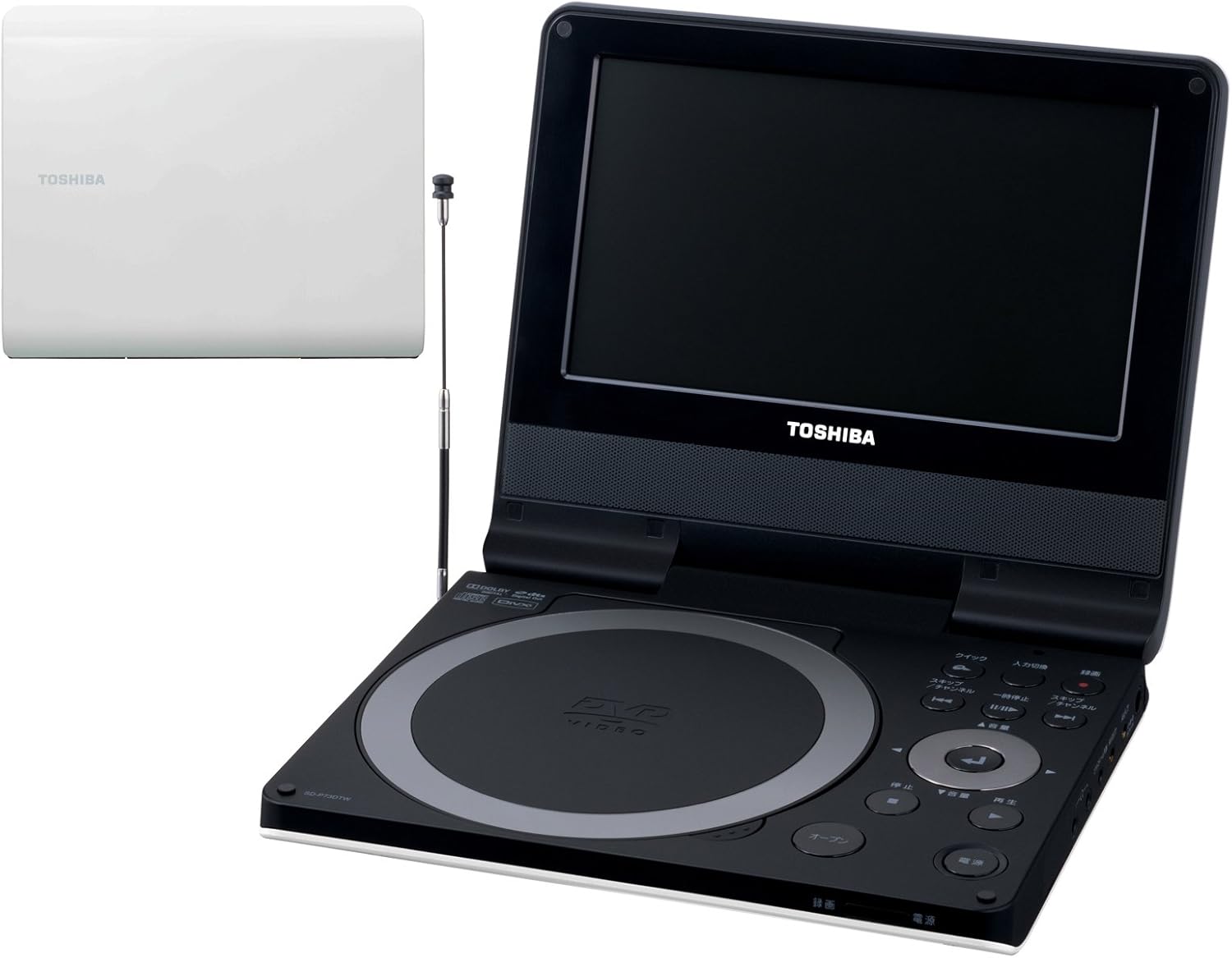
Figure 1: Front-right view of the TOSHIBA SD-P73DTW Portable DVD Player with the screen open and the One-Seg antenna extended. The DVD disc tray is visible on the left, and control buttons are on the right.

Figure 2: Front view of the TOSHIBA SD-P73DTW Portable DVD Player with the screen open. The main control panel with playback buttons and navigation is clearly visible.

Figure 3: Top view of the TOSHIBA SD-P73DTW Portable DVD Player in its closed, compact state. The Toshiba logo is visible on the white casing.
Main Unit Controls:
- POWER Button: Turns the unit on/off.
- OPEN Button: Opens the DVD disc cover.
- PLAY/PAUSE Button: Starts or pauses playback.
- STOP Button: Stops playback.
- SKIP Buttons (<< / >>): Skips tracks/chapters.
- SEARCH Buttons (<< / >>): Fast reverse/forward.
- VOLUME +/- Buttons: Adjusts audio volume.
- INPUT/DISPLAY Button: Switches input source or displays information.
- MENU Button: Accesses the DVD menu or system settings.
- DIRECTIONal Buttons (Up/Down/Left/Right) and ENTER Button: For menu navigation and selection.
- SD Card Slot: For inserting SD memory cards.
- Antenna: Extendable antenna for One-Seg TV reception.
Setup
1. Power Connection
- Connect the AC power adapter to the DC IN jack on the unit.
- Plug the AC power adapter into a standard wall outlet.
- Alternatively, for car use, connect the car adapter to the DC IN jack and plug it into your vehicle's 12V power outlet.
2. Initial Setup (First Use)
- Press the POWER button to turn on the unit.
- The initial setup screen will appear. Use the directional buttons and ENTER to select your preferred language.
- Follow the on-screen prompts to set the date, time, and region settings.
3. Antenna Connection (for One-Seg TV)
For optimal One-Seg TV reception, extend the built-in antenna fully. If reception is poor, connect the supplied indoor antenna to the antenna input jack on the unit.
Operating Instructions
1. DVD Playback
- Press the OPEN button to open the disc cover.
- Place a DVD disc gently onto the disc tray with the label side facing up.
- Close the disc cover firmly. The unit will automatically begin reading the disc.
- Press PLAY/PAUSE to start playback if it doesn't begin automatically.
- Use SKIP buttons to navigate chapters or SEARCH buttons for fast forward/reverse.
- Press STOP to stop playback.
2. SD Card Playback (MP3/WMA/JPEG)
- Insert an SD memory card into the SD card slot until it clicks into place.
- Press the INPUT/DISPLAY button to select "SD Card" as the input source.
- Navigate through the folders and files using the directional buttons and ENTER.
- Select an MP3/WMA file for audio playback or a JPEG file for image viewing.
3. One-Seg TV Viewing
- Extend the built-in antenna or connect the indoor antenna.
- Press the INPUT/DISPLAY button to select "TV" as the input source.
- The unit will automatically scan for available One-Seg channels during first use or if channels are not found.
- Use the CHANNEL +/- buttons on the remote or unit to switch channels.
4. One-Seg Recording to SD Card
You can record One-Seg TV programs directly to an inserted SD memory card.
- Ensure an SD card with sufficient free space is inserted.
- While viewing a One-Seg TV program, press the RECORD button on the remote control.
- Recording will begin. Press STOP to end the recording.
- Recorded programs can be accessed and played back from the SD Card input source.
5. Remote Control Usage
The supplied remote control provides convenient access to all functions.

Figure 4: The remote control for the TOSHIBA SD-P73DTW Portable DVD Player. It features a white body with grey and red buttons for power, navigation, playback, and channel selection.
- Insert two AAA batteries into the remote control, observing polarity.
- Point the remote control directly at the infrared sensor on the main unit.
- Refer to the labels on the remote control for specific button functions, including Top Menu, Subtitle, Audio, Random, Zoom, Angle, Repeat, A-B Repeat, and numeric keypad for direct channel/track selection.
Maintenance
Cleaning the Unit:
- Wipe the unit's exterior with a soft, dry cloth.
- For stubborn dirt, dampen the cloth slightly with water and then wipe dry.
- Do not use abrasive cleaners, benzene, or alcohol, as they may damage the surface.
- Clean the disc lens only with a specialized DVD lens cleaner disc.
Battery Care:
- If the unit will not be used for an extended period, disconnect the power adapter.
- Remove batteries from the remote control if it will not be used for a long time to prevent leakage.
Troubleshooting
Before contacting customer support, please refer to the following common issues and their solutions.
| Problem | Solution |
|---|---|
| No power. | Ensure the AC adapter is securely connected to both the unit and the power outlet. Check if the power outlet is functional. |
| Disc does not play. | Check if the disc is inserted correctly with the label side up. Ensure the disc is clean and free of scratches. Verify the disc format is supported (DVD-Video, DVD-R/-RW). |
| No One-Seg TV reception. | Extend the antenna fully. Try repositioning the unit or using the indoor antenna in a different location. Perform a channel scan again. Signal strength may vary by location. |
| Remote control not working. | Check and replace the batteries in the remote control. Ensure there are no obstructions between the remote and the unit's sensor. |
| SD card not recognized or files not playing. | Ensure the SD card is inserted correctly. Check if the files are in supported formats (MP3, WMA, JPEG). Some files may not be playable depending on their encoding or recording conditions. |
Specifications
| Feature | Detail |
|---|---|
| Model Number | SD-P73DTW |
| Screen Size | 7V-type Wide LCD (7 inches / 18 cm diagonal) |
| Display Type | LCD |
| Supported Media | DVD-R/-RW, SDHC Card |
| Supported Formats (SD Card) | MP3, WMA, JPEG |
| TV Tuner | One-Seg Digital TV |
| Recording Function | One-Seg TV recording to SD Card |
| Connectivity | HDMI (output not available), AV Output, Headphone Jack, DC In |
| Product Dimensions (W x D x H) | Approx. 16.1 x 19 x 3.1 cm |
| Product Weight | Approx. 0.82 kg (820 g) |
| Power Source | AC Adapter (included), Car Adapter (included) |
Warranty and Support
This product comes with a manufacturer's warranty. Please refer to the warranty card included in your package for details regarding warranty period and terms.
For technical support, service, or inquiries about your TOSHIBA Portarou SD-P73DTW, please contact TOSHIBA customer service. Contact information can typically be found on the official TOSHIBA website or on the warranty card.
Please have your model number (SD-P73DTW) and purchase date ready when contacting support.
Ask a question about this manual
Ask about setup, troubleshooting, compatibility, parts, safety, or missing instructions. Manuals+ will review the question and use this page’s manual context to help answer it.