
Introduction
This manual provides essential information for the safe and effective use of your Conntek 05365 Power Splitter. This device is designed to expand a single 15A power outlet into three distinct power connections, including two standard NEMA 5-15R outlets and one IEC C5 connector, commonly used for laptop power adapters. The integrated Snap Pop release tabs facilitate easy disconnection of devices.

Image: The Conntek 05365 Power Splitter, featuring a single NEMA 5-15P input plug at the top, splitting into three separate output cables. Two cables terminate in NEMA 5-15R female connectors, and one terminates in an IEC C5 female connector, all equipped with white Snap Pop release tabs.
Safety Information
Please read and understand all safety instructions before using this product. Failure to follow these instructions may result in electric shock, fire, or serious injury.
- Do not exceed the maximum electrical rating of 10 Amperes and 125 Volts.
- Ensure the power source and connected devices are compatible with the splitter's specifications.
- Do not use in wet conditions or near water.
- Avoid placing the splitter in areas where it can be tripped over or damaged.
- Do not attempt to modify or disassemble the splitter.
- Keep out of reach of children.
- Always grasp the plug firmly when inserting or removing it from an outlet or device. Do not pull by the cord.
Product Overview
The Conntek 05365 Power Splitter is designed for convenience and versatility, allowing you to power multiple devices from a single wall outlet.
Components:
- NEMA 5-15P Input Plug: Connects to a standard 3-prong wall outlet.
- NEMA 5-15R Output Sockets (x2): Standard 3-prong female outlets for various electronic devices.
- IEC C5 Output Connector (x1): A 3-pin connector, often referred to as a "Mickey Mouse" connector, compatible with many laptop power adapters.
- Snap Pop Release Tabs: Integrated levers on the output connectors for easy and secure disconnection.
Visual Identification:
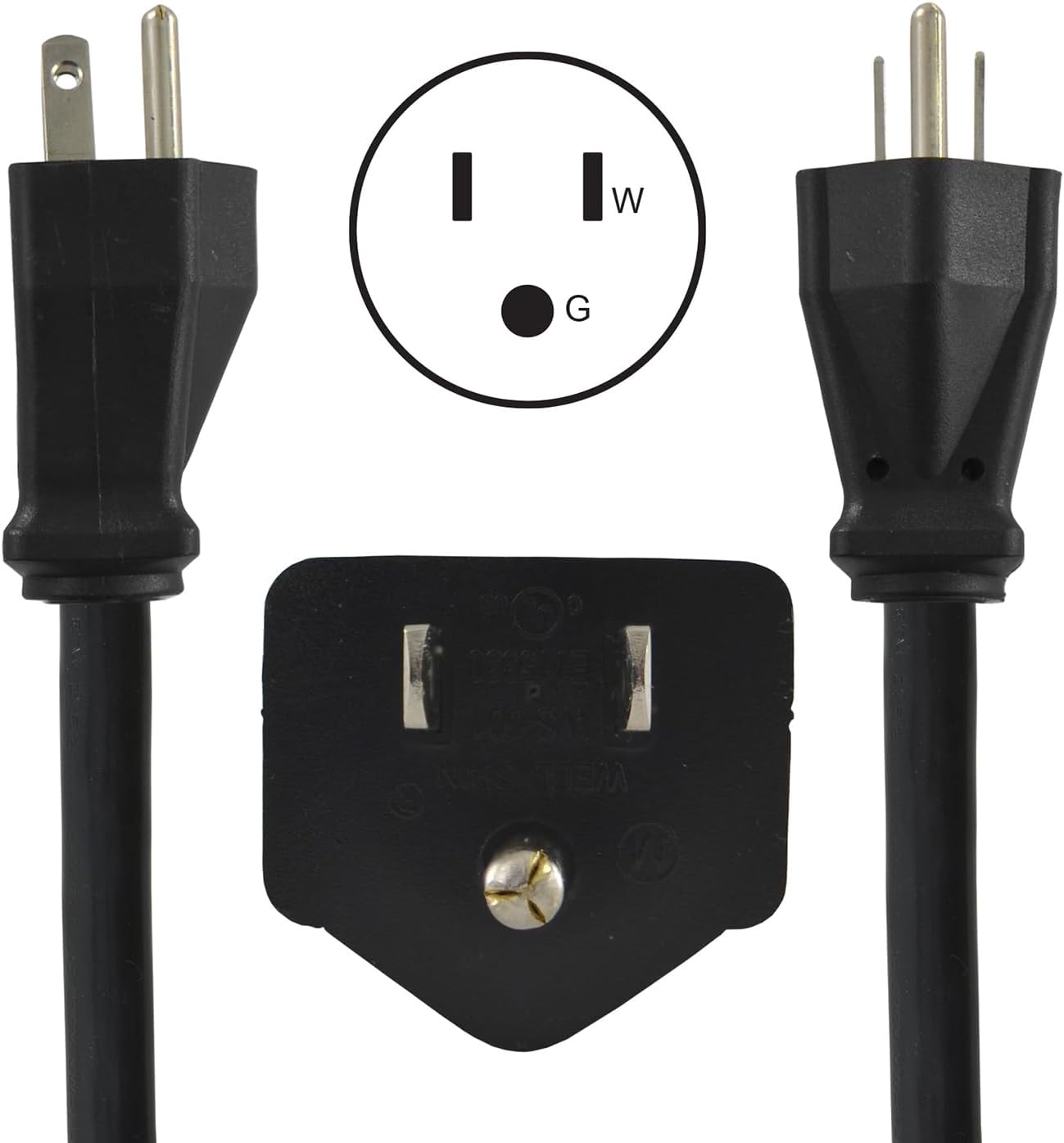
Image: Close-up of the NEMA 5-15P male input plug, showing its three prongs and the corresponding outlet diagram (W for neutral, G for ground, vertical slot for hot).

Image: Close-up of the two NEMA 5-15R female output sockets, illustrating their three-hole configuration and the corresponding outlet diagram.

Image: Close-up of the IEC C5 female output connector, showing its distinctive three-pin "Mickey Mouse" shape and a diagram of its pin configuration.

Image: A hand demonstrating the use of the white Snap Pop release tab on one of the output connectors, showing how it aids in disconnecting a plug.
Setup
- Inspect the Product: Before use, visually inspect the Conntek 05365 Power Splitter for any signs of damage to the cord, plugs, or connectors. Do not use if damaged.
- Identify Power Source: Locate a standard 3-prong (NEMA 5-15R) wall outlet that is easily accessible and not overloaded.
- Connect to Power Source: Firmly insert the NEMA 5-15P input plug of the splitter into the wall outlet. Ensure a snug fit.
- Organize Cables: Position the splitter and its output cables to avoid tangles or tripping hazards.
Operating Instructions
Once the splitter is connected to a power source, you can connect your devices.
- Connect Devices:
- For standard 3-prong devices, insert their plugs into the NEMA 5-15R output sockets.
- For laptops or other devices requiring an IEC C5 connection, insert their C6 plug into the IEC C5 output connector.
- Ensure Secure Connection: Push each device's plug firmly into the splitter's output connector until it is fully seated.
- Disconnecting Devices (Snap Pop Feature): To disconnect a device, press the white Snap Pop release tab on the corresponding output connector while gently pulling the device's plug. This mechanism helps to easily release the plug without excessive force.
- Total Load: Always ensure the total power draw of all connected devices does not exceed the splitter's maximum rating of 10 Amperes.
Maintenance
- Cleaning: Disconnect the splitter from the power source before cleaning. Wipe the exterior with a dry, soft cloth. Do not use liquid cleaners or immerse in water.
- Storage: When not in use, store the splitter in a dry, cool place, away from direct sunlight and extreme temperatures. Avoid tightly coiling the cable to prevent damage.
- Inspection: Periodically inspect the cable and connectors for any signs of wear, cuts, or damage. Discontinue use if damage is found.
Troubleshooting
No Power to Connected Devices:
- Check Wall Outlet: Ensure the wall outlet is functioning by plugging in another known working device directly.
- Check Connections: Verify that the splitter's input plug is fully inserted into the wall outlet and that all device plugs are securely connected to the splitter's output connectors.
- Overload: Confirm that the total power draw of all connected devices does not exceed the splitter's 10 Ampere rating. Disconnect some devices if an overload is suspected.
- Damaged Cable: Inspect the splitter's cable and connectors for any visible damage. If damaged, discontinue use and replace the product.
Specifications
| Feature | Detail |
|---|---|
| Model Number | 05365 |
| Input Connector | NEMA 5-15P (3-prong male) |
| Output Connectors | 2 x NEMA 5-15R (3-prong female), 1 x IEC C5 (3-pin female) |
| Electrical Rating | 10 Amperes, 125 Volts |
| Cable Type | SJT 14/3 + SVT 18/3 |
| Color | Black |
| Cord Length | Approximately 6 to 8 inches (output cables) |
| Product Dimensions | 8 x 3.7 x 1.9 inches (overall) |
| Item Weight | 9.6 ounces |

Image: The Conntek 05365 Power Splitter, highlighting the approximate length of the individual output cables, shown as 4.25 inches from the central splitter block to the connector end.
Warranty and Support
This Conntek 05365 Power Splitter comes with a limited 1-year warranty from the date of purchase. This warranty covers defects in materials and workmanship under normal use.
For warranty claims, technical support, or product inquiries, please contact Conntek customer service directly. Refer to the product packaging or the official Conntek website for current contact information.