
1. Introduction and Overview
The Chamberlain LiftMaster 485LM Battery Backup system ensures continued operation of your garage door opener during power outages. This battery allows you to access your garage even when the main power supply is interrupted, providing convenience and security.
This 100% OEM LiftMaster 485LM battery backup is factory supplied and compatible with all battery backup units featuring a slide-in battery, including models 385/855 and newer units. It also functions as a replacement part for Sears and Home Depot garage door battery backups.
2. Safety Information
Always prioritize safety when handling electrical components and batteries. Ensure the power to the garage door opener is disconnected before beginning any installation or maintenance procedures.
- Disconnect Power: Always disconnect the main power to the garage door opener before installing or replacing the battery.
- Battery Type: This is a non-spillable battery.
- Recycling: Batteries must be recycled properly. Do not dispose of batteries in regular household waste. Consult local regulations for proper battery disposal.
- Handling: Avoid short circuits. Do not charge in a sealed container. Do not disassemble, heat above 45°C, or incinerate.
3. Product Contents
Your package should contain the following:
- 1 x Chamberlain LiftMaster 485LM Battery Backup Unit

4. Installation Instructions
Follow these steps for easy DIY battery replacement:
- Disconnect Power: Disconnect the main power supply to your garage door opener unit. This is a crucial safety step.
- Remove Battery Cover: Using a Phillips head screwdriver, carefully remove the battery cover located on the motor unit of your garage door opener.
- Remove Old Battery: Gently remove the old battery from its compartment. Ensure proper disposal of the old battery according to local regulations.
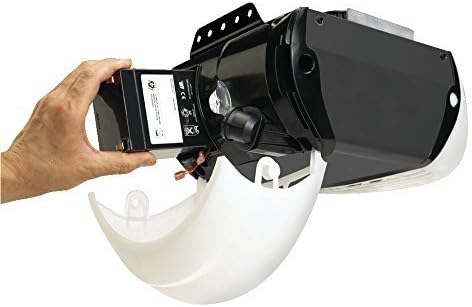
- Insert New Battery: Partially insert the new Chamberlain LiftMaster 485LM battery into the motor unit. Ensure the battery terminals are facing outwards for easy connection.
- Connect Wires: Connect the red (+) wire from the motor unit to the corresponding red (+) terminal on the new battery. Then, connect the black (-) wire from the motor unit to the corresponding black (-) terminal on the battery. Ensure connections are secure.
- Replace Battery Cover: Carefully replace the battery cover and secure it with the Phillips head screwdriver.
- Reconnect Power: Reconnect the main power supply to your garage door opener. The battery will begin charging automatically.
5. Operating Instructions
Once installed and charged, the LiftMaster 485LM Battery Backup operates automatically. In the event of a power outage, the battery will seamlessly provide power to your garage door opener, allowing you to open and close your garage door as usual. The battery will recharge once main power is restored.
6. Maintenance
To ensure optimal performance and longevity of your battery backup unit:
- Regular Testing: Periodically test your garage door opener's battery backup function by disconnecting the main power supply. Operate the garage door a few times to confirm the battery is working correctly.
- Battery Lifespan: The typical lifespan of a garage door opener battery backup is approximately 2-3 years. Replace the battery when you notice a decrease in performance or if the opener indicates a low battery.
- Cleaning: Keep the battery compartment clean and free of dust and debris.
- Disposal: Always recycle old batteries responsibly.
7. Troubleshooting
If your garage door opener with battery backup is exhibiting unusual behavior, consider the following:
- Chirping Sound: A persistent chirping sound from your garage door opener often indicates that the battery backup unit needs to be replaced. This sound is a warning that the battery is low or has reached the end of its service life.
- No Operation During Outage: If the garage door opener does not function during a power outage, the battery may be completely depleted or faulty. Check the battery connections and consider replacing the battery.
- Indicator Lights: Refer to your specific garage door opener model's manual for details on indicator lights, which can signal battery status or other issues.
8. Specifications
| Feature | Specification |
|---|---|
| Brand | CHAMBERLAIN |
| Model Number | 485LM |
| Manufacturer Part Number | 485LM |
| Item Weight | 3.13 pounds |
| Product Dimensions | 4 x 4 x 4 inches |
| Number of Batteries | 1 (12V batteries required) |
| Battery Cell Composition | Sealed Lead Acid |
| Battery Capacity | 12 Amp Hours |
| Voltage | 12 Volts (DC) |
| Amperage | 4.5 Amps |
| Recommended Uses | Garage Door Opener |
9. Warranty and Support
For warranty information or technical support, please refer to the official Chamberlain website or contact their customer service directly. Keep your purchase receipt for any warranty claims.
You can visit the official CHAMBERLAIN Store for more products and information.


