
1. Product Overview
The Fossil Men's Coachman Quartz Chronograph Watch, Model CH2565, is a timepiece designed for both style and functionality. It features a durable stainless steel case, a comfortable genuine leather strap, and a precise quartz movement. The watch includes chronograph capabilities, a date display, and luminous markers for enhanced visibility.

Image 1.1: Front view of the Fossil Men's Coachman Quartz Chronograph Watch, Model CH2565, showcasing its silver dial, brown leather strap, and chronograph sub-dials.
Key Features:
- Quartz Movement: Ensures accurate timekeeping.
- Chronograph Function: Three sub-dials track minutes, seconds, and 24-hour time, with a stopwatch function.
- Date Window: Displays the current date.
- Luminous Markers: Provides visibility in low-light conditions.
- Stainless Steel Case: Durable and robust 45mm case.
- Genuine Leather Strap: Comfortable brown calfskin leather strap with a secure buckle closure.
- Mineral Crystal Lens: Resists scratches to protect the dial.
- Water Resistance: Rated up to 100 meters (330 feet), suitable for bathing, swimming, or snorkeling.
2. Setup and Initial Use
2.1 Setting the Time
- Pull the crown (center knob on the right side of the watch) out to position 2.
- Rotate the crown clockwise or counter-clockwise to set the hour and minute hands to the desired time.
- Push the crown back in to position 1 to start the watch.
2.2 Setting the Date
- Pull the crown out to position 1 (first click).
- Rotate the crown clockwise or counter-clockwise to adjust the date in the date window.
- Once the correct date is displayed, push the crown back in to its original position.
2.3 Chronograph Operation
The chronograph function allows for precise timing of events.
- Start: Press the top pusher (button above the crown) to start the chronograph. The large second hand will begin to move.
- Stop: Press the top pusher again to stop the chronograph. The elapsed time will be indicated by the large second hand and the chronograph sub-dials.
- Reset: After stopping, press the bottom pusher (button below the crown) to reset the chronograph hands to their zero positions.

Image 2.1: Side view of the Fossil Men's Coachman Watch, showing the crown and pushers used for setting time, date, and operating the chronograph.
3. Operating the Watch
Your Fossil Coachman watch is designed for daily wear and offers various functions beyond basic timekeeping.
3.1 Reading the Sub-dials
- Left Sub-dial: Tracks elapsed minutes for the chronograph (up to 60 minutes).
- Bottom Sub-dial: Tracks elapsed seconds for the chronograph (up to 60 seconds).
- Right Sub-dial: Displays 24-hour time, useful for distinguishing AM/PM.
3.2 Water Resistance Guidelines
The watch is water resistant up to 100 meters (330 feet). This means it is suitable for:
- Bathing
- Swimming
- Snorkeling
Important: It is not resistant enough to withstand scuba diving. Avoid operating the crown or pushers while the watch is wet or submerged to prevent water intrusion. While the watch itself is water resistant, prolonged exposure to water can damage the leather strap. It is recommended to remove the watch before showering or swimming to preserve the strap's condition.
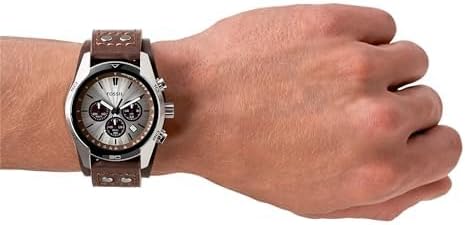
Image 3.1: The Fossil Coachman Watch worn on a wrist, demonstrating its fit and appearance.
4. Maintenance and Care
Proper care will ensure the longevity and optimal performance of your Fossil watch.
4.1 Cleaning Your Watch
- Case and Crystal: Wipe the watch case and crystal with a soft, damp cloth. For stubborn dirt, a mild soap solution can be used, followed by thorough rinsing and drying.
- Leather Strap: Avoid exposing the leather strap to excessive moisture, direct sunlight, or harsh chemicals. Clean with a dry, soft cloth. If the strap gets wet, allow it to air dry naturally, away from direct heat. Leather conditioners specifically designed for watch straps can help maintain its suppleness.
4.2 Battery Replacement
The watch is powered by one Lithium Metal battery. When the watch stops or the second hand begins to skip, it indicates a low battery. Battery replacement should be performed by a qualified watch technician to ensure proper sealing and water resistance.
4.3 Storage
When not in use, store your watch in a cool, dry place, away from direct sunlight and extreme temperatures. The original Fossil tin (if provided) is an ideal storage solution.
5. Troubleshooting
If you encounter any issues with your watch, refer to the following common troubleshooting steps:
- Watch Not Running: Check if the crown is fully pushed in to position 0. If the watch still does not run, the battery may need replacement.
- Incorrect Time/Date: Follow the instructions in Section 2.1 and 2.2 to re-set the time and date.
- Chronograph Hands Not Resetting to Zero: If the chronograph hands do not return to their 12 o'clock positions after resetting, consult a professional watch repair service.
- Condensation Under Crystal: This may indicate a loss of water resistance. Have the watch inspected by a professional immediately.
6. Specifications
| Feature | Specification |
|---|---|
| Model Number | CH2565 |
| Movement | Quartz Chronograph |
| Case Diameter | 45mm |
| Band Width | 22mm |
| Case Material | Stainless Steel |
| Strap Material | Genuine Calfskin Leather |
| Lens Material | Mineral Crystal |
| Water Resistance | 10 ATM (100 meters / 330 feet) |
| Battery Type | 1 Lithium Metal battery (included) |
| Product Dimensions | 4.33 x 5.12 x 3.15 inches |
| Item Weight | 3.39 ounces |
| Date First Available | February 20, 2009 |

Image 6.1: A size guide for men's watch cases, illustrating various diameters and case thicknesses to help understand watch proportions.
7. Warranty and Support
For detailed warranty information, please refer to the official Fossil website or the warranty card included with your purchase. Fossil provides customer support for product inquiries, service, and repairs.
You can visit the official Fossil store for more information and support:
8. Product Videos
Video 8.1: A merchant video showcasing the Fossil Men's Coachman Quartz Stainless Steel and Leather Casual Watch, highlighting its design and features.
Video 8.2: An Amazon Product Imaging video featuring the Fossil Men's Coachman Stainless Steel and Leather Casual Cuff Quartz Watch, providing a detailed view of the product.


