
Aube by Honeywell TH140-28-01-B
Honeywell Home Aube TH140-28-01-B
Hydronic Heating 7-Day Programmable Thermostat User Manual
Introduction
The Honeywell Home Aube TH140-28-01-B is a versatile 7-day programmable thermostat designed for hydronic heating systems. It is compatible with systems ranging from millivolt to 240 V, making it suitable for hot water heating, hydronic floor heating, and central heating applications.
This thermostat features advanced temperature control to minimize temperature swings, ensuring consistent comfort. Its selectable cycles allow optimization for various heating systems. A unique pump protection feature activates the pump for one minute every 24 hours to prevent seizure in hot water heating systems. Programming is made convenient through its 'Armchair Programming' design, allowing the faceplate to be removed from the base for easy setup. The precise LCD screen displays room temperature in increments of 0.1°C or 0.1°F.

Image: Front view of the Honeywell Home Aube TH140-28-01-B Hydronic Heating 7-Day Programmable Thermostat, showing its white and gray design with a digital display.
Setup and Installation
Installation of the TH140-28-01-B thermostat should be performed by a qualified technician in accordance with local electrical codes. The thermostat is battery-powered, requiring 2 AA alkaline batteries (not included) for operation. It is designed for wall mounting.
Wiring Diagram
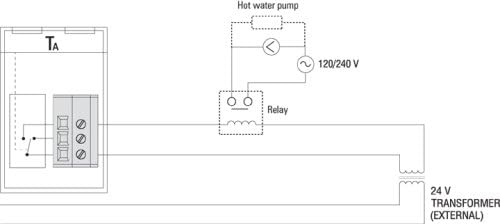
Image: A schematic wiring diagram illustrating the connection of the Aube TH140-28-01-B thermostat to a hot water pump and a 24V external transformer, suitable for 120/240V systems.
The thermostat features SPDT dry contact relay output and is compatible with millivolt, 24V, 120V, and 240V systems. Ensure all connections are secure and comply with the provided installation guide.
Operating Instructions
The TH140-28-01-B offers 7-day programmable scheduling to optimize your heating system's operation. The 'Armchair Programming' feature allows you to detach the faceplate for easier access to programming buttons.
Programming Overview

Image: The Aube TH140-28-01-B thermostat with its front cover open, revealing the programming buttons on the left and a summary of programming instructions printed on the inside of the cover.
- Setting Time and Day: Press the 'Hour' and 'Minute' buttons to adjust the time, and 'Day' to set the current day.
- Programming Schedule: The thermostat allows for four settings per day for each day of the week. You can set comfort, economic, and unoccupied setpoints.
- To Modify a Program: Press 'Program', select the desired day, then select the program number. Set the hour and minute for the program.
- Manual/Auto Mode: Switch between programmed operation and manual temperature control.
- Pump Protection: This feature automatically activates the pump for one minute every 24 hours to prevent seizure in hot water heating systems.
For detailed programming steps, refer to the instructions printed inside the front panel of the thermostat or the full owner's manual.
Maintenance
The TH140-28-01-B thermostat requires minimal maintenance. The primary maintenance task is battery replacement.
- Battery Replacement: The thermostat features a low battery indicator that provides approximately 60 days of warning before the batteries need to be replaced. Use 2 new AA alkaline batteries.
- Cleaning: Clean the thermostat's exterior with a soft, damp cloth. Do not use abrasive cleaners or solvents.
Troubleshooting
If you encounter issues with your TH140-28-01-B thermostat, consider the following common solutions:
- Temperature Drift/Inaccurate Readings: Ensure the thermostat is properly installed and not exposed to direct drafts, sunlight, or heat sources that could affect its internal sensor. If the issue persists, it may indicate a circuit problem. Verify all wiring connections are secure.
- Rapid Cycling: For hydronic floor heating systems, ensure the thermostat is set to the appropriate operating mode (e.g., 'Classic' mode if available, as some users report 'Progressive' mode can cause quirky behavior). Hydronic systems require longer cycles to heat effectively.
- Audible Click: An audible 'click' sound when the thermostat turns on or off is normal operation and indicates the internal relay engaging.
- Programming Difficulties: Refer to the detailed programming instructions inside the faceplate or the full user manual. Ensure you are following the steps precisely for setting time, day, and program schedules.
- No Display/Power: Check if the batteries are correctly installed and have sufficient charge. Replace batteries if the low battery indicator is on or if the display is blank.
If troubleshooting steps do not resolve the issue, contact customer support.
Specifications
| Feature | Detail |
|---|---|
| Brand | Aube by Honeywell |
| Model Name | TH140-28-01-B |
| Controller Type | Push Button |
| Special Feature | Low Battery Indicator, Programmable |
| Color | White and Gray |
| Specific Uses For Product | Electric Baseboard Heater, Hydronic Heating |
| Temperature Control Type | Heating |
| Included Components | Install Guide / Manual, Mounting Hardware, Thermostat |
| Power Source | Battery Powered (2 AA batteries required) |
| Voltage | Millivolt, 24V, 120V, 240 Volts |
| Material | Plastic |
| Display Type | Digital |
| Mounting Type | Wall Mount |
| Item Weight | 6.4 ounces |
| Product Dimensions | 1 x 3.8 x 4.9 inches |
Warranty Information
The Honeywell Home Aube TH140-28-01-B Thermostat comes with a 3-year limited warranty from the date of purchase. This warranty covers defects in materials and workmanship under normal use and service. For full warranty terms and conditions, please refer to the documentation included with your product or contact Honeywell Home customer support.
Support
For further assistance, technical support, or to inquire about replacement parts, please contact Honeywell Home customer service. You can typically find contact information on the manufacturer's official website or within the product packaging.
Online resources, including FAQs and additional troubleshooting guides, may also be available on the Honeywell Home support portal.
Ask a question about this manual
Ask about setup, troubleshooting, compatibility, parts, safety, or missing instructions. Manuals+ will review the question and use this page’s manual context to help answer it.