
Innovate Motorsports LM-2 Dual O2 Complete Kit (Model 3807)
Innovate Motorsports LM-2 Digital Dual Air/Fuel Ratio Wideband Meter and OBD-II Scan Tool
User Manual
Model: 3807 / LM-2 Dual O2 Complete Kit
Introduction
The Innovate Motorsports LM-2 is a versatile diagnostic and tuning tool designed for automotive enthusiasts and professionals. It integrates a wideband air/fuel ratio meter, a 32-channel datalogger, and an OBD-II scan tool into a single device. This manual provides essential information for the proper setup, operation, and maintenance of your LM-2 system.
Key Features
- Patented DirectDigital wideband sensor control, 100% digital wideband air/fuel ratio technology!
- Wideband O2 Compatible with ALL fuel types
- Dual (2) O2 Channel A/F Version
- OBD-II Scan tool- read/clear DTCs and log up to 16 channels of CAN OBD-II Data
- Log directly to SD card
Kit Contents
The Innovate Motorsports LM-2 Dual O2 Complete Kit (Model 3807) includes the following components:
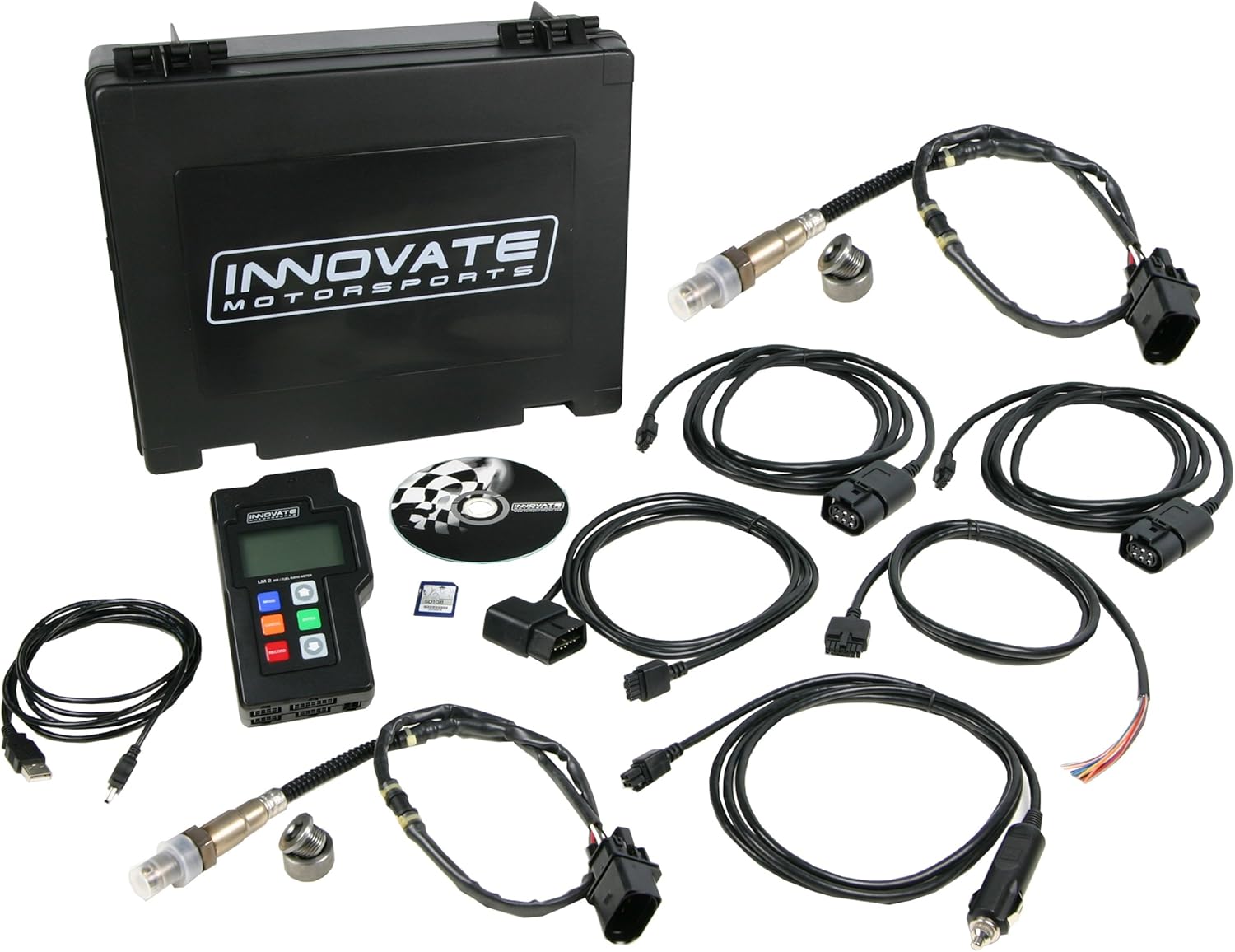
This image displays all components included in the Innovate Motorsports LM-2 Dual O2 Complete Kit. Visible items are the LM-2 meter, two O2 sensors, two sensor cables, an OBD-II cable, a USB PC cable, a power cable, two O2 sensor bungs, a quick start guide, and a carrying case.

This table provides a detailed comparison of the components included in various Innovate Motorsports LM-2 kits. The 'Complete Kits' column, specifically model 3807, is highlighted, indicating the inclusion of two wideband O2 sensors, 8ft sensor cables, bungs, USB cable, power cable, OBD-II cable, 2GB SD card, and a carrying case.
- LM-2 Meter
- Carrying Case
- O2 Sensor (x2)
- Bung (x2)
- OBD-II Cable
- Sensor Cable 8ft (x2)
- USB PC cable
- Power Cable
- Quickstart Guide
Setup
Software Installation
Before connecting the LM-2 to your vehicle, it is recommended to install the necessary software on your computer. The LM-2 utilizes Logworks 3.0 software for advanced data logging, analysis, and device configuration. This software is typically available as a free download from the Innovate Motorsports official website.
- Download the latest version of Logworks 3.0 from the Innovate Motorsports website.
- Follow the on-screen instructions to complete the software installation.
- Ensure your computer meets the minimum system requirements (e.g., Windows 10).
Hardware Connection
- O2 Sensor Installation: Install the wideband O2 sensors into the exhaust system using the provided bungs. Ensure proper placement for accurate readings.
- Connect Sensor Cables: Attach the 8ft sensor cables to the O2 sensors and then connect the other end to the corresponding ports on the LM-2 meter.
- OBD-II Connection: Connect the OBD-II cable to the LM-2 and then to your vehicle's OBD-II port, typically located under the dashboard.
- Power Connection: Use the provided power cable to supply power to the LM-2. This can often be done via a cigarette lighter adapter or direct wiring, depending on your setup.
- SD Card Insertion: Insert the provided 2GB SD card into the LM-2's SD card slot for data logging.
- USB PC Connection: For real-time logging and configuration via Logworks, connect the LM-2 to your computer using the USB PC cable.
Operating Instructions
Air/Fuel Ratio Monitoring
Once powered on and connected, the LM-2 will display real-time air/fuel ratio readings from the O2 sensors. The self-calibrating circuitry compensates for environmental changes, providing accurate data.
OBD-II Scan Tool Functions
The LM-2 functions as a full OBD-II scan tool, allowing you to:
- Read and clear Diagnostic Trouble Codes (DTCs).
- Log up to 16 channels of CAN OBD-II data, providing comprehensive insight into engine parameters.
Datalogging
The LM-2 can log data directly to the inserted SD card. This allows for extensive recording of air/fuel ratios and OBD-II parameters over time. The logged data can then be downloaded and analyzed using the Logworks 3.0 software on your computer.
Analog Outputs
The LM-2 features two fully programmable linear analog outputs. These outputs can be connected to analog gauges, dyno computers, ECUs, or other devices that accept analog inputs. The LM Programmer software allows users to define the parameters for these analog outputs.
Maintenance and Care
- Cleaning: Keep the LM-2 unit clean and free from dust and debris. Use a soft, dry cloth for cleaning. Avoid using harsh chemicals or abrasive materials.
- O2 Sensor Lifespan: Wideband O2 sensors are wear items and have a finite lifespan. Their longevity depends on fuel type, exhaust temperature, and operating conditions. Replace sensors as needed to maintain accuracy.
- Software Updates: Periodically check the Innovate Motorsports website for firmware updates for your LM-2 and software updates for Logworks 3.0 to ensure optimal performance and access to new features.
- Storage: When not in use, store the LM-2 and its components in the provided carrying case in a dry, temperate environment.
Troubleshooting Common Issues
If you encounter issues with your LM-2, consider the following general troubleshooting steps:
- No Power: Verify all power connections are secure and that the power source is active. Check fuses if applicable.
- Inaccurate Readings: Ensure O2 sensors are properly installed and calibrated. Check for exhaust leaks near the sensor. Consider replacing old O2 sensors.
- Connection Problems (PC/OBD-II): Confirm all cables are securely connected. Ensure correct drivers are installed for USB connection. Verify the vehicle's OBD-II port is functional.
- Datalogging Issues: Check if the SD card is properly inserted and has sufficient free space. Ensure the card is formatted correctly (FAT32).
- Software Not Recognizing Device: Reinstall Logworks software and USB drivers. Try a different USB port on your computer.
For more specific issues or advanced troubleshooting, refer to the comprehensive documentation available on the Innovate Motorsports website or consult their technical support resources.
Technical Specifications
| Specification | Detail |
|---|---|
| Brand | Innovate Motorsports |
| Model | LM-2 Dual O2 Complete Kit |
| Manufacturer Part Number | 3807 |
| Item Model Number | 38070 |
| Operating System Compatibility | Windows 10 |
| Automotive Fit Type | Universal Fit |
| Item Weight | 5 pounds |
| Product Dimensions | 14 x 10 x 5 inches |
| Country of Origin | China |
| UPC | 856428038077 |
Warranty and Customer Support
For detailed warranty information, technical support, or service inquiries regarding your Innovate Motorsports LM-2, please refer to the official Innovate Motorsports website or contact their customer service directly. Specific warranty terms and support contacts are typically provided with the product documentation or on the manufacturer's official channels.
Ask a question about this manual
Ask about setup, troubleshooting, compatibility, parts, safety, or missing instructions. Manuals+ will review the question and use this page’s manual context to help answer it.