
1. Introduction
The Minn Kota Marine Battery Box Power Center is designed for small boat and transom applications where dedicated battery compartments are not available. This unit provides easy access external battery terminals for connecting trolling motor leads and charger leads without needing to open the box. It features a built-in battery meter to display the current state of charge, two 12-volt accessory plugs, and two manual reset circuit breakers for enhanced safety and convenience. This power center is compatible with Group 24 and 27 size batteries. Please note: Battery is not included with this product.
2. Product Features
- Easy Access External Terminals: Allows connection of trolling motor and charger leads without opening the battery box.
- Battery Protection: Securely houses and protects your battery in small boat or transom applications.
- Built-in Battery Meter: Push-button meter with 4 LED indicators displays the current 'state of charge'.
- Dual 12-Volt Accessory Plugs: Provides convenient power for various 12V accessories.
- Integrated Circuit Breakers: Includes a 60A resettable circuit breaker for the trolling motor and a 10A resettable circuit breaker for the accessory ports.
- Ring Terminals: Internal battery connectors are equipped with ring terminals.
- Carrying Handles: Convenient handles on both sides for easy transport.
- Battery Compatibility: Designed to fit Group 24 and 27 size batteries.
- Durable Construction: Made from robust plastic material.
3. Package Contents
Your Minn Kota Marine Battery Box Power Center package includes:
- 1 x Minn Kota Marine Battery Box Power Center
4. Safety Information
WARNING: This product can expose you to chemicals including lead and lead compounds, which are known to the State of California to cause cancer and birth defects or other reproductive harm. For more information go to www.P65Warnings.ca.gov.
Always handle batteries with care. Ensure proper ventilation when charging. Avoid short-circuiting battery terminals. Use only compatible battery types and sizes as specified in this manual. Do not connect multiple batteries in series or parallel unless explicitly instructed by a qualified professional and with appropriate safety measures.
5. Setup (Installation)
5.1. Battery Selection
The Minn Kota Marine Battery Box Power Center is designed to accommodate Group 24 and Group 27 size batteries. Ensure your battery fits within the internal dimensions of the box for a secure fit. Battery is not included.
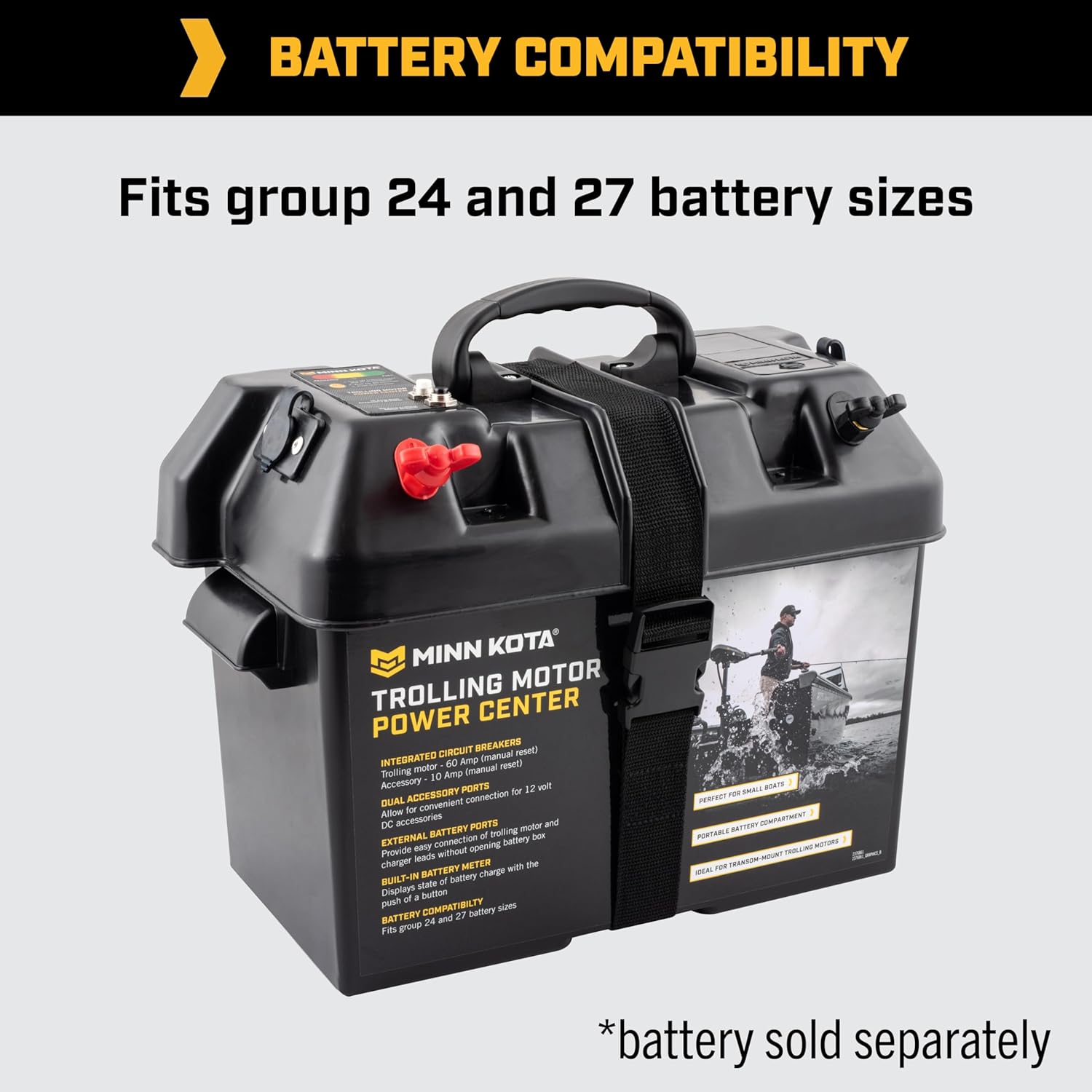
Image: Minn Kota Trolling Motor Power Center, highlighting compatibility with Group 24 and 27 battery sizes. Note: Battery sold separately.
5.2. Installing the Battery
- Open the lid of the battery box.
- Carefully place your Group 24 or 27 battery inside the box. Ensure it sits flat and securely.
- Connect the pre-wired internal ring terminals from the lid to your battery's positive (+) and negative (-) posts. Ensure connections are tight and secure.
- Close the lid of the battery box and secure it using the provided fastening strap.
5.3. Connecting External Devices
The power center features external terminals and ports for various connections:
- Trolling Motor/Charger Leads: Connect your trolling motor or battery charger leads directly to the external positive (+) and negative (-) terminals on the top of the box.
- 12V Accessory Plugs: Utilize the two 12-volt accessory plugs for powering compatible devices.
- USB Ports: Use the integrated USB ports for charging smaller electronic devices.
Video: Official overview of the Minn Kota Marine Battery Power Center, demonstrating its key features and functionality, including external terminals, accessory plugs, and battery meter.
6. Operating Instructions
6.1. Checking Battery Status
Press the push-button on the built-in battery meter. The 4 LED indicators will illuminate to display the current 'state of charge' of your installed battery.
6.2. Using Accessory Ports
Plug your 12-volt accessories into the designated ports. For USB charging, connect your device to the USB ports. The 10A resettable circuit breaker protects these accessory ports.
6.3. Trolling Motor Operation
Connect your trolling motor leads to the external terminals. The 60A resettable circuit breaker provides protection for your trolling motor circuit.
6.4. Resetting Circuit Breakers
If a circuit is overloaded, the corresponding circuit breaker will trip. To reset, simply press the button on the circuit breaker. Identify and resolve the cause of the overload before resetting to prevent further issues.
Video: A demonstration of a trolling motor battery power center in use, showing its versatility for powering various devices and its suitability for outdoor and marine applications.
7. Maintenance
- Regularly inspect all connections for tightness and corrosion. Clean terminals as needed.
- Keep the battery box clean and free from debris.
- Store the battery box in a cool, dry place when not in use.
- Ensure the battery is charged periodically during storage to maintain its health.
8. Troubleshooting
| Problem | Possible Cause | Solution |
|---|---|---|
| No power from accessory ports/USB | 10A circuit breaker tripped; loose connection; discharged battery. | Press 10A circuit breaker reset button; check connections; charge battery. |
| Trolling motor not receiving power | 60A circuit breaker tripped; loose connection; discharged battery. | Press 60A circuit breaker reset button; check connections; charge battery. |
| Battery meter not displaying charge | Battery completely discharged; faulty meter. | Charge battery; contact customer support if issue persists. |
9. Specifications
| Specification | Detail |
|---|---|
| Brand | Minn Kota |
| Model Number | 1820175 |
| Material | Plastic |
| Color | Black |
| Product Dimensions | 7"D x 13.5"W x 12"H |
| Compatible Battery Sizes | Group 24 and 27 |
| Trolling Motor Circuit Breaker | 60 Amp (Resettable) |
| Accessory Port Circuit Breaker | 10 Amp (Resettable) |
| Accessory Ports | Two 12-volt plugs |
| Battery Meter | Built-in, push-button with 4 LEDs |
10. Warranty and Support
For warranty information or technical support, please refer to the documentation provided with your purchase or visit the official Minn Kota website. Keep your proof of purchase for any warranty claims.
11. Legal Disclaimer
No refunds.