
1. Introduction
This instruction manual provides essential information for the proper use, care, and maintenance of your Contax 50mm F1.4 Planar T* MM lens. Please read this manual thoroughly before using the lens to ensure optimal performance and longevity. The Contax 50mm F1.4 Planar T* MM is a high-quality manual focus lens designed for exceptional optical performance.
2. Product Overview
The Contax 50mm F1.4 Planar T* MM lens is renowned for its bright f/1.4 maximum aperture, making it suitable for low-light photography and achieving shallow depth of field. The "Planar" designation refers to its optical design, known for excellent sharpness and minimal distortion, while "T*" indicates Contax's multi-coating technology for reduced flare and improved contrast. The "MM" version signifies compatibility with aperture-priority automatic exposure modes on certain Contax camera bodies.
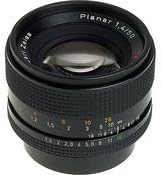
Figure 1: Front view of the Contax 50mm F1.4 Planar T* MM lens, showing the aperture and focus rings, and the "Planar 1.4/50" inscription.
3. Setup: Mounting the Lens
To attach the Contax 50mm F1.4 Planar T* MM lens to your compatible camera body:
- Ensure both the camera and the lens are clean and free of dust.
- Remove the rear lens cap from the lens and the body cap from the camera.
- Align the red or white mounting index mark on the lens barrel with the corresponding mark on the camera's lens mount.
- Insert the lens into the camera's mount and rotate it clockwise (or counter-clockwise, depending on the camera model) until it clicks securely into place. Do not force the lens.
- To detach the lens, press the lens release button on the camera body and rotate the lens counter-clockwise (or clockwise) until it disengages, then carefully remove it.
4. Operating the Lens
4.1. Focusing
The Contax 50mm F1.4 Planar T* MM is a manual focus lens. To achieve sharp focus:
- Look through the camera's viewfinder or use Live View on digital cameras.
- Rotate the focus ring on the lens barrel until your subject appears sharp. The focus ring is typically the wider ring closer to the front of the lens.
- Utilize any focus aids provided by your camera, such as split-prism focus screens, microprism collars, or focus peaking in Live View.
4.2. Aperture Control
The lens features a manual aperture ring to control the depth of field and exposure:
- Rotate the aperture ring (the narrower ring, usually closer to the camera body) to select your desired f-stop (e.g., f/1.4, f/2, f/2.8, etc.).
- A smaller f-number (e.g., f/1.4) indicates a wider aperture, allowing more light and creating a shallower depth of field (more background blur).
- A larger f-number (e.g., f/16) indicates a narrower aperture, allowing less light and creating a greater depth of field (more of the scene in focus).
- The "MM" designation allows the camera to control the aperture in aperture-priority (Av or A) mode when the lens is set to its smallest aperture (e.g., f/16 or f/22, often marked in green).
5. Maintenance and Care
Proper maintenance ensures the longevity and optical performance of your lens.
5.1. Cleaning the Lens
- Lens Elements: Use a blower brush to remove loose dust. For smudges or fingerprints, apply a small amount of lens cleaning fluid to a clean microfiber lens cloth and gently wipe in a circular motion from the center outwards. Never apply fluid directly to the lens surface.
- Lens Body: Wipe the lens barrel with a soft, dry cloth. Avoid using harsh chemicals or solvents.
- Avoid: Do not touch the lens elements with your fingers. Avoid excessive rubbing, which can damage coatings.
5.2. Storage
- Always attach the front and rear lens caps when the lens is not in use.
- Store the lens in a cool, dry, and dust-free environment.
- If storing for extended periods, consider using a dehumidifying cabinet or silica gel packets to prevent mold and fungus growth.
- Avoid extreme temperatures and high humidity.
6. Troubleshooting
If you encounter issues with your Contax 50mm F1.4 Planar T* MM lens, consider the following common solutions:
- Blurry Images:
- Ensure the lens is properly focused. This is a manual focus lens, so precise focusing is critical.
- Check your camera's shutter speed. If it's too slow, camera shake can cause blur.
- Verify the aperture setting. A very wide aperture (e.g., f/1.4) results in a very shallow depth of field, meaning only a small part of your image will be in sharp focus.
- Dust or Spots in Images:
- Inspect the front and rear lens elements for dust or smudges and clean them carefully as described in Section 5.1.
- Check your camera's sensor for dust.
- Lens Not Mounting Securely:
- Ensure the lens and camera mount are clean.
- Verify that you are aligning the mounting marks correctly and rotating the lens until it clicks.
7. Specifications
| Feature | Detail |
|---|---|
| Brand | Contax |
| Model | 50mm F1.4 Planar T* MM |
| Focal Length | 50 mm |
| Maximum Aperture | f/1.4 |
| Lens Type | Standard |
| Compatible Mountings | Contax (C/Y mount) |
| Item Weight | 9.6 ounces (approx. 272 grams) |
| Package Dimensions | 3.31 x 2.8 x 0.2 inches |
8. Warranty and Support
For information regarding warranty coverage, service, or technical support for your Contax 50mm F1.4 Planar T* MM lens, please refer to the documentation provided at the time of purchase or contact Contax customer service directly. As this is a vintage lens, warranty terms may vary depending on the seller and region. It is recommended to retain your proof of purchase for any warranty claims.