
1. Product Overview
The RTA Home and Office LT-020 is a versatile utility stand featuring a clear glass top and an aluminum frame with casters. Designed primarily for laptops, its contemporary design and adjustable features make it suitable for various uses, including as a stand for wireless devices or in professional settings. The stand is engineered for easy assembly and mobility.
2. Safety Information
- Weight Capacity: Do not exceed the maximum weight capacity of the stand. Overloading can cause instability and damage.
- Stable Surface: Always place the stand on a flat, stable surface to prevent tipping.
- Caster Locks: Engage caster locks when the stand is in a stationary position to prevent unintended movement.
- Glass Care: Handle the glass top with care. Avoid dropping heavy objects on it or applying excessive force, which could cause breakage.
- Assembly: Ensure all components are securely fastened during assembly. Periodically check all connections for tightness.
- Children and Pets: Keep children and pets away from the stand during assembly and when adjusting its height to prevent accidents.
3. Package Contents
Before beginning assembly, verify that all parts are present and undamaged. If any parts are missing or damaged, do not proceed with assembly. Contact customer support for assistance.
- Glass Top
- Main Support Pole (with hydraulic lift mechanism)
- Base with Caster Sockets
- Casters (5 units)
- Glass Top Attachment Plate
- Screws and Washers for Glass Top Attachment
- Allen Wrench (for assembly)
- Decorative Finishing Ring (for pole base)
4. Assembly Instructions
Follow these steps carefully to assemble your RTA Home and Office LT-020 Laptop Stand. It is recommended to assemble the stand on a soft, clean surface to prevent scratching the glass or metal components.
- Attach Casters to Base: Firmly snap each of the five casters into the designated sockets on the base. Apply steady pressure until each caster is fully seated.

Image 4.1: The chrome base with five black casters securely inserted into their sockets.
- Attach Glass Top Attachment Plate: Position the glass top attachment plate onto the underside of the glass top. Align the holes on the plate with the pre-drilled holes in the glass. Secure the plate using the provided screws and washers with the Allen wrench. Ensure the height adjustment lever mechanism is facing the desired direction (e.g., away from the primary user position).
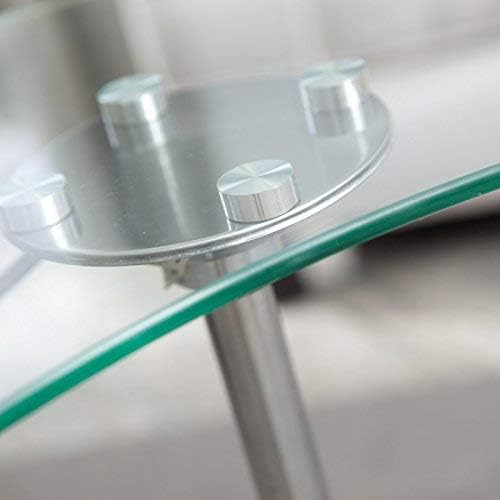
Image 4.2: A close-up view of the circular metal plate attached to the clear glass top with four silver standoffs.
- Connect Main Support Pole: Insert the main support pole into the center opening of the assembled base. Then, carefully lower the glass top assembly onto the top of the main support pole, ensuring it slides into place. The hydraulic lift mechanism should connect securely.
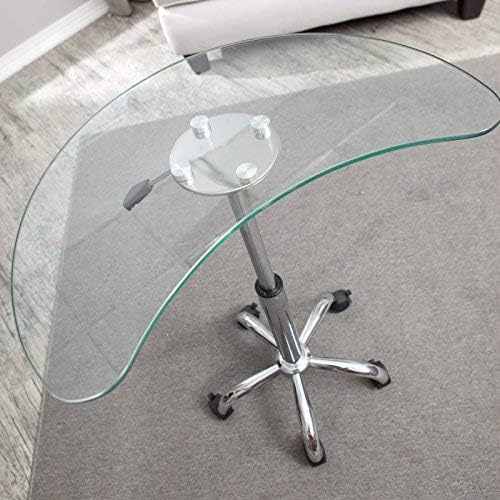
Image 4.3: The fully assembled laptop stand, showing the clear glass top, chrome support pole, and five-star base with casters.
- Install Decorative Ring: Slide the decorative finishing ring over the base of the main support pole, covering the connection point with the five-star base.
5. Operating Instructions
5.1 Adjusting Height
The RTA Home and Office LT-020 features a hydraulic lift system for easy height adjustment.
- To Raise the Stand: While holding the glass top, lift the height adjustment lever located beneath the glass top. The stand will automatically rise. Release the lever at the desired height.
- To Lower the Stand: While applying gentle downward pressure on the glass top, lift the height adjustment lever. The stand will lower. Release the lever at the desired height.
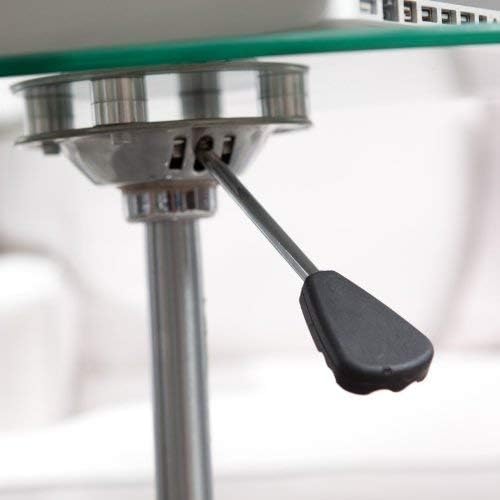
Image 5.1: A close-up view of the black height adjustment lever located beneath the glass top, attached to the chrome support pole.
5.2 Moving the Stand
The stand is equipped with five casters for easy mobility.
- To Move: Ensure the caster locks (if present on your model) are disengaged. Gently push or pull the stand to its desired location.
- To Secure: Once in position, engage the caster locks on at least two casters to prevent the stand from rolling unintentionally.
6. Maintenance and Care
- Cleaning the Glass Top: Use a standard glass cleaner and a soft, lint-free cloth to clean the glass surface. Avoid abrasive cleaners or scouring pads that could scratch the glass.
- Cleaning the Metal Frame: Wipe the aluminum and chrome parts with a soft, damp cloth. For stubborn marks, a mild soap solution can be used, followed by drying thoroughly.
- Caster Maintenance: Periodically check the casters for any accumulated debris (hair, dust, etc.) and clean them to ensure smooth rolling.
- Tighten Connections: Every few months, inspect all screws and connections to ensure they remain tight. Retighten if necessary to maintain stability.
7. Troubleshooting
- Stand Does Not Adjust Height:
- Ensure the height adjustment lever is fully engaged when attempting to raise or lower the stand.
- If the stand is stuck in a low position, try applying more downward pressure while lifting the lever. If stuck high, try lifting the lever without pressure first, then apply pressure.
- Verify that no obstructions are preventing the pole from moving freely.
- Stand is Unstable/Wobbly:
- Check all assembly screws and connections, especially those attaching the glass top and the main support pole to the base. Tighten any loose fasteners.
- Ensure the stand is placed on a level surface.
- Verify that all casters are fully inserted into the base.
- Casters Do Not Roll Smoothly:
- Check for and remove any debris (e.g., hair, lint) wrapped around the caster wheels.
- Ensure caster locks are disengaged.
8. Specifications
| Model Number | LT-020 |
| Brand | RTA Home and Office |
| Item Weight | 30 pounds |
| Product Dimensions (L x W x H) | 15.8 x 25.5 x 31.5 inches |
| Assembled Height | 31.5 inches |
| Assembled Width | 25.6 inches |
| Assembled Length | 15.8 inches |
| Material | Clear Glass, Aluminum |
9. Warranty and Support
For warranty information, technical support, or to inquire about replacement parts, please contact RTA Home and Office customer service. Keep your purchase receipt and model number (LT-020) readily available when contacting support.
Contact information for RTA Home and Office can typically be found on their official website or on the product packaging.