
Introduction
This manual provides instructions for the safe and efficient operation, maintenance, and troubleshooting of your Bostitch B440LR Long Reach Stapler. Please read this manual thoroughly before using the product to ensure proper function and longevity.
The Bostitch B440LR is an all-metal 12-inch long reach stapler designed for high-quality and versatile stapling tasks. It features a stay-back pusher for convenient staple loading, a floating core to prevent staple jams, and a power spring for robust performance. An adjustable paper stop with both English and Metric rulers ensures precise stapling.
Key Product Features
- 12-Inch Long Reach: Ideal for stapling booklets, brochures, and other large documents up to 25 inches wide.
- All-Metal Construction: Ensures durability and long-lasting performance.
- Anti-Jam Technology: Features a floating core mechanism to prevent staple jams.
- Stay-Back Pusher: Allows for easy and convenient loading of a full strip of standard staples.
- Adjustable Paper Stop: Equipped with English and Metric rulers for precise staple placement.
- 20-Sheet Capacity: Reliably staples up to 20 sheets of paper.
- Dual Clinch: Provides options for permanent or temporary stapling.
- Non-Slip Feet: Rubberized feet ensure stability during use and protect desktop surfaces.

Image: Visual representation of the Bostitch B440LR Long Reach Stapler highlighting its jam-free stapling capability, all-metal build, and non-slip feet for stability.
Setup Instructions
Unpacking
Carefully remove the stapler from its packaging. Inspect the stapler for any signs of damage. Retain packaging for future storage or transport.
Loading Staples
- Pull the staple pusher rod back until it locks into the 'stay-back' position.
- Insert a full strip of standard staples (e.g., Bostitch B8 PowerCrown 1/4 inch staples) into the staple channel.
- Gently push the staple pusher rod forward until it engages with the staples.

Image: The Bostitch B440LR Long Reach Stapler in its ready state, showcasing its extended arm and integrated ruler, illustrating the staple loading area.
Operating the Stapler
Basic Stapling
- Place the documents to be stapled under the stapler head.
- Align the stapler head over the desired stapling point.
- Press down firmly on the stapler handle until the staple penetrates the paper and clinches.
Using the 12-Inch Reach
The extended arm allows stapling at a distance from the paper's edge, ideal for creating booklets or stapling in the center of larger sheets. Utilize the integrated ruler for precise measurements.
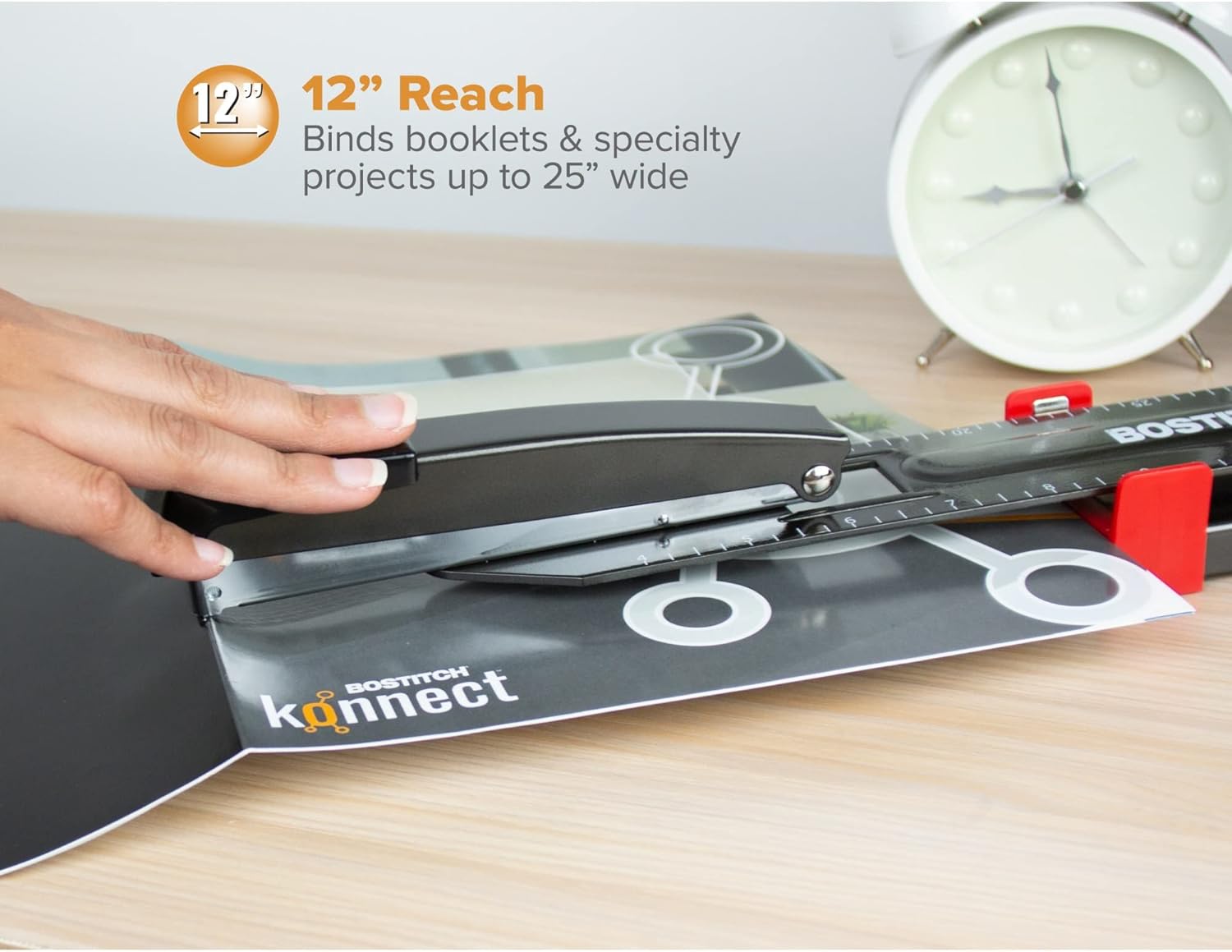
Image: Demonstrating the 12-inch reach of the stapler, allowing users to staple the center of large documents or booklets with ease.
Adjusting the Paper Stop
The red adjustable paper stop can be moved along the ruler to ensure consistent staple placement. Slide the stop to the desired measurement (in inches or centimeters) for precise alignment of your documents.

Image: A hand adjusting the red paper guide along the integrated ruler for precise staple positioning on the Bostitch B440LR stapler.
Dual Clinch Function
The stapler features a dual clinch mechanism, allowing for either permanent or temporary stapling. The base plate can be rotated to select the desired clinch type. For permanent stapling, the staple legs are bent inward. For temporary stapling, the staple legs are bent outward for easy removal.

Image: Close-up view of the stapler's base, illustrating the dual clinch feature set for permanent stapling where staple legs are bent inwards.
Maintenance
- Cleaning: Wipe the stapler regularly with a dry, soft cloth to remove dust and debris. Avoid using abrasive cleaners or solvents, as these can damage the finish or internal components.
- Staple Compatibility: Use only standard-size staples (e.g., 26/6 or 24/6) to ensure optimal performance and prevent jams. Refer to the product specifications for recommended staple types. Using incorrect staples can lead to frequent jamming and damage to the stapler.
Troubleshooting
- Staples are jamming frequently.
- Ensure you are using the correct size and type of staples. Check if the staple channel is clear of debris. Do not exceed the maximum sheet capacity (20 sheets). The floating core is designed to minimize jams, but proper staple usage is crucial.
- Staples are not penetrating the paper.
- Verify that the staple pusher rod is fully engaged with the staples. Ensure you are using staples of appropriate leg length for the number of sheets. Apply firm, even pressure when stapling. Check if the paper stack is too thick for the stapler's capacity.
- Staples are bending or misforming.
- This can occur if the staple capacity is exceeded or if the staples are not properly seated in the channel. Ensure the paper is flat and aligned correctly. Check the base plate for proper clinch setting (permanent vs. temporary). Using damaged or low-quality staples can also cause this issue.
Product Specifications
| Feature | Detail |
|---|---|
| Model Number | B440LR |
| Brand | Bostitch |
| Stapling Capacity | Up to 20 sheets |
| Reach Depth | 12 inches (30.48 cm) |
| Material | All-Metal |
| Color | Black |
| Dimensions (L x W x H) | 17.4 x 2.72 x 2.32 inches (44.2 x 6.9 x 5.9 cm) |
| Item Weight | 2.2 pounds (1 kg) |
| Special Features | Anti-Jam Floating Core, Stay-Back Pusher, Adjustable Paper Stop, Dual Clinch, Non-Slip Feet |
Warranty and Support
For warranty information or technical support regarding your Bostitch B440LR Long Reach Stapler, please contact Bostitch customer service directly. Refer to the product packaging or the official Bostitch website for current contact details and detailed warranty terms and conditions.