
1. Product Overview
The ShaverAid SP-280 is a high-quality replacement screen foil designed to restore the performance of your Remington Intercept electric shaver. This replacement part ensures a close and comfortable shave by replacing worn or damaged foils.
Key Features:
- Direct replacement for SP-280 screen foils.
- Engineered for compatibility with all Remington Intercept shaver models.
- Durable construction for long-lasting performance.
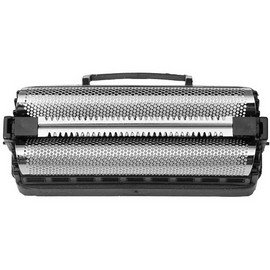
Image: The ShaverAid SP-280 replacement screen foil, designed for Remington Intercept shavers.
2. Safety Information
Caution:
- This product is for use with electric shavers only.
- Always hold the shaver at a slight angle to the skin and use gentle, even strokes.
- Avoid applying too much pressure to prevent cuts and skin irritation.
- Do not use on broken or irritated skin.
- Always unplug the shaver before cleaning or replacing parts.
- Keep the shaver dry to prevent electrical shock.
- Do not use the shaver while it is charging.
3. Compatibility
The ShaverAid SP-280 replacement screen foil is compatible with all Remington Intercept shaver models. This includes, but is not limited to, the following models:
- M-2810
- M-2820
- M-2822
- M-2825
- M-2830
- M-8221
- RS-6963
- RS-6943
- RS-6930
- RS6720
- RS7830
To ensure you have the correct model, please refer to the model number printed on your shaver.
4. Installation Instructions
Before installing your new ShaverAid SP-280 screen foil, it is crucial to correctly identify your Remington shaver's model number to ensure compatibility and proper fit. The model number is typically found on the back of the shaver or under the trimmer.
Video: How to Identify Your Shaver Model Number. This video demonstrates common locations for model numbers on Remington shavers, which is essential before replacing parts.
Replacing the Screen Foil:
- Power Off and Unplug: Ensure your shaver is turned off and unplugged from any power source.
- Remove Old Foil: Gently press the release buttons (if present) or pull the old screen foil assembly upwards to detach it from the shaver head. Dispose of the old foil responsibly.
- Clean Shaver Head: Use a small brush to clean any hair clippings or debris from the shaver's internal components and the area where the foil attaches.
- Install New Foil: Align the new ShaverAid SP-280 screen foil with the shaver head. Press down firmly until it clicks securely into place. Do not force it.
- Test: Turn on your shaver to ensure the new foil is properly seated and functioning.
5. Maintenance
Proper maintenance of your shaver and its replacement parts will extend their lifespan and ensure optimal shaving performance.
- Regular Cleaning: After each use, remove the screen foil and brush away any trapped hair. For a deeper clean, rinse the foil under warm running water (if your shaver is waterproof). Allow to air dry completely before reattaching.
- Lubrication: Periodically apply a drop of shaver oil to the cutters to maintain smooth operation and reduce wear.
- Handle with Care: Avoid dropping the shaver or applying excessive pressure to the foil, as this can cause damage.
- Replace as Needed: Screen foils are wear-and-tear parts. Replace them every 6-12 months, or sooner if you notice reduced performance, irritation, or visible damage.
6. Specifications
| Feature | Detail |
|---|---|
| Product Model | SP-280 |
| Brand | Shaver Aid |
| Head Type | Foil |
| Blade Material | Stainless Steel |
| Color | Silver |
| Manufacturer | Aftermarket |
| UPC | 744539015875 |
| Package Dimensions | 2.5 x 1.2 x 0.6 inches; 0.8 ounces |
7. Support
For further assistance, questions regarding compatibility, or troubleshooting, please contact the seller or manufacturer directly. Ensure you have your shaver's model number ready when seeking support.
You may also refer to the original Remington shaver manual for specific instructions related to your shaver model.