
1. Introduction
This manual provides essential information for the proper use and maintenance of your Grover TD175 Soprano Recorder. This instrument is designed for ease of use and durability, suitable for beginners and students.
The Grover TD175 is a soprano recorder with Baroque fingering, accurately tuned to A-440. It is constructed from high-impact plastic, ensuring longevity and consistent performance.
2. Product Components
Your Grover TD175 Soprano Recorder package includes the following items:
- Grover TD175 Soprano Recorder (Black, Baroque Fingering)
- Fingering Chart
- Cleaning Rod
- Carrying Pouch

Figure 1: Grover TD175 Soprano Recorder and included accessories.
3. Setup
The Grover TD175 Recorder is a one-piece instrument, meaning it does not require assembly. It is ready to play directly from the packaging.
Before playing, ensure the instrument is clean and free from any debris. Refer to the 'Maintenance' section for cleaning instructions.
4. Operating the Recorder
4.1 Holding the Recorder
Hold the recorder gently with both hands. The left hand is typically placed towards the top of the instrument, covering the upper holes, while the right hand supports the lower part and covers the remaining holes. Ensure a relaxed grip to allow for agile finger movement.
4.2 Fingering Chart
The included fingering chart illustrates the correct finger positions for various notes. The Grover TD175 uses Baroque fingering. Pay close attention to the diagrams to accurately cover the tone holes.
4.3 Producing Sound
Place the mouthpiece gently between your lips. Blow a steady, gentle stream of air into the instrument. Avoid blowing too hard, as this can produce a harsh or squeaky sound. Experiment with different air pressures to find the optimal tone.
Video 1: General demonstration of a soprano recorder, including discussion of Baroque fingering and cleaning. Note: The recorder shown in this video is a different color and brand (YONTY) but illustrates general principles applicable to the Grover TD175.
5. Maintenance
Regular cleaning is crucial for maintaining the sound quality and hygiene of your recorder.
5.1 Cleaning the Interior
- After each use, use the provided cleaning rod with a soft, lint-free cloth.
- Gently push the cloth through the bore of the recorder using the cleaning rod to remove moisture and debris.
- Ensure all moisture is removed from the windway (the narrow channel in the mouthpiece) to prevent blockages and maintain clear tone.
5.2 Cleaning the Exterior
Wipe the exterior of the recorder with a soft, dry cloth. For stubborn marks, a slightly damp cloth can be used, followed by immediate drying.
5.3 Storage
Store the recorder in its provided carrying pouch when not in use. This protects it from dust, scratches, and temperature fluctuations.
6. Troubleshooting
6.1 Squeaky Sound
A squeaky sound often indicates that the tone holes are not fully covered, or that too much air pressure is being used. Ensure fingers are flat and cover the holes completely. Practice blowing with a softer, more controlled breath.
6.2 Muffled or Weak Sound
This can be caused by moisture buildup in the windway. Use the cleaning rod and cloth to thoroughly dry the interior of the instrument, especially the mouthpiece area.
7. Specifications
| Feature | Detail |
|---|---|
| Model Number | TD175 |
| Brand | Grover |
| Instrument Type | Soprano Recorder |
| Fingering System | Baroque |
| Material | High-Impact Plastic |
| Color | Black |
| Tuning | A-440 |
| Dimensions | 1.3 x 13 x 1.3 inches |
| Weight | 2.4 ounces |
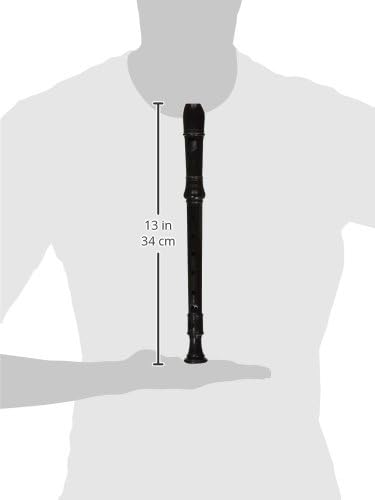
Figure 2: Dimensions of the Grover TD175 Soprano Recorder.
8. Warranty and Support
For information regarding warranty coverage or technical support, please refer to the product packaging or contact Grover customer service directly. Specific warranty terms may vary by region and retailer.