
Introduction
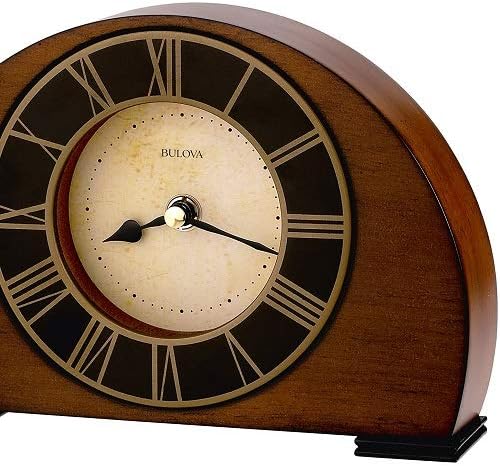
Thank you for choosing the Bulova B7340 Tremont Clock. This elegant timepiece features an antique walnut finish, an antique-finish aluminum bezel with Roman numerals, and an ivory parchment dial. Designed for indoor use, this battery-powered clock provides reliable timekeeping with its quartz movement. This manual provides essential information for setting up, operating, and maintaining your clock.
Setup
1. Unpacking
Carefully remove the clock from its packaging. Inspect the clock for any signs of damage. Retain all packaging materials for future transport or storage.
2. Battery Installation
The Bulova B7340 Tremont Clock requires one (1) AA battery (not included) for operation. To install the battery:
- Locate the battery compartment cover on the back of the clock.
- Gently remove the cover. It may be a snug fit to ensure the battery is secure.
- Insert one fresh AA battery, ensuring the positive (+) and negative (-) terminals align correctly with the indicators inside the compartment.
- Replace the battery compartment cover securely.
3. Setting the Time
Once the battery is installed:
- Locate the time-setting knob on the back of the clock, typically a small wheel or dial.
- Gently turn the knob in either direction to move the clock hands to the correct time.
- Ensure the hands are not obstructed and move freely.
Operation
Your Bulova B7340 Tremont Clock operates continuously once the battery is installed and the time is set. The quartz movement ensures accurate timekeeping. No further adjustments are typically needed unless the time changes (e.g., Daylight Saving Time) or the battery needs replacement.

Product Summary Video
Maintenance
Cleaning
To maintain the appearance of your clock:
- Wipe the wood case with a soft, dry cloth. Avoid abrasive cleaners or solvents.
- For the protective glass lens, use a soft, lint-free cloth and a mild glass cleaner if necessary. Spray cleaner onto the cloth, not directly onto the clock.
Battery Replacement
Replace the AA battery approximately once a year, or when you notice the clock losing time or stopping. Follow the battery installation steps outlined in the Setup section.
Troubleshooting
- Clock Not Running:
Check if the AA battery is installed correctly with the correct polarity. Ensure the battery is fresh. - Incorrect Time:
Adjust the time using the setting knob on the back of the clock. If the clock consistently loses or gains time, replace the battery. - Difficulty Removing Battery Cover:
The battery cover is designed to fit snugly. If it is difficult to remove, apply gentle, even pressure around the edges while attempting to lift or slide it off. Avoid using excessive force or sharp objects that could damage the clock.
Specifications
| Feature | Detail |
|---|---|
| Brand | Bulova |
| Model Number | B7340 |
| Product Dimensions (W x H x D) | 8.25" x 5.75" x 1.75" |
| Material Type | Wood |
| Color | Walnut Finish |
| Display Type | Analog |
| Dial Color | Ivory Parchment |
| Watch Movement | Quartz |
| Power Source | Battery Powered (1 AA battery required) |
| Special Feature | Protective Glass Lens |
| Mounting Type | Tabletop |
Warranty
Bulova products are manufactured to high-quality standards. For information regarding the manufacturer's warranty, please refer to the documentation included with your purchase or visit the official Bulova website. Keep your proof of purchase for warranty claims.
Support
If you require further assistance or have questions not covered in this manual, please contact Bulova customer service. Contact details can typically be found on the Bulova website or on the product packaging.
