
1. Introduction
This manual provides instructions for the installation, operation, and maintenance of your TP-Link TL-SG1008 8-Port Gigabit Ethernet Unmanaged Switch. This device is designed to expand your network capacity with high-speed Gigabit connections, offering a simple plug-and-play solution for home and small office environments.

Figure 1: TP-Link TL-SG1008 8-Port Gigabit Ethernet Unmanaged Switch, front view.
2. Product Overview
2.1 Key Features
- 8 Gigabit Ethernet ports for high-speed network connections.
- Unmanaged design for simple plug-and-play operation.
- Auto MDI/MDIX eliminates the need for crossover cables.
- Innovative energy-efficient technology for reduced power consumption.
- Non-blocking switching architecture for maximum throughput.
- Metal casing for durability and heat dissipation.
- Desktop or rack-mountable design.

Figure 2: High reliability features of the TL-SG1008, including strict testing, reliable operation, complete quality control, and high-quality metal housing.
2.2 Package Contents
Verify that your package contains the following items:
- TP-Link TL-SG1008 8-Port Gigabit Desktop Switch
- Power Cord
- Installation Guide
- Rackmount Kit (for rack installation)
- Rubber Feet (for desktop placement)
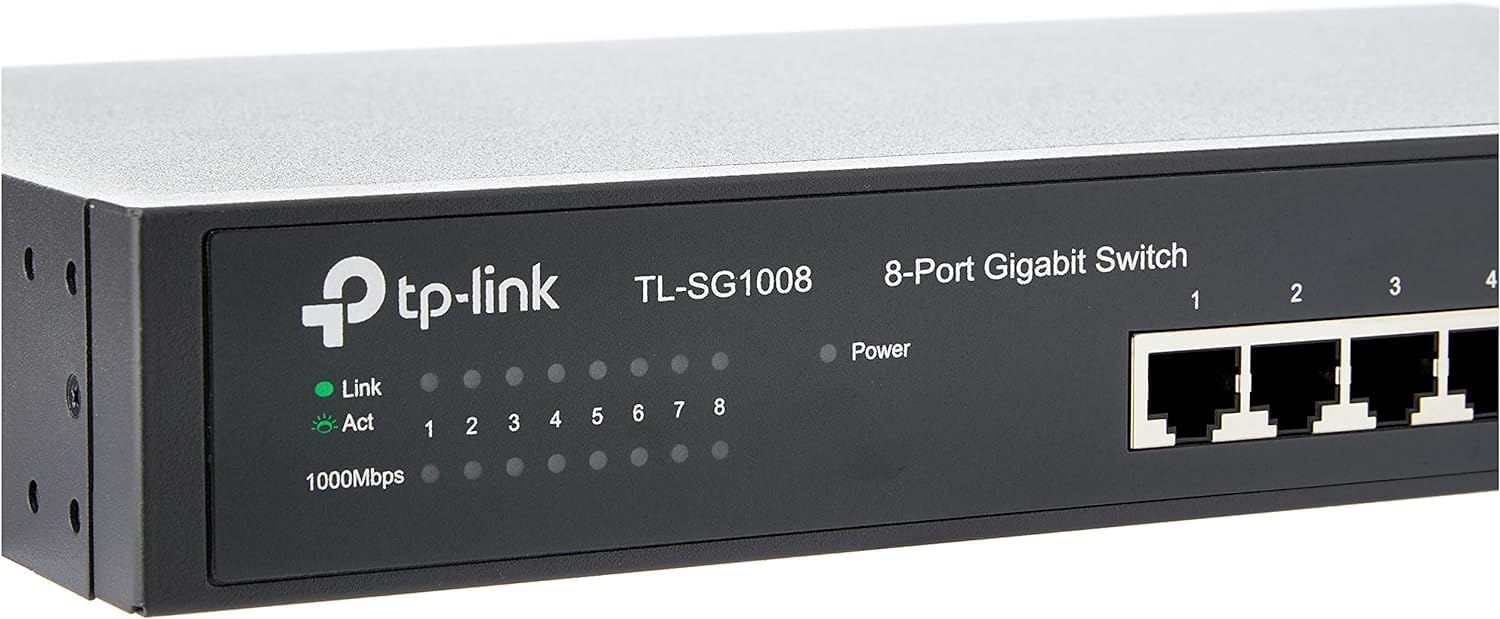
Figure 3: The TL-SG1008 switch and its packaging, indicating included accessories.
3. Setup
Follow these steps to set up your TL-SG1008 switch:
- Placement: Place the switch on a flat, stable surface or mount it in a standard 19-inch equipment rack using the provided rackmount kit. Ensure adequate ventilation around the switch.
- Connect Devices: Connect your network devices (computers, servers, network printers, etc.) to the RJ45 ports (1-8) on the front panel of the switch using Ethernet cables. The switch supports Auto MDI/MDIX, so you can use either straight-through or crossover cables.
- Connect Power: Connect the provided power cord to the power inlet on the rear panel of the switch and then to a standard electrical outlet.
- Power On: The switch will power on automatically. The Power LED on the front panel will illuminate, indicating that the switch is receiving power.

Figure 4: Front panel of the TL-SG1008, showing the 8 RJ45 ports and LED indicators for Link/Act and 1000Mbps status.
4. Operating Instructions
The TL-SG1008 is an unmanaged switch, meaning it requires no configuration. It operates on a plug-and-play basis.
4.1 LED Indicators
The front panel features LED indicators to monitor the switch's status:
- Power LED:
- On: The switch is powered on.
- Off: The switch is powered off.
- Link/Act LEDs (for each port):
- Green (Solid): A device is connected to the port, and the link is active at 1000Mbps.
- Green (Flashing): Data is being transmitted or received through the port at 1000Mbps.
- Yellow (Solid): A device is connected to the port, and the link is active at 10/100Mbps.
- Yellow (Flashing): Data is being transmitted or received through the port at 10/100Mbps.
- Off: No device is connected to the port, or the connected device is powered off.
4.2 Network Expansion
This switch is suitable for expanding both home and small office networks, providing reliable high-speed connectivity for multiple devices.

Figure 5: The TL-SG1008 can be used to expand an office network.

Figure 6: The TL-SG1008 is also suitable for home network expansion.
5. Maintenance
To ensure optimal performance and longevity of your switch, consider the following maintenance guidelines:
- Ventilation: Ensure the switch is placed in a well-ventilated area to prevent overheating. Do not block the ventilation openings.
- Cleaning: Keep the switch clean and free of dust. Use a soft, dry cloth for cleaning. Do not use liquid or aerosol cleaners.
- Power Supply: Use only the power adapter provided with the switch.
- Cable Management: Organize network cables to prevent strain on the ports and to maintain a tidy setup.
6. Troubleshooting
If you encounter issues with your TL-SG1008 switch, refer to the following common problems and solutions:
6.1 No Power LED
- Ensure the power cord is securely connected to the switch and a working electrical outlet.
- Verify that the power outlet is functional by plugging in another device.
6.2 No Link/Act LED for a Connected Device
- Check that the Ethernet cable is securely connected to both the switch port and the network device.
- Ensure the connected device is powered on and its network adapter is functioning correctly.
- Try a different Ethernet cable to rule out a faulty cable.
- Test with a different port on the switch.
6.3 Slow Network Speed
- Ensure all connected devices and cables support Gigabit Ethernet (Cat5e or Cat6 cables are recommended for Gigabit speeds).
- Check the Link/Act LED color: Green indicates Gigabit speed, Yellow indicates 10/100Mbps. If it's Yellow, check the connected device's network adapter settings or cable quality.
- Avoid placing the switch near sources of strong electromagnetic interference.
7. Specifications
| Feature | Description |
|---|---|
| Model | TL-SG1008 |
| Interface | 8 10/100/1000Mbps RJ45 Ports (Auto Negotiation/Auto MDI/MDIX) |
| Data Transfer Rate | 1000 Megabits Per Second |
| Switching Capacity | 16 Gbps |
| Case Material | Metal |
| Dimensions (L x W x H) | 15.75 x 3.15 x 9.84 inches |
| Item Weight | 2.53 pounds |
| Power Supply | 240 Volts |
| Operating Temperature | 0°C to 40°C (32°F to 104°F) |
| Storage Temperature | -40°C to 70°C (-40°F to 158°F) |
| Operating Humidity | 10% to 90% non-condensing |
| Storage Humidity | 5% to 90% non-condensing |
8. Warranty and Support
8.1 Limited Lifetime Warranty
The TP-Link TL-SG1008 switch comes with a limited lifetime warranty. For detailed warranty terms and conditions, please refer to the official TP-Link website or the warranty card included with your product.
8.2 Technical Support
For technical support, firmware updates, and product information, please visit the official TP-Link support website. You can find FAQs, troubleshooting guides, and contact information for customer service there.
TP-Link Official Website: www.tp-link.com


