
1. Introduction and Overview
The Bresser Researcher Trino 40-1000x Microscope is designed for professional and educational use, offering an excellent balance of quality and performance. Its robust metal construction and adherence to DIN standards for eyepieces and objectives ensure reliable optical and mechanical performance. The trinocular head allows for simultaneous binocular observation and connection of a PC eyepiece or camera for imaging.
This manual provides detailed instructions for the setup, operation, maintenance, and troubleshooting of your Bresser Researcher Trino microscope.

Figure 1: Bresser Researcher Trino 40-1000x Microscope. This image shows the complete microscope unit, highlighting its robust design and trinocular head.
2. Safety Information
Please read all safety instructions carefully before operating the microscope to prevent damage to the device or personal injury.
- Always handle the microscope with care. Avoid sudden movements or impacts.
- Do not expose the microscope to direct sunlight, high temperatures, or high humidity.
- Ensure the microscope is placed on a stable, level surface.
- Disconnect the power cord before cleaning or performing any maintenance.
- Do not attempt to disassemble or repair the microscope yourself. Refer to qualified service personnel.
- Keep the microscope away from children and pets to prevent accidental damage or misuse.
3. Package Contents
Verify that all components listed below are present in your package:
- Trinocular Microscope Unit
- 1 Pair of DIN WF 10x Eyepieces (23mm diameter)
- 4-fold Objective Revolver (pre-installed)
- 4 DIN Objectives: 4x/0.1, 10x/0.25, 40x/0.65, 100x/1.25 (Oil Immersion)
- Condenser
- Mechanical Stage with Vernier Scale
- Fine and Coarse Focus Drive (integrated)
- Immersion Oil
- Power Cord
- Dust Cover (if included)
4. Setup
- Unpacking: Carefully remove all components from the packaging. Retain the original packaging for future transport or storage.
- Placement: Place the microscope on a stable, vibration-free surface away from direct sunlight and heat sources. Ensure adequate space around the microscope for operation.
- Eyepiece Installation: Insert the 10x WF eyepieces into the eyepiece tubes of the trinocular head. Gently push them down until they are seated firmly.
- Objective Installation: The objectives are typically pre-installed on the revolving nosepiece. If not, carefully screw each objective into the nosepiece in ascending order of magnification (4x, 10x, 40x, 100x).
- Power Connection: Connect the power cord to the microscope's power input and then to a suitable electrical outlet (6 Volts).
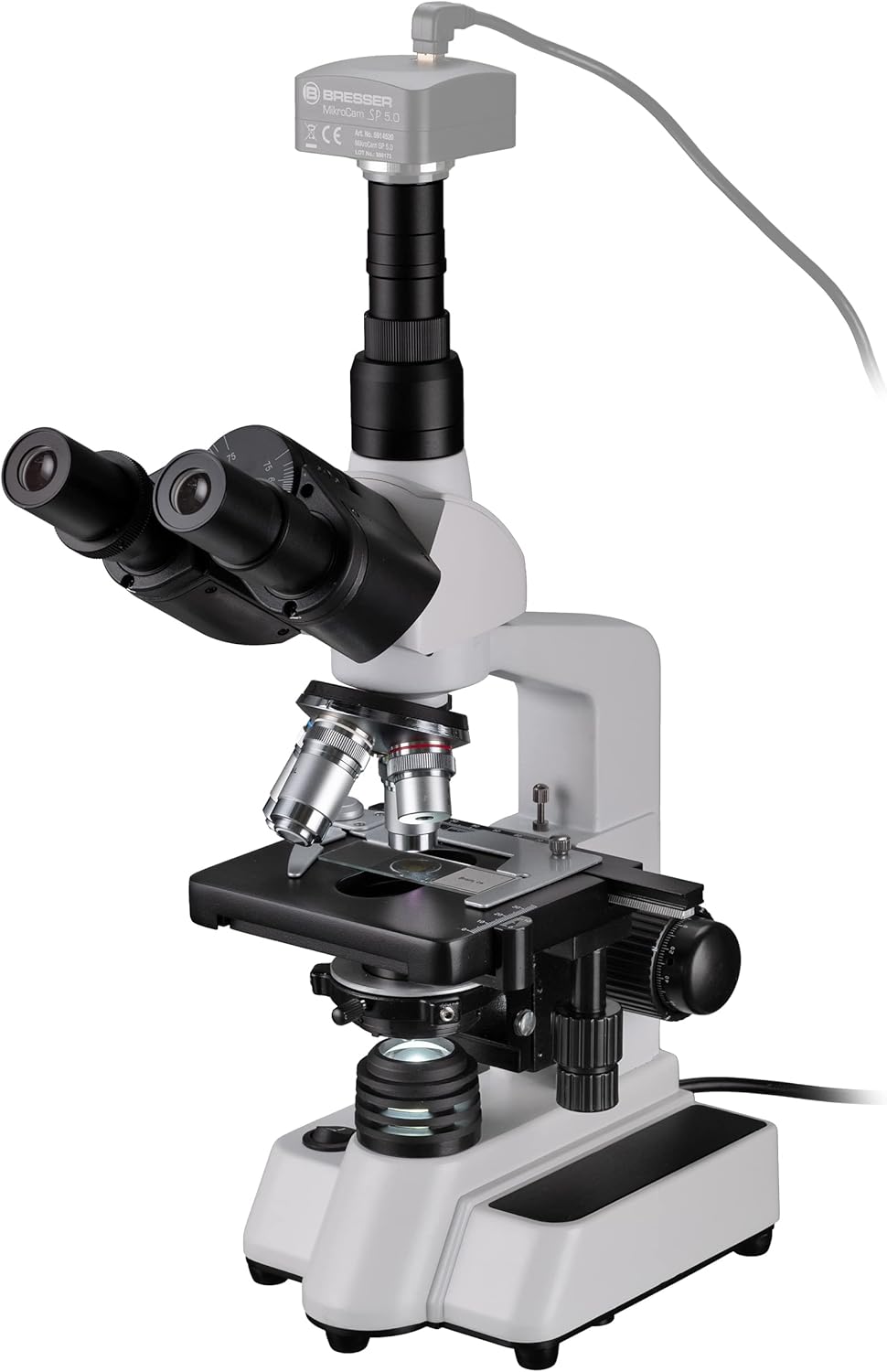
Figure 2: Microscope with an optional camera attached to the trinocular port. This view shows the top of the microscope head and the camera connection.
5. Operating Instructions
5.1 Preparing a Specimen
- Place a prepared slide onto the mechanical stage.
- Use the stage clips to secure the slide.
- Use the X-Y stage control knobs to center the specimen area you wish to observe under the objective.
5.2 Illumination
- Turn on the LED illumination using the power switch.
- Adjust the brightness using the dimmer control.
- Adjust the condenser and iris diaphragm for optimal contrast and resolution.
5.3 Focusing
- Rotate the revolving nosepiece to select the lowest magnification objective (4x).
- Using the coarse focus knob, lower the stage until the objective is just above the slide.
- While looking through the eyepieces, slowly raise the stage using the coarse focus knob until the specimen comes into view.
- Use the fine focus knob for precise focusing.
- Adjust the interpupillary distance by moving the eyepiece tubes until you see a single, circular field of view.
- Adjust the diopter setting on one eyepiece (usually the left one) to compensate for differences in vision between your eyes.
5.4 Changing Magnification
- Once focused at a lower magnification, rotate the nosepiece to the next higher objective (e.g., 10x).
- Only minor adjustments with the fine focus knob should be needed due to the parfocal design of the objectives.
- For the 100x oil immersion objective, place a small drop of immersion oil directly onto the slide in the area to be observed. Carefully lower the 100x objective into the oil drop until it makes contact. Focus using only the fine focus knob.

Figure 3: Side view of the microscope, showing the focus knobs and mechanical stage controls. An optional camera is attached to the trinocular port.
6. Maintenance
- Cleaning Optics: Use a soft, lint-free cloth and specialized optical cleaning solution to clean objective lenses and eyepieces. Never use abrasive materials or household cleaners. For oil immersion objectives, clean off immersion oil immediately after use.
- Cleaning Body: Wipe the microscope body with a soft, damp cloth. Avoid getting moisture into electrical components.
- Storage: When not in use, cover the microscope with the provided dust cover to protect it from dust and debris. Store in a cool, dry place.
- Lubrication: Moving parts like the focus mechanism and mechanical stage are factory-lubricated and generally do not require user lubrication. If movement becomes stiff, contact professional service.
7. Troubleshooting
| Problem | Possible Cause | Solution |
|---|---|---|
| No illumination | Power cord disconnected, power switch off, dimmer set to minimum, LED failure. | Check power connection, turn on switch, increase dimmer setting. If problem persists, contact support. |
| Image blurry/out of focus | Incorrect focus adjustment, objective not fully engaged, slide upside down, dirty optics. | Adjust fine/coarse focus, rotate nosepiece until objective clicks into place, check slide orientation, clean lenses. |
| Dark field of view | Diaphragm closed, condenser too low, objective not aligned. | Open iris diaphragm, raise condenser, ensure objective is clicked into viewing position. |
| Dust or spots in view | Dust on eyepieces, objectives, or slide. | Clean eyepieces and objectives. Check and clean the slide. |
8. Specifications
| Feature | Detail |
|---|---|
| Brand | BRESSER |
| Model | 5723100 |
| Type | Trinocular Biological Microscope |
| Magnification Range | 40x - 1000x |
| Eyepieces | WF 10x (23.2 mm diameter) |
| Objectives | DIN Achromatic 4x, 10x, 40x, 100x (Oil Immersion) |
| Head | Trinocular, 360° rotatable, with diopter adjustment |
| Illumination | Transmitted LED, Dimmable |
| Focusing | Coarse and Fine Focus Knobs |
| Stage | Mechanical Stage with Vernier Scale |
| Condenser | Abbe Condenser with Iris Diaphragm |
| Material | Metal Body |
| Dimensions (L x W x H) | 28 x 36 x 17.5 cm (approx.) |
| Weight | 3.8 kg (approx.) |
| Power Supply | 6 Volts |
9. Warranty and Support
This Bresser Researcher Trino microscope comes with a 1-year availability for spare parts, indicating support for components for at least one year from the date of purchase.
For technical support, warranty claims, or service inquiries, please contact Bresser customer service or your authorized dealer. Please have your model number (5723100) and proof of purchase ready when contacting support.
For more information, visit the official Bresser website or refer to the contact details provided with your product packaging.


