
1. Introduction
This manual provides detailed instructions for the installation, operation, and maintenance of your VideoSecu IR806AS CCTV Outdoor Day Night Security Camera. The IR806AS is designed for reliable surveillance, featuring a 1/3'' Color CCD image sensor, 480 TV lines resolution, and 20 infrared LEDs for effective night vision. Its weatherproof aluminum housing ensures durability for both outdoor and indoor applications.
2. Package Contents
Please verify that all items listed below are included in your package:
- 1 x VideoSecu IR806AS CCD IR Camera
- 1 x 12V DC 500mA Power Supply
- 1 x Camera Extension Cable
- 1 x Security Warning Decal

Figure 2.1: Package contents including the IR806AS camera, power supply, and extension cable.
3. Product Overview
The VideoSecu IR806AS camera features a durable design suitable for various environments. Key components include the lens, infrared LEDs for night vision, and the mounting bracket.
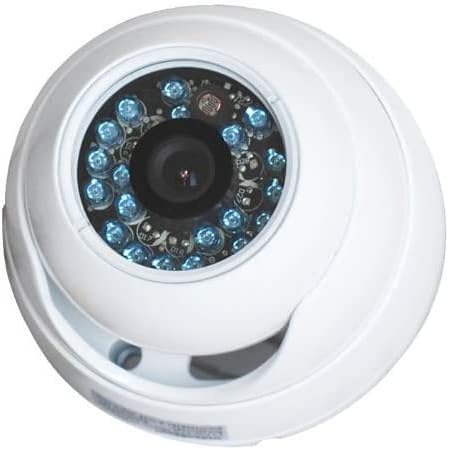
Figure 3.1: Front view of the IR806AS camera, highlighting the lens and IR LEDs.
4. Installation and Setup
4.1 Mounting the Camera
The IR806AS camera is designed for wall mounting. Select a suitable location that provides the desired viewing angle and is within reach of power and video connections.
- Position the camera bracket against the mounting surface.
- Mark the drilling points through the bracket holes.
- Drill pilot holes if necessary.
- Secure the camera bracket using appropriate screws (not included).
- Adjust the camera's angle and tighten the bracket securely.
4.2 Connecting the Camera
The camera requires both power and video connections. It is designed to integrate with a CCTV surveillance system, typically connecting to a Digital Video Recorder (DVR) or a monitor.
- Video Connection: Connect the BNC connector from the camera to the video input of your DVR or monitor using the provided extension cable or a suitable BNC cable.
- Power Connection: Connect the 2.1mm power connector from the camera to the included 12V DC 500mA power supply. Plug the power supply into a standard electrical outlet.
Important: This is a CCTV camera and requires a separate DVR or monitor for recording and viewing footage. These additional components are not included with the camera.
5. Operation
Once properly installed and connected, the VideoSecu IR806AS camera operates automatically.
- Day Vision: The camera provides clear color video during daylight hours.
- Night Vision: The built-in 20 infrared LEDs automatically activate in low-light conditions, providing black and white video for surveillance in darkness. The automatic CDS sensor manages the transition between day and night modes.
- Wide View Angle: The 3.6mm lens offers a wide field of view, suitable for covering larger areas.
6. Maintenance
Regular maintenance ensures optimal performance and longevity of your camera.
- Cleaning: Periodically clean the camera lens and housing with a soft, damp cloth. Avoid abrasive cleaners that could scratch the lens or damage the finish.
- Connection Check: Inspect all cable connections (power and video) regularly to ensure they are secure and free from corrosion or damage.
- Housing Integrity: Verify that the weatherproof aluminum housing remains intact and sealed to protect internal components from environmental elements.
7. Troubleshooting
If you encounter issues with your camera, refer to the following troubleshooting guide:
| Problem | Possible Cause | Solution |
|---|---|---|
| No video signal |
|
|
| Poor image quality (blurry, distorted) |
|
|
| Night vision not activating or poor |
|
|
8. Specifications
| Feature | Detail |
|---|---|
| Model Number | IR806AS |
| Image Sensor | 1/3'' Color CCD |
| Video Resolution | 480 TV Lines |
| Lens | 3.6mm Wide Angle |
| Night Vision | 20 Infrared LEDs |
| Power Input | 12V DC |
| Video Output | BNC Connector |
| Housing Material | Aluminum |
| Weatherproof Rating | IP65 |
| Usage Environment | Outdoor / Indoor |
| Special Features | Automatic CDS sensor, Night Vision |
9. Warranty Information
Specific warranty terms and conditions for the VideoSecu IR806AS camera are not provided in this manual. For detailed warranty information, please refer to the product packaging, the official VideoSecu website, or contact your retailer.
10. Customer Support
Should you require technical assistance, have questions regarding installation, or need further support, please contact VideoSecu customer service. Contact details can typically be found on the VideoSecu official website or on your product's packaging.