
1. Introduction
This manual provides comprehensive instructions for the Celestion G12-65 Heritage Guitar Speaker, 8 Ohm variant. This 12-inch speaker is a faithful recreation of a classic model, renowned for its high power handling, tight low-end response, balanced midrange, and clear, crisp high frequencies. Manufactured in the United Kingdom, it is designed to deliver exceptional audio performance for guitar amplification.
Please read this manual thoroughly before installation and operation to ensure proper use and longevity of your speaker.
2. Setup and Installation
The Celestion G12-65 Heritage speaker is designed for flush mount installation within compatible guitar amplifier cabinets. Proper installation is crucial for optimal performance and safety.
2.1 Unpacking
Carefully remove the speaker from its protective packaging. Inspect the speaker for any signs of damage during transit. The package should include the speaker and assembly instructions.
2.2 Compatibility
- Speaker Type: Woofer
- Recommended Use: For Guitar Amplifiers
- Impedance: 8 Ohms. Ensure your amplifier's output impedance matches the speaker's impedance to prevent damage to your amplifier.
- Power Handling: 65 Watts. Do not exceed the rated power handling of the speaker.
- Speaker Size: 12 Inches. Verify that your cabinet has adequate space and mounting holes for a 12-inch speaker.
2.3 Mounting the Speaker
The speaker is designed for flush mounting. Align the speaker's mounting holes with the corresponding holes in your amplifier cabinet. Use appropriate screws and washers (not included) to secure the speaker firmly. Avoid overtightening, which can damage the speaker frame.
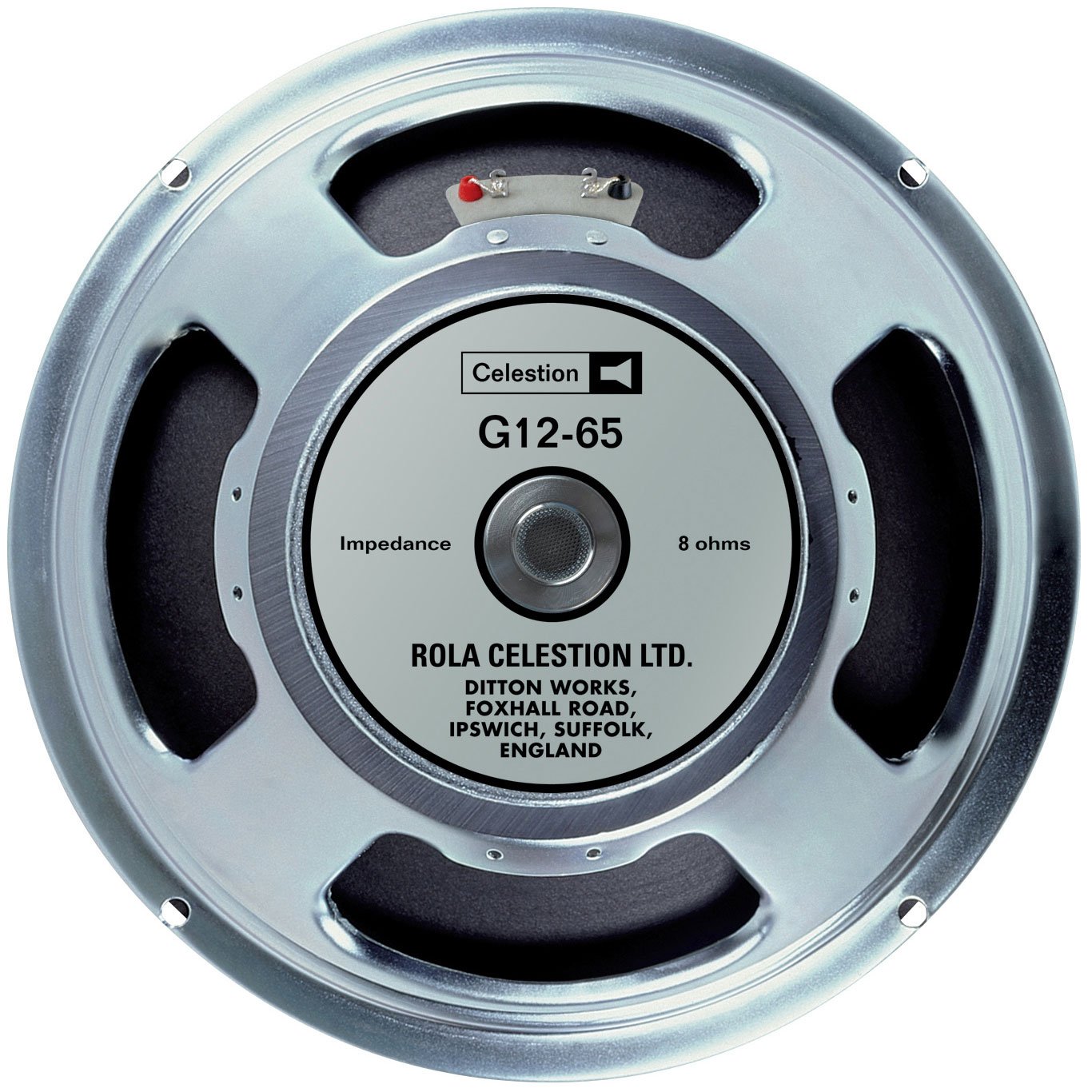
Figure 1: Celestion G12-65 Heritage Guitar Speaker (8 Ohm). This image shows the rear view of the speaker, highlighting its frame and magnet structure, ready for flush mounting into a cabinet.
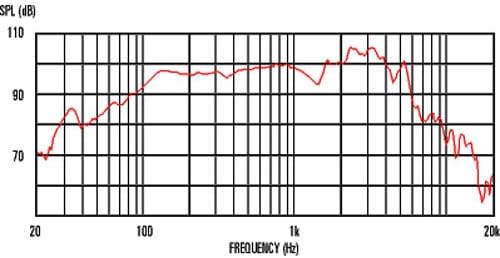
Figure 2: Celestion G12-65 Heritage Guitar Speaker, front view. This image displays the speaker cone and surround, which are visible from the front of the amplifier cabinet once installed.
2.4 Wiring
Connect the speaker to your amplifier's speaker output using a high-quality speaker cable. Ensure correct polarity (+ to + and - to -) to avoid phase issues. This is a passive speaker, meaning it requires an external amplifier for power.
3. Operation
The Celestion G12-65 Heritage speaker is designed for use with guitar amplifiers. It is a passive speaker, meaning it does not have its own power source and must be connected to a suitable guitar amplifier.
3.1 Initial Use and Break-in
Like all new speakers, the G12-65 Heritage will benefit from a break-in period. During this time, the speaker's suspension components will loosen, allowing it to achieve its full tonal potential. Play the speaker at moderate volumes for several hours before using it at higher volumes. This process helps to smooth out the frequency response and enhance overall sound quality.
3.2 Sound Characteristics
The G12-65 Heritage is known for its balanced sound profile, offering a tight low end, a rich and articulate midrange, and clear, non-harsh highs. Its design makes it suitable for a wide range of musical styles, from clean jazz tones to heavy rock overdrive.

Figure 3: Typical Frequency Response Graph for a Celestion G12-65 speaker. This graph illustrates the speaker's output (SPL in dB) across the audible frequency spectrum (Hz), showing its tonal characteristics.
3.3 Video Demonstration
For a comparative demonstration of the Celestion G12-65 Heritage speaker's sound characteristics, please watch the following video:
Video 1: Comparison of Celestion Heritage G12-65 and G12M-65 Creamback speakers. This video provides an audio demonstration and comparison of the G12-65 Heritage speaker's tone against another popular Celestion model, showcasing its unique sonic qualities.
4. Maintenance
The Celestion G12-65 Heritage speaker requires minimal maintenance to ensure its longevity and performance.
4.1 Cleaning
To clean the speaker, gently wipe the frame and cone with a soft, dry cloth. Avoid using liquid cleaners or abrasive materials, as these can damage the paper or composite cone material. Do not apply pressure to the cone.
4.2 Environmental Conditions
- Indoor Use Only: This speaker is designed for indoor use. Exposure to outdoor elements can cause damage.
- Moisture: The speaker is not water-resistant. Keep it away from moisture, humidity, and direct exposure to liquids.
- Temperature: Avoid extreme temperatures and rapid temperature changes.
5. Troubleshooting
If you encounter issues with your Celestion G12-65 Heritage speaker, refer to the following common troubleshooting steps:
5.1 No Sound or Low Volume
- Check Connections: Ensure all speaker cables are securely connected to both the amplifier and the speaker, and that polarity is correct.
- Amplifier Settings: Verify that your amplifier is powered on, volume is up, and all settings are appropriate.
- Impedance Match: Confirm that the amplifier's output impedance matches the speaker's 8 Ohm impedance. An impedance mismatch can lead to low volume or amplifier damage.
- Cable Integrity: Test with a different speaker cable to rule out a faulty cable.
5.2 Distorted Sound
- Overdriving: Reduce the amplifier's volume or gain settings. Exceeding the speaker's 65 Watt power handling can cause distortion and damage.
- Loose Connections: Check for any loose wiring or mounting screws that might be causing vibrations.
- Damaged Cone: Visually inspect the speaker cone for tears, punctures, or other physical damage.
5.3 Unusual Noises (Buzzing, Rattling)
- Loose Components: Check the speaker mounting screws and ensure the speaker is firmly seated in the cabinet.
- Cabinet Resonance: Inspect the amplifier cabinet for any loose panels or hardware that might be vibrating.
- Foreign Objects: Ensure no foreign objects have fallen into the speaker or cabinet.
If these steps do not resolve the issue, contact customer support or a qualified technician.
6. Specifications
| Feature | Detail |
|---|---|
| Model Name | G12-65 |
| Item Model Number | T3053/D |
| Brand | Celestion |
| Speaker Type | Woofer |
| Speaker Size | 12 Inches |
| Impedance | 8 Ohms |
| Power Handling (RMS) | 65 Watts |
| Frequency Response | 75 Hz (lower limit, typical) |
| Mounting Type | Flush Mount |
| Material | Paper or composite material |
| Product Dimensions (D x W x H) | 13"D x 13"W x 6"H |
| Item Weight | 9.06 pounds (4.12 Kilograms) |
| Country of Origin | United Kingdom |
| Connectivity Technology | Coaxial |
| Audio Output Mode | Stereo |
| Water Resistance Level | Not Water Resistant |
| Indoor/Outdoor Usage | Indoor |
| Control Method | Touch |
7. Warranty and Support
7.1 Warranty Information
The Celestion G12-65 Heritage Guitar Speaker comes with an extended warranty. For specific details regarding the duration and terms of your warranty, please refer to the warranty card included with your purchase or visit the official Celestion website.
7.2 Customer Support
For technical assistance, troubleshooting beyond this manual, or warranty claims, please contact Celestion customer support. Contact information can typically be found on the official Celestion website or on your product packaging.

Figure 4: Celestion Brand Logo. For official support and further information, please refer to the manufacturer's resources.


