
1. Introduction
Product Overview
The Newair AI-100R Countertop Ice Maker is designed to provide a steady supply of bullet ice for various occasions, from home use to entertaining. This compact and portable ice maker produces up to 28 pounds of ice per day, ensuring you never run out. It features simple two-button operation and offers three different ice cube sizes to suit your needs.

Figure 1: Newair AI-100R Countertop Ice Maker (Red model shown)
Key Features:
- High Capacity: Produces up to 28 pounds of bullet ice per day.
- Three Ice Sizes: Choose from small, medium, or large bullet ice.
- Portable Design: Compact size ideal for countertops, RVs, boats, and outdoor events.
- Easy Operation: Simple two-button control panel with clear indicator lights.
- BPA-Free Parts: Ensures safe and clean ice production.
- Insulated Storage: Keeps ice colder for longer, and melted ice is recycled.
2. Important Safety Information
DANGER: Risk of Fire or Explosion. Flammable Refrigerant Used.
- Do not use mechanical devices to defrost ice maker.
- Do not puncture refrigerant tubing.
- Ensure the unit is placed on a stable, level surface away from direct sunlight or heat sources.
- Always unplug the ice maker before cleaning or performing any maintenance.
- Do not immerse the unit in water or other liquids.
- Keep children and pets away from the appliance during operation.
- Use only potable water in the ice maker.
3. What's in the Box
Upon unpacking your Newair AI-100R Ice Maker, ensure all components are present and in good condition:
- Newair AI-100R Ice Maker Unit
- Ice Basket
- Ice Scoop
- Product Manual (this document)
If any parts are missing or damaged, please contact Newair customer support immediately.
4. Setup
Unpacking and Placement
- Remove all packaging materials and tape from the unit.
- Place the ice maker on a flat, stable surface. Ensure there is adequate ventilation around the unit (at least 5 inches of space from walls or other appliances).
- Allow the unit to stand upright for at least 1 hour before plugging it in. This allows the refrigerant to settle.

Figure 2: Internal view of the ice maker with the lid open.
Initial Cleaning
- Open the lid and remove the ice basket.
- Clean the interior of the ice maker, including the water reservoir and ice basket, with a soft cloth and mild detergent. Rinse thoroughly with clean water.
- Wipe the exterior with a damp cloth.
Adding Water
- Ensure the drain plug on the side of the unit is securely closed.
- Open the lid and pour potable water into the water reservoir. Do not fill above the MAX fill line.

Figure 3: Water reservoir and evaporator for ice production.
Helpful Video: How to Use
Video 1: Official 'How to Use' guide for the Newair Ice Maker. This video demonstrates the basic operation and features of the ice maker, including adding water and selecting ice size.
5. Operating Instructions
Control Panel
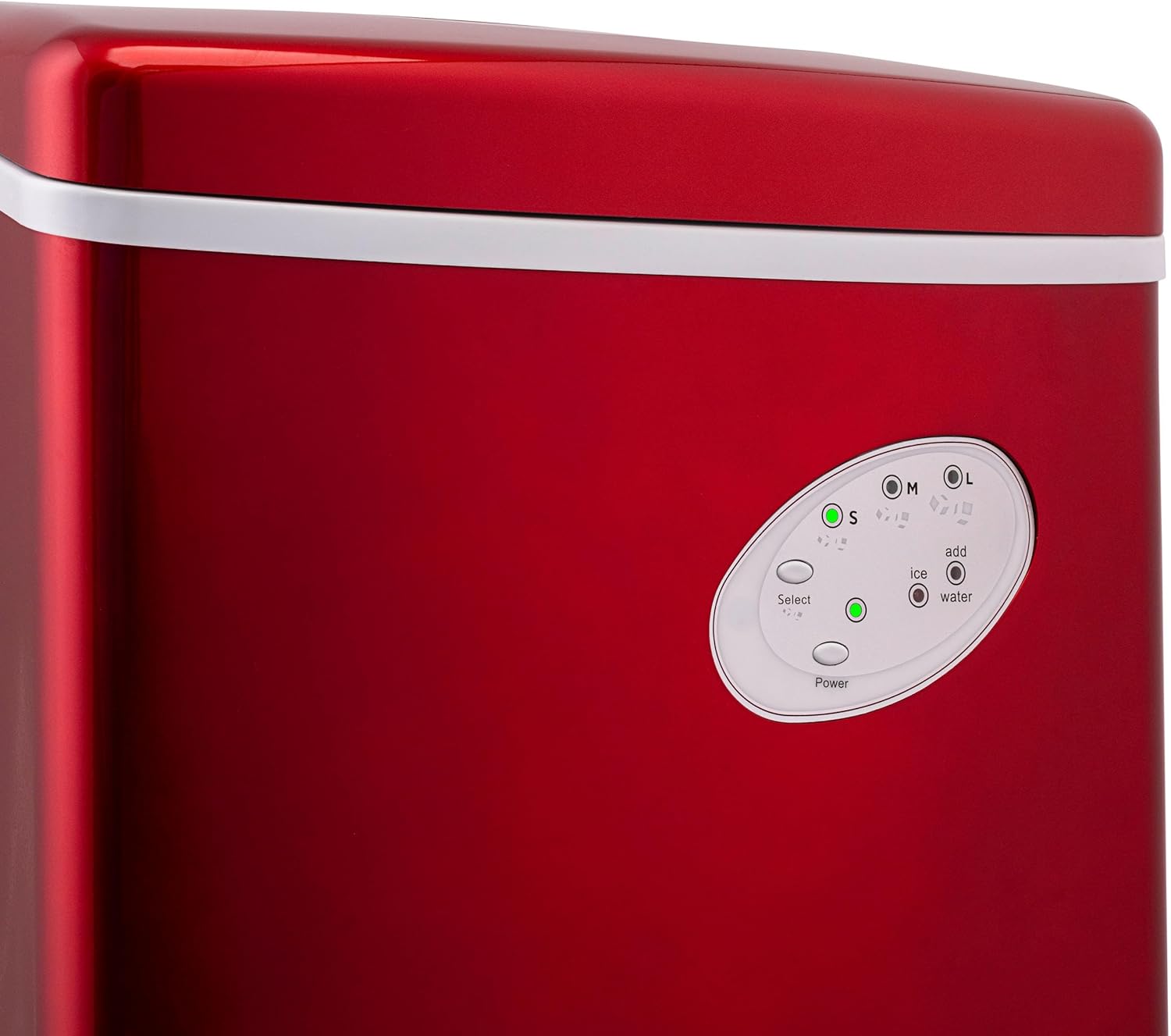
Figure 4: The intuitive control panel for easy operation.
- ON/OFF Button: Press to turn the unit on or off.
- SELECT Button: Press to cycle through ice cube sizes: Small (S), Medium (M), Large (L).
- TIMER Button: (If applicable) Use to set a timer for operation.
- CLEAN Button: (If applicable) Initiates the self-cleaning cycle.
- Indicator Lights:
- Ice Size (S, M, L): Illuminates to indicate the selected ice cube size.
- Add Ice: Illuminates when the ice basket is full.
- Add Water: Illuminates when the water reservoir needs refilling.
Making Ice
- Plug the ice maker into a grounded electrical outlet.
- Press the ON/OFF button to turn on the unit. The Power indicator light will illuminate.
- Press the SELECT button to choose your desired ice cube size (Small, Medium, or Large). The corresponding indicator light will illuminate.
- The ice maker will begin its first cycle. The first batch of ice may take slightly longer (approximately 6-15 minutes) and might be smaller or less formed as the condenser cools down. Subsequent batches will be more consistent.
- When the "Add Ice" indicator light illuminates, the ice basket is full. Use the provided scoop to remove ice.
- When the "Add Water" indicator light illuminates, the water reservoir is low. Refill the reservoir with potable water. The unit will automatically resume ice production once water is added.

Figure 5: Easily scoop fresh bullet ice from the removable basket.
The insulated storage compartment helps keep the ice cold. Any melted ice will drain back into the reservoir and be recycled for the next ice-making cycle.
6. Maintenance
Regular Cleaning
Regular cleaning is essential to ensure optimal performance and hygiene of your ice maker.
- Unplug the ice maker from the power outlet.
- Open the drain plug located on the side of the unit to drain any remaining water from the reservoir. Place a container underneath to catch the water.
- Remove the ice basket and clean it with warm water and a mild detergent. Rinse thoroughly.
- Clean the interior of the water reservoir and the ice-making components with a soft cloth and a solution of water and vinegar (or a specialized ice maker cleaner).
- Rinse the interior thoroughly with clean water multiple times to remove any cleaning solution residue.
- Wipe the exterior of the unit with a damp cloth.
- Ensure all parts are dry before reassembling and storing the unit.
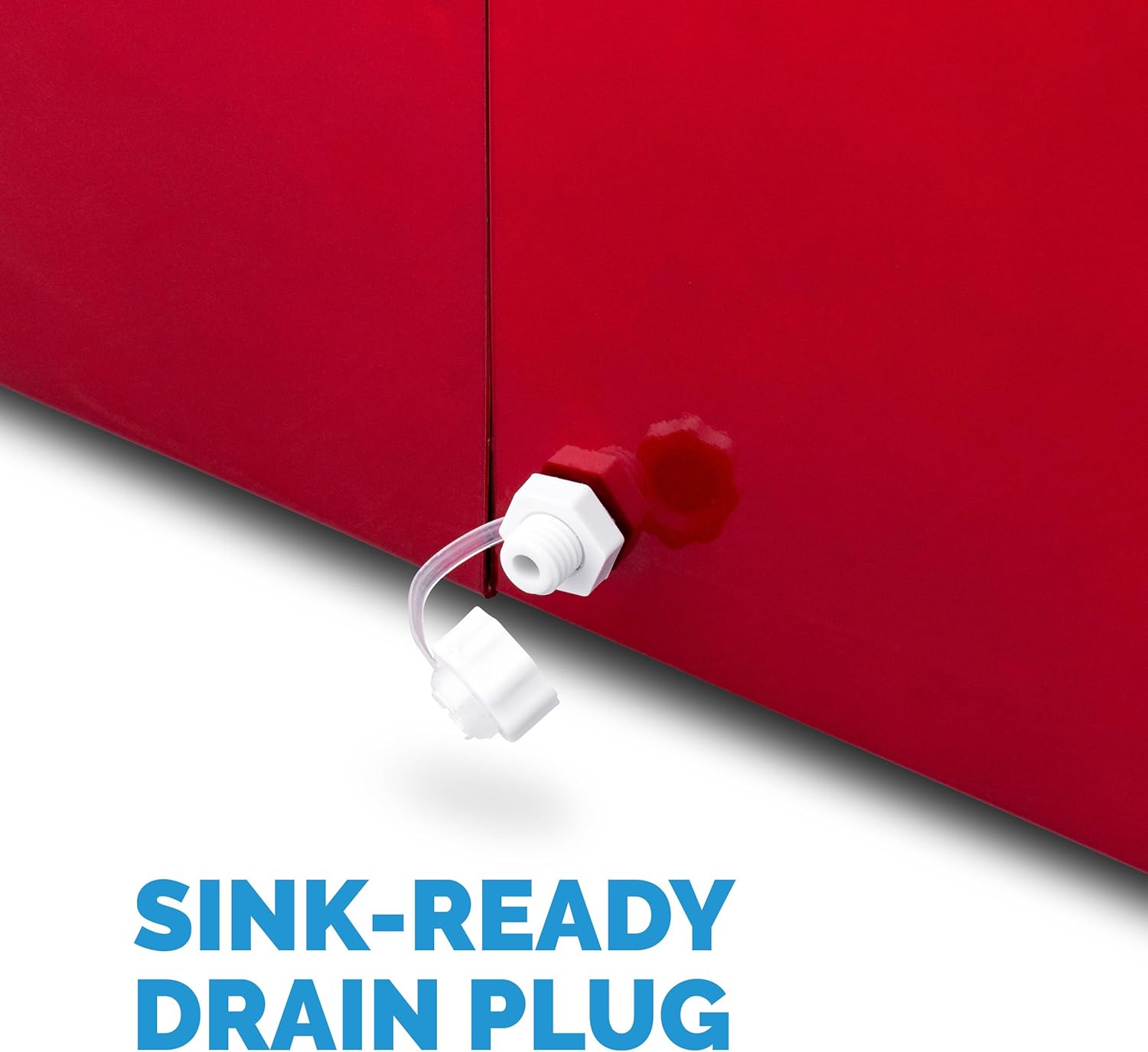
Figure 6: The convenient drain plug for easy water removal.
7. Troubleshooting
| Problem | Possible Cause | Solution |
|---|---|---|
| "Add Water" light is on, but water is present. | Water level sensor issue or temporary glitch. | Turn the unit off, wait 10-15 seconds, then turn it back on. This often resets the sensor. Ensure water level is above the minimum. |
| Ice is wet, thin, or flimsy. | First few batches, or unit not cold enough. | Discard the first few batches of ice. Allow the unit to run for a longer period to reach optimal operating temperature. Ensure proper ventilation. |
| Unit making unusual noises or burning smell. | Internal component issue. | Immediately unplug the unit and discontinue use. Contact customer support for assistance. |
| Ice production is slow. | Poor ventilation, high ambient temperature, or dirty condenser. | Ensure adequate space around the unit. Operate in a cooler environment. Clean the condenser fan and vents regularly. |
8. Specifications
| Feature | Specification |
|---|---|
| Brand | NewAir |
| Model Name | Red (AI-100R) |
| Product Dimensions | 14.5"D x 11.75"W x 15"H |
| Capacity | 28 lbs of ice per day (176 Fluid Ounces water reservoir) |
| Wattage | 115 watts |
| Voltage | 120V |
| Refrigerant | R600a |
| Material | Stainless Steel (exterior finish) |
| Item Weight | 23.9 pounds |
| Country of Origin | China |
| Installation Type | Countertop |
| Special Features | Portable, BPA Certified Parts |
| Ice Cube Sizes | Small, Medium, Large Bullet Ice |
| Ice Production Cycle | 6 to 15 minutes per batch |
9. Warranty and Support
NewAir products are designed for reliability and performance. For specific warranty details and terms, please refer to the warranty card included with your product or visit the official NewAir website. Keep your purchase receipt as proof of purchase for any warranty claims.
For technical support, troubleshooting assistance, or to inquire about replacement parts, please contact NewAir customer service. Contact information can typically be found in your product manual or on the NewAir official website.