
Introduction
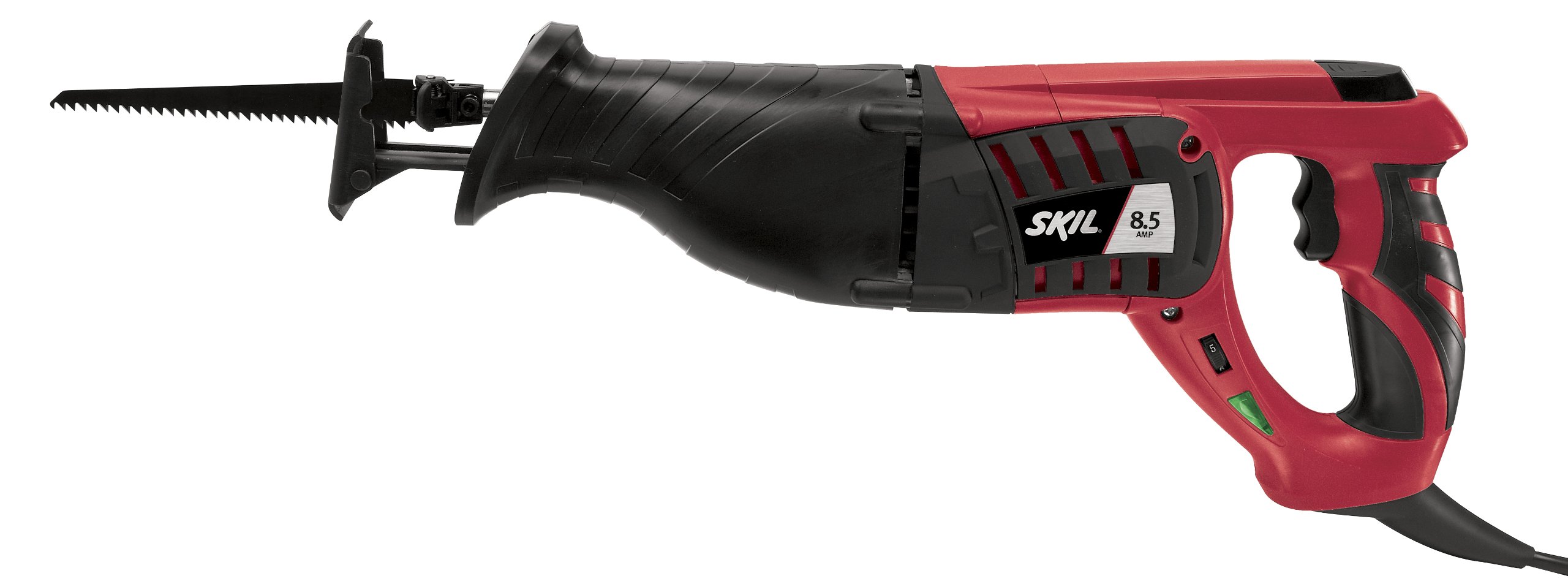
This manual provides essential information for the safe and effective operation, maintenance, and troubleshooting of your SKIL 9215-02 8.5 Amp Reciprocating Saw. Please read these instructions carefully before using the tool and keep them for future reference.
General Safety Instructions
Always follow basic safety precautions when using electric tools to reduce the risk of fire, electric shock, and personal injury.
- Work Area Safety: Keep your work area clean and well-lit. Cluttered or dark areas invite accidents. Do not operate power tools in explosive atmospheres, such as in the presence of flammable liquids, gases, or dust.
- Electrical Safety: Power tool plugs must match the outlet. Never modify the plug in any way. Avoid body contact with earthed or grounded surfaces such as pipes, radiators, ranges, and refrigerators.
- Personal Safety: Always wear eye protection. Use hearing protection when operating power tools for extended periods. Dress properly; avoid loose clothing or jewelry. Secure long hair.
- Tool Use and Care: Do not force the power tool. Use the correct power tool for your application. Disconnect the plug from the power source before making any adjustments, changing accessories, or storing power tools.
- Maintenance: Maintain power tools. Check for misalignment or binding of moving parts, breakage of parts, and any other condition that may affect the power tool’s operation.
Setup
Blade Installation
The SKIL 9215-02 features an E-Z Lock blade clamp system for secure, tool-free blade changes.
- Ensure the saw is unplugged from the power source before installing or removing a blade.
- Locate the blade clamp lever on the front of the saw.
- Push the blade clamp lever to open the blade clamp.
- Insert the shank of the reciprocating saw blade fully into the blade clamp opening. Ensure the teeth of the blade are facing the correct direction for cutting.
- Release the blade clamp lever. Gently pull on the blade to confirm it is securely locked in place. If the blade is not secure, repeat the steps.
For optimal performance, use a 9-inch blade for fast branch trimming or other appropriate blades for your specific cutting task.
Operating Instructions
Powering On and Off
Plug the saw into a 120-volt power outlet. The Power On LED will illuminate, indicating the tool is connected to power. To start the saw, press the trigger switch. Release the trigger switch to turn off the saw.
Variable Speed Control
This reciprocating saw features variable speed control, allowing you to adjust the cutting speed for different materials and desired cut quality. Apply more pressure to the trigger for higher speeds and less pressure for lower speeds. This feature is useful for achieving clean cuts or faster material removal.
Cutting Techniques
Hold the saw firmly with both hands, utilizing the soft-grip design for added comfort and control. Ensure the shoe of the saw is pressed against the workpiece before starting the cut. Allow the blade to reach full speed before engaging the material. Guide the saw smoothly through the material, letting the tool do the work. Do not force the saw, as this can lead to blade damage or reduced cutting efficiency.
This saw is suitable for cutting wood and similar materials. Always select the appropriate blade for the material you are cutting.
Maintenance
Regular maintenance ensures the longevity and safe operation of your reciprocating saw.
- Cleaning: After each use, unplug the tool and clean the exterior with a soft, damp cloth. Remove any sawdust or debris from the ventilation openings to prevent overheating. Do not use harsh chemicals or abrasive cleaners.
- Blade Inspection: Regularly inspect blades for sharpness and damage. Dull or damaged blades can cause kickback and reduce cutting efficiency. Replace blades as needed.
- Cord Inspection: Check the power cord for any cuts, fraying, or damage. If the cord is damaged, have it repaired by a qualified service technician.
- Storage: Store the saw in a dry, secure location out of reach of children. Use the provided carry bag for protection during storage and transport.
Troubleshooting
| Problem | Possible Cause | Solution |
|---|---|---|
| Saw does not start. | No power supply; faulty power cord; trigger switch issue. | Check power outlet and cord. Ensure the Power On LED is illuminated. If not, check the power source. If the LED is on but the saw doesn't start, contact customer support. |
| Blade not cutting efficiently or binding. | Dull or incorrect blade; forcing the saw; material too thick. | Replace with a sharp, appropriate blade for the material. Do not force the saw; let the tool work at its own pace. Ensure the material is within the saw's capacity. |
| Excessive vibration or noise. | Loose blade; damaged blade; internal component issue. | Ensure the blade is securely installed. Replace any damaged blades. If the issue persists, discontinue use and contact customer support. |
Specifications
| Feature | Detail |
|---|---|
| Brand | Skil |
| Model Number | 9215-02 |
| Power Source | 120 Volts (AC) |
| Amperage | 8.5 Amp |
| Item Weight | 4 Pounds |
| Blade Length | 9 Inches |
| Blade Material | High Speed Steel |
| Surface Recommendation | Wood |
| Handle Material | Plastic |
| Included Components | Bare Tool (typically includes a blade and carry bag) |
Warranty Information
The SKIL 9215-02 Reciprocating Saw comes with a 1-Year Limited Warranty and a 30-Day Money Back Guarantee. For specific terms and conditions, please refer to the warranty card included with your product or visit the official Skil website.
Customer Support
For technical assistance, parts, or service, please contact Skil customer support. You can find contact information on the official Skil website or through the documentation provided with your tool.
Website: www.skil.com