
1. Introduction
The Hasbro Transformers Animated Supreme - Roll Out Command Optimus Prime is an interactive action figure designed for fans aged 5-12 years. This figure converts between an Autobot robot warrior and an Earth truck vehicle mode, featuring electronic sounds, lights, and automatic conversion technology. It is designed for easy transformation and engaging play.
2. What's in the Box
- Optimus Prime Figure
- Ultra-Axe Accessory
- 2 AAA Batteries (pre-installed or included)

Figure in original packaging, displaying both robot and truck modes.
3. Setup
3.1 Battery Installation
The Optimus Prime figure requires 2 AAA batteries for electronic functions. These batteries are included. If replacement is needed:
- Locate the battery compartment on the figure (refer to diagram in physical manual if available).
- Using a small Phillips head screwdriver, open the battery compartment.
- Insert 2 new AAA batteries, ensuring correct polarity (+/-).
- Close the battery compartment and secure with the screw.
3.2 Initial Inspection
Before play, ensure all parts are securely attached and free from damage. Check the Ultra-Axe for proper fit in the robot's hand.
4. Operating Instructions
4.1 Truck to Robot Conversion (Roll Out Command)
To convert Optimus Prime from truck mode to robot mode using the Roll Out Command feature:
- Step 1: Ensure Optimus Prime is in his complete truck vehicle mode.
- Step 2: Place the truck on a flat surface.
- Step 3: Simply roll the truck forward. This action will activate electronic revving engine sounds and the auto-spin conversion technology.
- Step 4: Observe as the vehicle's cab spins and automatically changes into the robot's upper body.
- Step 5: Make any necessary minor adjustments to fully complete the robot transformation, such as positioning the arms and legs.
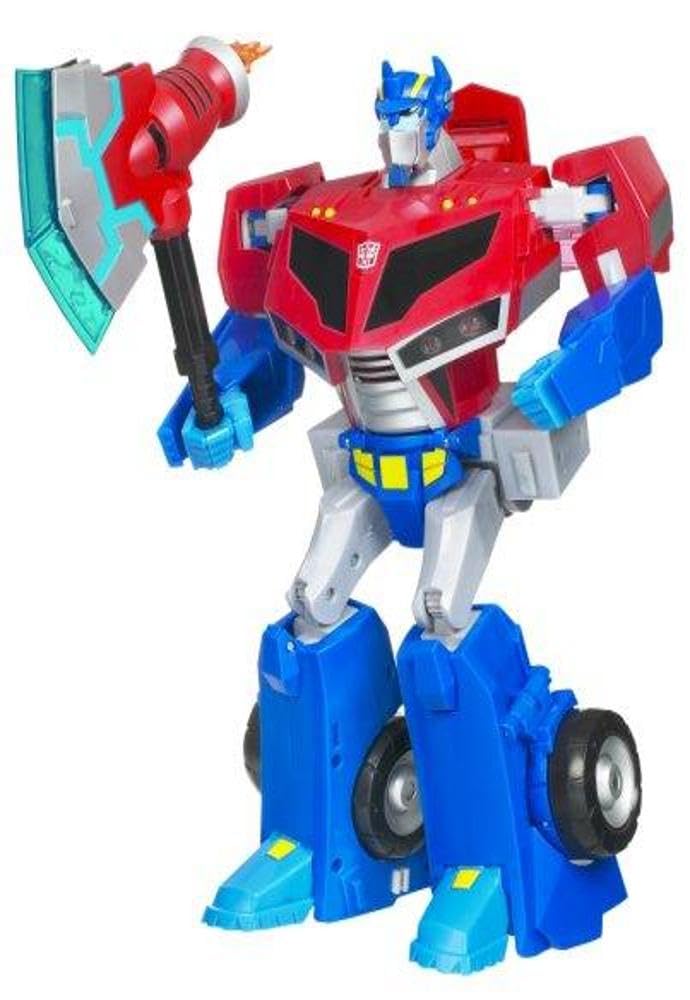
- Step 6: Place the Ultra-Axe in the robot's hand. This will trigger the automatic pop-out "plasma blade."
Optimus Prime in truck cab mode, with the Ultra-Axe shown separately.
4.2 Robot to Truck Conversion
To convert Optimus Prime from robot mode back to truck mode:
- Step 1: Remove the Ultra-Axe from the robot's hand.
- Step 2: Fold the robot's head down into the chest cavity.
- Step 3: Rotate the arms inwards and secure them against the body.
- Step 4: Fold the upper body section forward to begin forming the truck cab.
- Step 5: Adjust the legs and connect them to form the rear chassis of the truck.
- Step 6: Ensure all panels and connections are securely fastened to form a compact truck.

Optimus Prime in robot mode, ready for action.
4.3 Activating Electronic Features
The figure features electronic speech, sirens, lights, and battle sounds. These are activated by rolling the truck forward during conversion or by pressing specific buttons on the figure (refer to the physical manual for exact button locations).
The Ultra-Axe has an automatic pop-out "plasma blade" feature, activated when placed in the robot's hand.
5. Key Features
- Robot-to-Vehicle Conversion: Easily transforms between Autobot robot warrior and Earth truck vehicle mode.
- Electronic Sounds & Lights: Features revving engine sounds, sirens, battle sounds, and lights.
- Auto-Spin Conversion Technology: The vehicle's cab spins and changes into the robot's upper body automatically when rolled forward.
- Electronic Speech: Optimus Prime speaks phrases like "My name is Optimus Prime," with a moving mouth feature.
- Ultra-Axe with Pop-Out Blade: Includes a signature Ultra-Axe accessory with an automatic pop-out "plasma blade."
- Articulation: Arms move at the shoulder joints for posing.
6. Maintenance
- Cleaning: Wipe the figure with a dry, soft cloth. Do not use harsh chemicals or abrasive cleaners.
- Storage: Store the figure in a cool, dry place away from direct sunlight to prevent discoloration or damage.
- Battery Care: Remove batteries if the toy will not be used for an extended period to prevent leakage.
7. Troubleshooting
| Problem | Possible Cause | Solution |
|---|---|---|
| Figure does not transform smoothly. | Parts are not aligned correctly or are stiff. | Gently re-align parts according to the conversion steps. Ensure all joints are fully extended or retracted. |
| Electronic sounds/lights not working. | Low or dead batteries; incorrect battery installation. | Replace batteries with new AAA batteries, ensuring correct polarity. |
| Ultra-Axe does not stay in hand or blade doesn't pop out. | Improper insertion or mechanism obstruction. | Ensure the Ultra-Axe is fully inserted into the designated slot in the robot's hand. Check for any debris obstructing the blade mechanism. |
8. Specifications
- Model Number: 83613
- Product Dimensions: 6 x 12.5 x 14.75 inches
- Item Weight: 2.8 pounds
- Manufacturer Recommended Age: 5 - 12 years
- Batteries: 2 AAA batteries required (included)
- Manufacturer: Hasbro
- Release Date: July 28, 2008
9. Safety Information
Safety Warning: This product may contain sharp points, small parts that are choking hazards, and other elements that are not suitable for children under 3 years of age.
- Always supervise young children during play.
- Keep away from extreme heat or open flames.
- Do not attempt to force parts during transformation, as this may cause damage.
10. Warranty and Support
For warranty information or product support, please contact Hasbro customer service. Details can typically be found on the product packaging or the official Hasbro website.
Website: www.hasbro.com
11. Product Videos
Transformation Demonstration
This video demonstrates the transformation process of a similar Transformers toy, showcasing how it converts between robot and vehicle modes. Note that this video is for a similar product and may not perfectly reflect the exact model 83613.
