
Aquatic AV AQ-MP-5UBT-S
Aquatic AV MP5+ Marine Stereo (AQ-MP-5UBT-S) Instruction Manual
Model: AQ-MP-5UBT-S | Brand: Aquatic AV
Introduction
This manual provides detailed instructions for the installation, operation, and maintenance of your Aquatic AV MP5+ Marine Stereo. Designed for marine and motorcycle environments, this waterproof stereo offers Bluetooth, MP3, USB, and AUX connectivity, along with AM/FM radio capabilities. Please read this manual thoroughly before use to ensure proper function and longevity of your device.
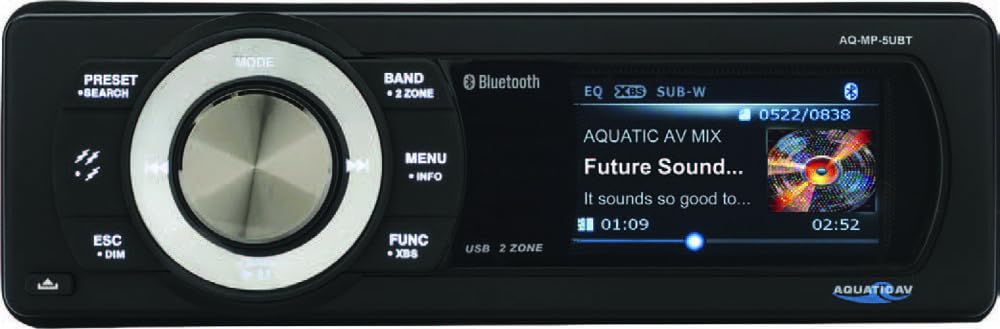
Figure 1: Aquatic AV MP5+ Marine Stereo unit.
Setup and Installation
Unboxing and Components
Upon opening the package, verify that all components are present. The stereo unit includes a removable faceplate, the main chassis, and necessary wiring harnesses for power, speakers, and auxiliary inputs. Familiarize yourself with the unit's front panel controls, including the rotary knob, mode button, band button, and display screen.
Wiring Diagram
Refer to the detailed wiring diagram provided on the unit's chassis or in the included installation guide for proper electrical connections. Ensure all connections are secure and insulated to prevent short circuits and water ingress. The unit typically requires connections for 12V DC power, ground, accessory power, and speaker outputs. It also features RCA pre-outputs for external amplifiers.
Mounting
The MP5+ Marine Stereo is designed for installation into a standard single-DIN opening. Ensure the mounting location is secure and provides adequate space for wiring. The unit's robust design includes a rubber gasket around the faceplate to enhance its waterproof capabilities once installed. Secure the unit using the provided mounting hardware.
Operating Instructions
Power On/Off
Press and hold the power button (usually marked with a power symbol) to turn the unit on or off. A short press may mute or pause audio depending on the active source.
Source Selection
Use the MODE or SOURCE button to cycle through available audio sources: Bluetooth, MP3, USB, AUX, and FM/AM Radio. The active source will be displayed on the color LCD screen.
Bluetooth Connectivity
- Ensure Bluetooth is enabled on your mobile device.
- Select "Bluetooth" as the source on the stereo. The unit will enter pairing mode.
- On your mobile device, search for available Bluetooth devices and select "Aquatic AV" (or a similar identifier for your model).
- Once paired, you can stream audio wirelessly from your device to the stereo.
USB and AUX Input
The unit features a USB port for playing MP3 files and charging devices, and a 3.5mm AUX input for connecting other audio sources. These inputs are conveniently located within the internal docking compartment, accessible by removing the faceplate. This compartment provides a secure and waterproof space for your device while connected.
Radio Operation
Select FM or AM mode using the MODE button. Use the BAND button to switch between FM1, FM2, FM3, and AM1, AM2 bands. Use the seek buttons (usually left/right arrows) to find stations or the preset buttons to recall saved stations.
Audio Adjustments
Use the main rotary knob to control the volume. Press the AUDIO MENU button to access settings such as bass, treble, balance, fader, and equalizer presets. Navigate through the menu using the rotary knob and select options by pressing it.
Maintenance
Cleaning
Clean the unit's faceplate and display with a soft, damp cloth. Avoid using abrasive cleaners, solvents, or harsh chemicals, as these can damage the finish and waterproof seals. For stubborn dirt, a mild soap solution can be used, followed by rinsing with clean water and drying.
Weather Protection
The MP5+ Marine Stereo is designed to be waterproof, UV protected, and salt/fog resistant, making it suitable for harsh outdoor environments. To maintain its protective qualities, ensure the faceplate is always properly secured and the rubber gasket is free from debris or damage. Avoid direct high-pressure water spray on the unit.
Removable Faceplate Care
When removing the faceplate for security or to access the internal compartment, handle it carefully. Store it in a safe, clean, and dry place to prevent scratches or damage to the display and controls. Ensure the connection pins are clean before reattaching.
Troubleshooting
- No Power: Check power connections and fuses. Ensure the ignition is on if the stereo is wired to an accessory circuit. Verify the main power cable is securely connected.
- No Audio: Verify speaker connections are secure and correctly wired. Check volume levels on both the stereo and your connected device. Ensure the correct audio source is selected. If using external amplifiers, confirm they are powered on and functioning.
- Bluetooth Pairing Issues: Ensure the stereo is in Bluetooth mode and discoverable. On your mobile device, forget the "Aquatic AV" device and attempt to pair again. Ensure no other devices are actively connected to the stereo via Bluetooth. Move your device closer to the unit.
- USB Playback Issues: Ensure the USB device is formatted correctly (FAT32 is recommended) and contains compatible MP3 files. Try a different USB device to rule out a faulty drive.
- Poor Radio Reception: Check the antenna connection. Ensure the antenna is fully extended and not obstructed by metal objects. Try moving to a different location to improve signal strength.
For further assistance, please refer to the comprehensive troubleshooting guide on the Aquatic AV website or contact customer support.
Specifications
| Feature | Detail |
|---|---|
| Manufacturer | Aquatic AV |
| Model | AQ-MP-5UBT-S |
| Item Weight | 5.94 pounds |
| Product Dimensions | 17 x 12 x 3.75 inches |
| Special Features | Built-In Bluetooth |
| Wattage | 288 watts |
| Connectivity Technology | USB, 3.5mm Jack, RCA |
| Controller Type | iOS |
| Compatible Devices | Smartphone, Speaker |
| Audio Encoding | Stereo |
| Audio Output Mode | Stereo |
| Surround Sound Channel Configuration | 4 channel |
| Exterior | Painted |
| Waterproof | Yes |
| UV Protected | Yes |
| Salt/Fog Resistant | Yes |
| Amplifier | 288W |
| Speakers | Connects up to 8x speakers |
| Pre-Outputs | 2V |
| Remote Ready | Yes |
| USB Charging | Yes |
| FM/AM Radio | Yes |
Warranty and Support
Warranty Information
For specific warranty details, including coverage period and terms, please refer to the warranty card included with your product or visit the official Aquatic AV website. It is important to retain your proof of purchase for any warranty claims.
Customer Support
If you require technical assistance, have questions regarding the operation of your MP5+ Marine Stereo, or need to report an issue, please contact Aquatic AV customer support. Contact information can typically be found on their official website or within your product packaging. Their team is available to provide guidance and solutions.
Related documentsAQ-MP-5UBT-S


Ask a question about this manual
Ask about setup, troubleshooting, compatibility, parts, safety, or missing instructions. Manuals+ will review the question and use this page’s manual context to help answer it.