
1. Introduction
The Sennheiser PC 350 is a high-performance collapsible gaming headset designed to provide an immersive audio experience and clear communication for serious gamers. Engineered with Sennheiser's expertise in electro-acoustics, this headset focuses on delivering precise sound quality and effective noise isolation, giving you a competitive edge.
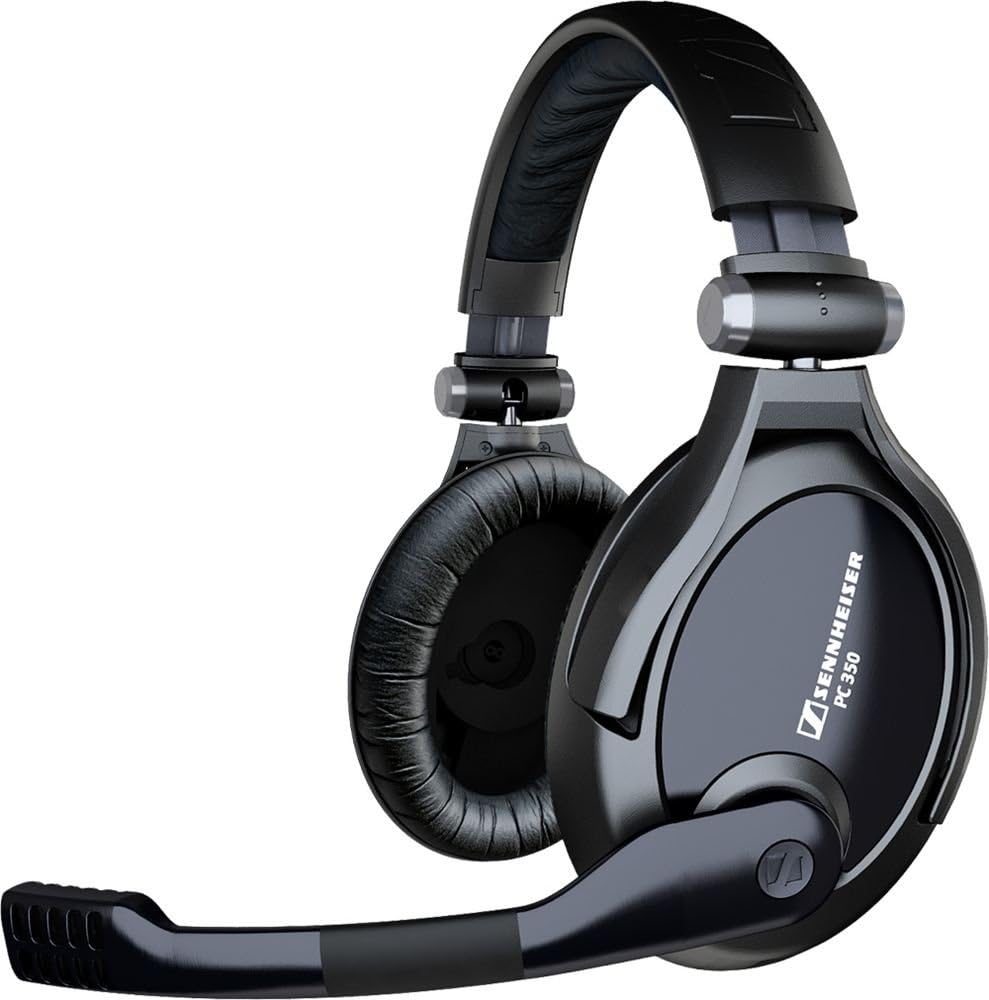
Figure 1: The Sennheiser PC 350 Collapsible Gaming Headset.
2. Key Features
- Closed-Type, Circumaural Ear Cups: Designed for superior passive noise attenuation, blocking out ambient noise for focused gaming.
- High-Quality Sennheiser Speakers: Deliver superb stereo sound with precise audio positioning.
- Noise-Canceling Microphone: Filters out background noise for crystal-clear voice transmission.
- Adjustable Microphone Boom: Allows optimal positioning for speech clarity.
- Extra-Large Ear Pads: Provide comfort during extended gaming sessions.
- In-Line Volume Control and Mute Switch: Conveniently located on the cable for quick adjustments.
- Collapsible Design: Enables easy folding for compact storage and portability.
- Plug-and-Play Simplicity: Easy connection to virtually any PC sound card.
3. What's in the Box
Your Sennheiser PC 350 headset package includes:
- Sennheiser PC 350 Headset with 2 x 3.5 mm connectors
4. Setup
The PC 350 headset is designed for plug-and-play simplicity with your PC. It features two 3.5mm jacks, one for audio output and one for microphone input.
- Locate the audio output (typically green) and microphone input (typically pink) ports on your computer's sound card. These are usually found on the back of a desktop PC or the side of a laptop.
- Plug the green 3.5mm jack from the headset into the audio output port.
- Plug the pink 3.5mm jack from the headset into the microphone input port.
Your headset should now be recognized by your computer. You may need to adjust sound settings in your operating system for optimal performance.
5. Operating the Headset
The PC 350 features convenient controls integrated into the cable for easy access during gameplay.
- Volume Control: An in-line volume control wheel allows you to adjust the audio level directly without needing to access your computer's settings.
- Microphone Mute: A dedicated mute switch is located on the in-line control for quick and easy muting of the microphone.
Video 1: Overview of Sennheiser Gaming Headsets (PC 350 and PC 360). Note: Some features shown, such as ear-cup volume control or boom mute, may be specific to the PC 360 model. The PC 350 features in-line volume and mute controls as described above.
6. Comfort and Design
The PC 350 is built for comfort during long gaming sessions, ensuring minimal fatigue.
- Ear Cups: The headset features extra-large, circumaural ear pads that fully enclose the ears. This design provides a comfortable fit and excellent passive noise isolation, helping to immerse you in the game. The ear pads are made from a durable, comfortable material.
- Headband: The adjustable headband is cushioned for added comfort and can be easily folded for compact storage and transport.
7. Audio Performance
The closed-type acoustic design of the PC 350, combined with its circumaural ear cups, provides superior passive attenuation of ambient noise. This allows for optimal sound quality and helps you focus intensely on the game's soundscape without distractions.
Sennheiser speakers deliver superb stereo sound, ensuring precise audio positioning which is crucial for competitive gaming, allowing you to hear every detail and react faster than your opponents.
8. Communication
The professional noise-canceling microphone filters out ambient noise, ensuring your voice is heard clearly by teammates, whether you whisper or shout. The microphone boom is adjustable, allowing you to position it optimally for speech clarity.
9. Portability
The PC 350 features a collapsible headband, making it easy to fold and transport between gaming events or for convenient storage when not in use.
10. Specifications
| Attribute | Value |
|---|---|
| Headphones Jack | 3.5 mm Jack |
| Model Name | xg |
| Connectivity Technology | Wired |
| Wireless Communication Technology | 3.5 mm |
| Included Components | Headphones |
| Age Range (Description) | Adult |
| Material | Plastic, Silicone |
| Specific Uses For Product | Gaming |
| Compatible Devices | comcast |
| Control Type | Volume Control |
| Cable Feature | Retractable |
| Item Weight | 1.6 Pounds |
| Frequency Range | 10 Hz - 26 kHz |
| Unit Count | 1.0 Count |
| Number of Items | 1 |
| Audio Driver Type | Dynamic Driver |
| Earpiece Shape | Rounded |
| Is Autographed | No |
| UPC | 858399226743 615104133020 150000569172 |
| Global Trade Identification Number | 00150000569172 |
| Manufacturer | Sennheiser |
| Product Dimensions | 8 x 5 x 9 inches |
| Item Weight | 1.6 pounds |
| ASIN | B0012XFDWO |
| Item model number | 502141 |
| Customer Reviews | 3.9 out of 5 stars (362 ratings) |
| Best Sellers Rank | #3,175 in Computer Headsets |
| Is Discontinued By Manufacturer | No |
| Date First Available | January 22, 2008 |
| Brand | Sennheiser |
| Color | Black |
| Ear Placement | Over Ear |
| Form Factor | Bi-fold |
| Noise Control | Sound Isolation |
11. Troubleshooting
If you encounter any issues with your Sennheiser PC 350 headset, please consider the following common troubleshooting steps:
- No Sound/Microphone Not Working: Ensure both 3.5mm jacks are fully inserted into the correct ports on your computer. Check your computer's sound settings to ensure the headset is selected as the default playback and recording device. Verify the in-line volume control is turned up and the mute switch is off.
- Poor Sound Quality: Ensure the connectors are clean and free of debris. Try connecting the headset to a different audio source or computer to rule out a device-specific issue.
- Microphone Issues: Check that the microphone boom is positioned correctly near your mouth. Ensure the in-line mute switch is not activated. Adjust microphone levels in your computer's sound settings.
- Comfort Issues: Adjust the headband and ear cups to find the most comfortable fit for extended use.
For more detailed troubleshooting or persistent issues, please refer to the official Sennheiser support resources.
12. Maintenance
To ensure the longevity and optimal performance of your Sennheiser PC 350 headset, follow these maintenance guidelines:
- Cleaning: Gently wipe the ear cups and headband with a soft, dry cloth. Avoid using harsh chemicals or abrasive materials.
- Storage: When not in use, store the headset in a clean, dry place. Utilize its collapsible feature to minimize space and protect it from damage.
- Cable Care: Avoid sharp bends or excessive pulling on the cable to prevent internal damage.
- Avoid Extreme Conditions: Do not expose the headset to extreme temperatures, humidity, or direct sunlight for prolonged periods.
13. Warranty and Support
The Sennheiser PC 350 is covered by a 2-year international warranty. This warranty ensures swift and smooth handling of any manufacturing defects or issues that may arise under normal use.
For warranty claims, technical support, or additional product information, please visit the official Sennheiser website (www.sennheiser.com) or contact their customer service directly. Please have your product model number (502141) and proof of purchase ready when seeking support.


