
1. Initial Setup
1.1 Unpacking
Carefully remove all components from the packaging. Ensure all items listed below are present:
- AWS-100 Digital Pocket Scale
- User Manual
- VIP Guide
- Double Sided Microfiber Cloth
- Warranty Card

Image Description: A flat lay image displaying the AWS-100 Digital Pocket Scale along with its included accessories: a user manual, a VIP guide, a blue microfiber cloth, and a warranty card. The scale is open, showing its weighing platform and digital display.
1.2 Battery Installation
The AWS-100 scale requires 2 AAA batteries (included). To install or replace batteries:
- Locate the battery compartment on the underside of the scale.
- Slide the battery cover off.
- Insert two AAA batteries, ensuring correct polarity (+/-).
- Replace the battery cover.

Image Description: A hand is shown placing a 100g calibration weight onto the stainless steel weighing platform of the AWS-100 scale. The scale's blue backlit LCD display shows '100.00', indicating a successful calibration or accurate measurement.
Video Description: This video provides a hands-on review of the AWS 100g Pocket Scale, demonstrating its features including battery installation, power on/off, unit conversion, tare function, and calibration process.
2. Operating Instructions
2.1 Power On/Off
To turn the scale ON, press the ON/OFF button. The display will light up and show "0.00g" (or the last used unit). To turn the scale OFF, press and hold the ON/OFF button until the display turns off.
2.2 Unit Conversion
The AWS-100 scale can measure in grams (g), ounces (oz), carats (ct), and grains (gn). To switch between units, press the MODE button repeatedly until your desired unit is displayed.
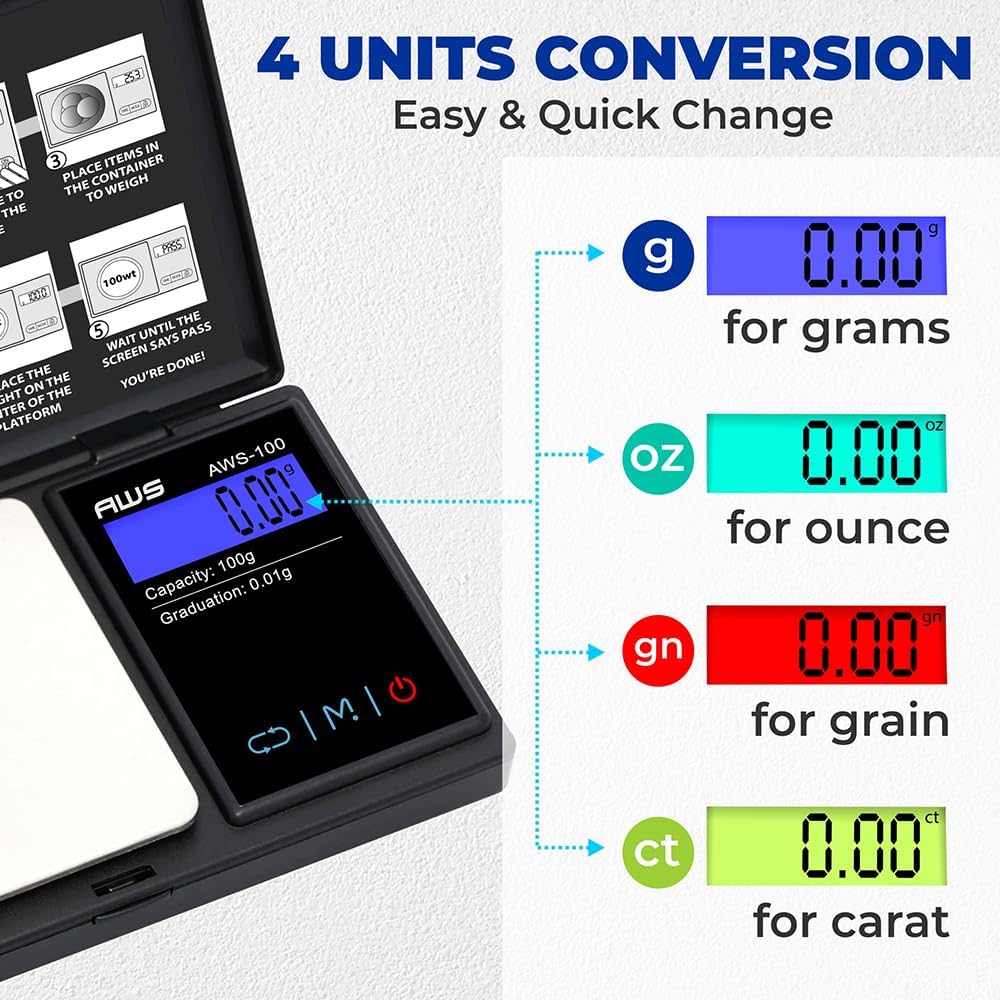
Image Description: A close-up of the AWS-100 scale's blue backlit LCD display, illustrating the four available units of measurement: grams (g), ounces (oz), grains (gn), and carats (ct), each with a different color background for visual distinction.
2.3 Tare Function
The Tare function allows you to subtract the weight of a container, so you only measure the weight of its contents.
- Place an empty container on the weighing platform.
- Press the TARE button. The display will reset to "0.00".
- Add the items you wish to weigh into the container. The display will show the net weight of the items.
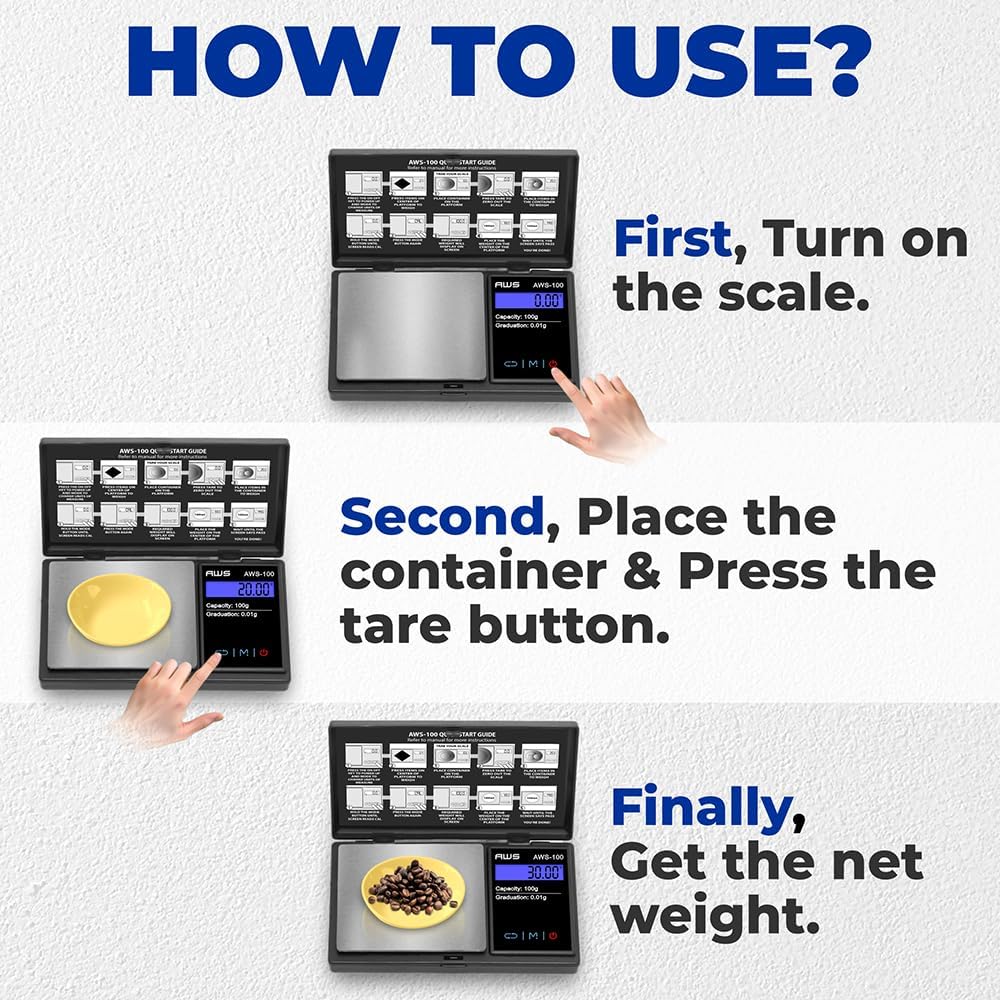
Image Description: A graphic illustrating three easy steps to use the scale: 1. Turn on the scale. 2. Place a container and press the tare button. 3. Add items to the container to get the net weight.
2.4 Weighing Items
- Turn the scale ON and wait for the display to show "0.00".
- If using a container, perform the Tare function as described above.
- Carefully place the item(s) to be weighed on the center of the weighing platform.
- Read the stable weight displayed on the LCD screen.

Image Description: The AWS-100 scale is shown with coffee beans on its platform, displaying a weight of 25.00g. Surrounding the scale are small bowls containing various items such as medicine, jewelry, supplements, and gun powder, emphasizing the scale's high precision for diverse uses.
3. Calibration Adjustment
Calibration is performed at the factory. However, the weighing range can shift slightly during shipping or due to changes in local acceleration of gravity. Adjustment is recommended when moving the scale from one location to another.
- Press the ON/OFF key to turn the scale on.
- Wait for the display to show "0.00g".
- Press and hold the MODE key until the display shows "CAL", then release.
- Press the MODE key again. The display will flash "CAL" followed by the required calibration weight (e.g., "100.00g").
- Place the required calibration weight (100g) on the center of the platform.
- The display will show "PASS" then return to normal weighing mode. Calibration is complete.
Image Description: A hand is shown placing a 100g calibration weight onto the stainless steel weighing platform of the AWS-100 scale. The scale's blue backlit LCD display shows '100.00', indicating a successful calibration or accurate measurement.
4. Care and Maintenance
- Cleaning: Use a soft, damp cloth to clean the scale surface. Avoid abrasive cleaners or harsh chemicals.
- Storage: Store the scale in a clean, dry environment. Keep the protective cover closed when not in use to prevent damage to the weighing platform.
- Handling: Handle the scale with care. Avoid dropping or subjecting it to strong impacts, as this can affect its accuracy.
- Overload Protection: Do not exceed the maximum weight capacity of 100g to prevent damage to the internal sensors.
5. Troubleshooting Guide
| Problem | Possible Cause | Solution |
|---|---|---|
| Inaccurate Readings | Unstable surface, low battery, calibration needed, overload. | Place on a stable surface, replace batteries, recalibrate the scale, do not exceed 100g. |
| Display shows "Lo" | Low battery. | Replace batteries. |
| Display shows "O-Ld" | Overload. | Remove excess weight immediately. |
| Scale does not turn on | Dead batteries, incorrect battery installation. | Replace batteries, ensure correct polarity. |
6. Product Specifications
- Brand: AMERICAN WEIGH SCALES
- Model: AWS-100
- Capacity: 100g
- Accuracy: 0.01g
- Units: Grams (g), Ounces (oz), Carats (ct), Grains (gn)
- Display: Backlit LCD
- Power: 2 x AAA Batteries (included)
- Dimensions: 3 x 5 x 0.8 inches
- Material: Plastic, Stainless Steel platform
- Special Features: Tare Function, Protective Cover

Image Description: A person is shown placing the compact AWS-100 Digital Pocket Scale into a jeans pocket, emphasizing its portability. The image also highlights the scale's dimensions: 5 inches in length, 3 inches in width, and 0.8 inches in thickness.
7. Warranty and Customer Support
The AMERICAN WEIGH SCALES AWS-100 Digital Pocket Scale comes with a 10-year warranty. This warranty covers defects in quality, service, design, and function.
For technical support, warranty claims, or any inquiries, please visit the official AMERICAN WEIGH SCALES store or contact their customer service department.
Visit the AMERICAN WEIGH SCALES Store for more information.