
1. Introduction
This manual provides comprehensive instructions for the proper use and care of your Tamron AF 70-200mm f/2.8 Di LD IF Macro Lens (Model A001NII). Designed for Nikon Digital SLR Cameras, this high-performance telephoto zoom lens offers a constant f/2.8 aperture and macro capabilities, making it suitable for a wide range of photographic applications. Please read this manual thoroughly before using the lens to ensure optimal performance and longevity.
2. Product Overview
The Tamron AF 70-200mm f/2.8 Di LD IF Macro Lens is a versatile telephoto zoom lens featuring a fast, constant maximum aperture of f/2.8 across its entire 70-200mm focal range. It incorporates Low Dispersion (LD) glass elements for reduced chromatic aberration and Internal Focusing (IF) for stable handling. The lens also offers a macro magnification ratio of 1:3.1 at 200mm, allowing for close-up photography.
2.1 Key Features
- 70-200mm Focal Length: Versatile telephoto zoom range.
- Constant f/2.8 Maximum Aperture: Excellent low-light performance and shallow depth of field.
- Di (Digitally Integrated) Design: Optimized for digital SLR cameras.
- LD (Low Dispersion) Elements: Minimizes chromatic aberrations for sharp, clear images.
- IF (Internal Focusing) System: Maintains constant lens length during focusing and allows for easier use of polarizing filters.
- Macro Capability: Achieves a maximum magnification ratio of 1:3.1 at 200mm.
- Built-in Motor: Provides autofocus functionality with Nikon Digital SLR Cameras.
- 77mm Filter Thread: Accommodates standard 77mm filters.
- Removable Tripod Holder: For stable mounting on a tripod or monopod.
2.2 Lens Components
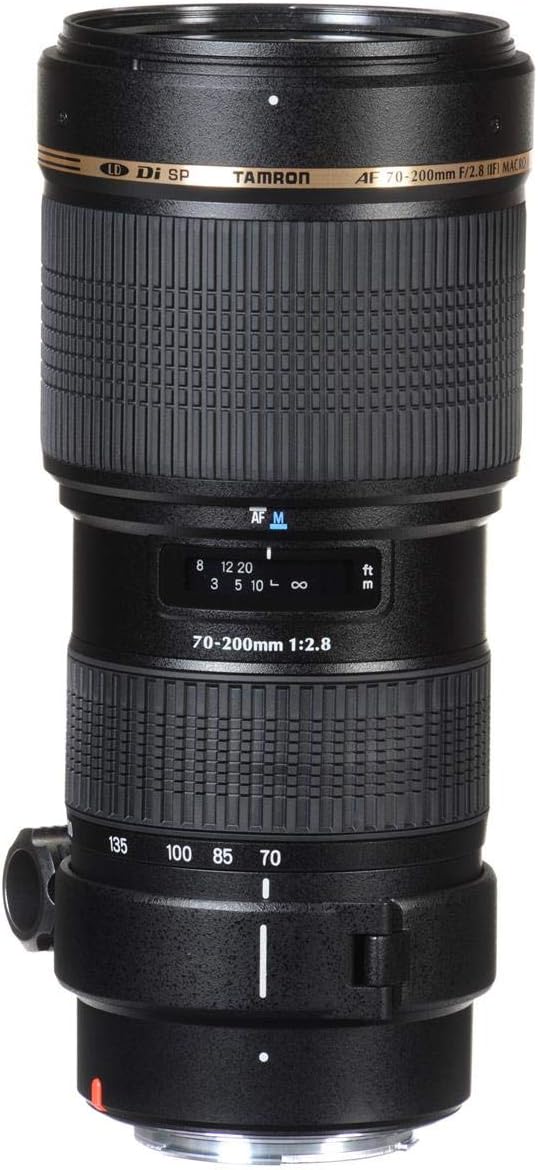
Figure 1: Front view of the Tamron AF 70-200mm f/2.8 Di LD IF Macro Lens. This image displays the lens from the front, showing the zoom ring, focus ring, distance scale, and the AF/MF switch. The lens barrel has a textured grip for secure handling.

Figure 2: Side view of the Tamron AF 70-200mm f/2.8 Di LD IF Macro Lens. This perspective highlights the lens's length and the attached tripod collar, which can be rotated or removed for different shooting orientations.

Figure 3: Angled view of the Tamron AF 70-200mm f/2.8 Di LD IF Macro Lens with the lens hood attached. The lens hood helps to prevent flare and protect the front element.
3. Setup
3.1 Attaching the Lens to the Camera
- Ensure both the camera and lens are powered off.
- Remove the rear lens cap from the lens and the body cap from the camera.
- Align the mounting index mark on the lens (usually a white dot) with the corresponding mark on the camera body.
- Insert the lens into the camera's lens mount and rotate it clockwise until it clicks into place. Do not force the lens.
- To detach, press the lens release button on the camera body and rotate the lens counter-clockwise until it detaches.

Figure 4: Rear view of the Tamron AF 70-200mm f/2.8 Di LD IF Macro Lens, illustrating the lens mount and electrical contacts for communication with the camera body.
3.2 Attaching the Lens Hood
The included lens hood helps to block extraneous light, reducing flare and ghosting, and provides physical protection to the front element. Align the lens hood with the front of the lens and rotate it until it locks into place. For storage, the hood can be reversed and mounted onto the lens.
3.3 Using the Tripod Collar
The removable tripod collar allows for better balance when mounting the lens and camera on a tripod or monopod, especially given the lens's weight. Loosen the locking knob on the collar to rotate the lens for horizontal or vertical shooting, or to remove the collar entirely if not needed.
4. Operating Instructions
4.1 Autofocus (AF) and Manual Focus (MF)
- AF/MF Switch: Locate the AF/MF switch on the lens barrel. Slide it to 'AF' for autofocus or 'MF' for manual focus.
- Autofocus Operation: In AF mode, the lens will automatically focus when the camera's shutter button is half-pressed. The built-in motor provides focusing for compatible Nikon bodies.
- Manual Focus Operation: In MF mode, rotate the focus ring on the lens barrel to adjust focus manually. Use the camera's viewfinder or live view to confirm sharpness.
4.2 Zooming
Rotate the zoom ring on the lens barrel to change the focal length between 70mm and 200mm. The focal length markings are indicated on the lens barrel.
4.3 Aperture Control
This lens features a constant maximum aperture of f/2.8 across its entire zoom range. Aperture settings are controlled via your camera body. Refer to your camera's instruction manual for details on setting aperture, shutter speed, and ISO.
4.4 Macro Photography
The lens offers a macro magnification ratio of 1:3.1 at the 200mm focal length, with a minimum focus distance of 0.95m (37.4 inches). This allows for detailed close-up shots of smaller subjects.
5. Maintenance and Care
- Cleaning the Lens: Use a soft, clean microfiber cloth specifically designed for optics to gently wipe dust and smudges from the lens elements. For stubborn marks, use a small amount of lens cleaning fluid applied to the cloth, not directly to the lens.
- Cleaning the Lens Body: Wipe the lens barrel with a soft, dry cloth. Avoid using harsh chemicals or solvents.
- Storage: When not in use, store the lens with both front and rear caps attached in a cool, dry place, away from direct sunlight and extreme temperatures. Consider using a dehumidifying cabinet or silica gel packs in humid environments to prevent mold growth.
- Handling: Avoid dropping or subjecting the lens to strong impacts. Do not touch the lens elements with your fingers.
- Water and Dust: This lens is not weather-sealed. Avoid exposure to rain, snow, or excessive dust.
6. Troubleshooting
- Autofocus is slow or hunts:
- Ensure sufficient light is available for the autofocus system.
- Check that the AF/MF switch on the lens is set to 'AF'.
- Verify that the camera's autofocus mode is correctly set.
- In very low light, try focusing on a high-contrast area.
- Images are blurry or not sharp:
- Check if the lens is properly focused (either manually or via autofocus).
- Ensure the shutter speed is fast enough to prevent camera shake, especially at longer focal lengths (e.g., 1/200s or faster at 200mm).
- Clean the front and rear lens elements.
- Use a tripod for maximum sharpness, particularly in low light or with slower shutter speeds.
- Lens not recognized by camera:
- Ensure the lens is securely attached to the camera body.
- Clean the electrical contacts on both the lens mount and camera body with a clean, dry cloth.
- Power cycle the camera (turn off, remove battery, reinsert, turn on).
If problems persist, consult a qualified service technician or contact Tamron customer support.
7. Specifications
| Model Name | A001NII (A001-N) |
| Focal Length | 70-200mm |
| Maximum Aperture | f/2.8 (Constant) |
| Minimum Aperture | f/32 |
| Lens Construction | (Information not explicitly provided in input, general description used) |
| Diaphragm Blades | 9 |
| Minimum Focus Distance | 0.95m (37.4 inches) |
| Maximum Magnification Ratio | 1:3.1 (at 200mm, MFD 0.95m) |
| Filter Size | 77mm |
| Dimensions (Diameter x Length) | Approximately 7.64 x 3.54 x 3.54 inches (Product Dimensions) |
| Weight | 2.93 pounds |
| Compatible Mountings | Nikon F |
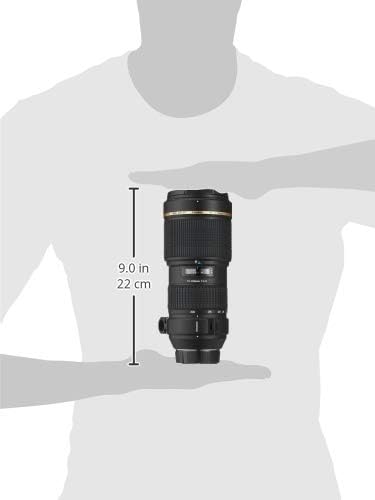
Figure 5: Diagram illustrating the approximate dimensions of the Tamron AF 70-200mm f/2.8 Di LD IF Macro Lens, showing a length of 9.0 inches (22 cm).
8. Warranty and Support
This Tamron lens comes with a 6-year manufacturer's warranty. For warranty claims, technical support, or service inquiries, please contact Tamron customer service directly. Keep your proof of purchase for warranty validation.
For the most up-to-date contact information and support resources, please visit the official Tamron website.