
1. Introduction
The Sunforce 11260 2500 Watt Pure Sine Wave Inverter is designed to convert 12V DC power from a battery into clean, stable 110V AC power. This inverter is suitable for powering sensitive electronics and various household appliances, including small electronic tools, air pumps, electronic doors, small motors, and refrigerators. It provides a continuous output of 2500 Watts and a peak surge power of 5000 Watts, ensuring compatibility with a wide range of equipment.
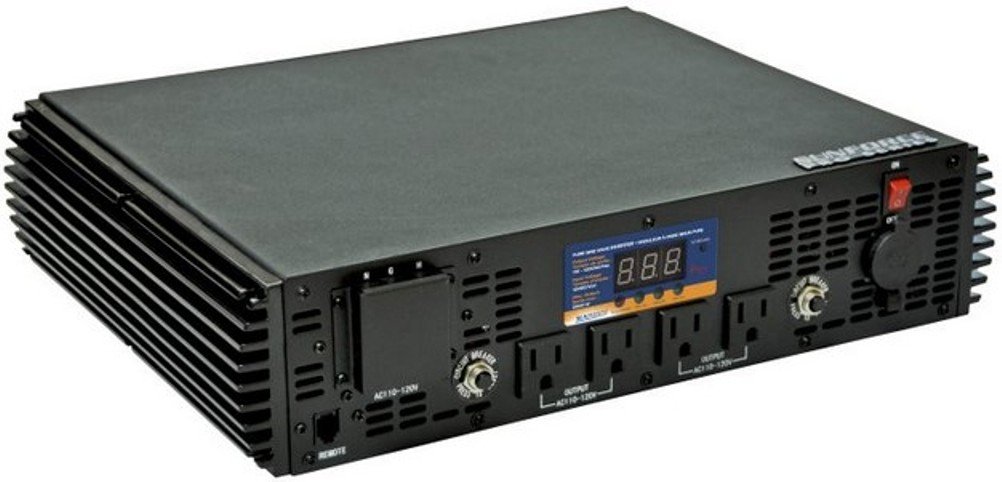
Image 1.1: Sunforce 11260 2500 Watt Pure Sine Wave Inverter, front view.
2. Safety Information
Please read and understand all safety instructions before operating the inverter. Failure to follow these instructions may result in electric shock, fire, or serious injury.
- Read all instructions thoroughly before initial use.
- Ensure proper ventilation around the inverter to prevent overheating. Do not block any ventilation openings.
- Connect the inverter only to a 12V DC power source. Do not attempt to connect to any other voltage.
- Use appropriate gauge wiring for DC connections to prevent voltage drop, overheating, and potential fire hazards.
- Do not expose the inverter to moisture, water, rain, or snow.
- Avoid operating the inverter near flammable materials, gases, or liquids.
- Do not open the inverter casing. There are no user-serviceable parts inside. Opening the unit will void the warranty and expose you to dangerous voltages.
- Always disconnect the inverter from the battery before performing any maintenance, cleaning, or moving the unit.
- Keep children away from the inverter and its connections.
3. Package Contents
Verify that all items are present in the package:
- Sunforce 11260 2500 Watt Pure Sine Wave Inverter
- Wired Remote Control with modular connector cable
- Key Chain Remote Control (wireless)
- Integrated LCD Digital Display (on inverter unit)
- User Manual (this document)

Image 3.1: Included remote controls and modular connector cable.
4. Product Features
The Sunforce 11260 Inverter offers the following key features:
- Pure Sine Wave Output: Converts 12V DC to 110V AC pure sine wave power, suitable for sensitive electronics.
- High Power Output: Provides 2500 Watts continuous power and 5000 Watts peak surge power.
- Multiple AC Outlets: Equipped with four 110V AC household electrical outlets.
- Integrated LCD Display: Digital display for monitoring input voltage, output wattage, and other operational parameters.
- Dual Remote Control Options: Includes both a wired remote control with a modular connector cable and a wireless key chain remote control for convenient operation.
- Advanced Safety Protections: Features a soft-start system, low battery shut down, DC input overload voltage protection, output overload protection, overload temperature protection, short circuit shut down, and a high-speed cooling fan.

Image 4.1: Front panel of the inverter showing outlets, display, and controls.
5. Setup
Proper setup is crucial for the safe and efficient operation of your inverter.
5.1 Inverter Placement
- Position the inverter in a dry, well-ventilated area, away from direct sunlight, heat sources, and moisture.
- Ensure adequate space (at least 6 inches or 15 cm) around all sides of the unit for proper airflow and cooling.
- Mount the inverter securely on a stable, non-flammable surface.
5.2 DC Input Connection
Connect the inverter directly to a 12V DC battery bank. Use heavy-gauge wiring to minimize voltage drop and ensure efficient power transfer, especially for high-power applications.
- Wiring Gauge: For optimal performance and safety, use appropriate gauge wiring (e.g., 1 AWG or 4/0 welding cable) for the DC input connections. The required gauge depends on the cable length and the desired full output. Consult an electrician if unsure.
- Polarity: Connect the positive (+) terminal of the inverter to the positive (+) terminal of the battery. Connect the negative (-) terminal of the inverter to the negative (-) terminal of the battery. Ensure connections are tight and secure.
- Fusing: It is highly recommended to install an appropriate fuse (e.g., 200 amp) in the positive DC line, as close to the battery as possible, for added protection against short circuits.
- Hardwire Option: For installations requiring the full 2500 Watt output, consider utilizing the hardwire option if available and recommended by the manufacturer. Ensure all electrical safety standards and local codes are met for such installations.

Image 5.1: Diagram illustrating 12V battery connection to the inverter and 110V AC output to appliances.
5.3 Remote Control Connection
- Wired Remote: Plug the modular connector cable of the wired remote control into the designated "REMOTE" port on the inverter.
- Wireless Remote: The key chain remote control operates wirelessly and does not require a physical connection to the inverter.

Image 5.2: Physical dimensions of the Sunforce 11260 Inverter.
6. Operating Instructions
Follow these steps to operate your Sunforce 11260 Inverter:
6.1 Powering On the Inverter
- Ensure all DC input connections are secure and the battery has sufficient charge.
- Locate the main power switch on the inverter unit and switch it to the "ON" position. The integrated LCD display should illuminate, indicating the inverter is active and ready to provide AC power.
- Alternatively, use the wired remote control or the key chain wireless remote to turn the inverter on.
6.2 Connecting AC Devices
- Once the inverter is powered on, plug your 110V AC appliances into the four available AC outlets on the inverter's front panel.
- Ensure the total continuous power draw of all connected devices does not exceed 2500 Watts. The inverter can handle surge loads up to 5000 Watts for short durations, which is useful for starting motors or compressors.
- For optimal performance, turn on appliances one by one, starting with the highest power draw.
6.3 Monitoring Operation
- The integrated LCD digital display provides real-time information such as input voltage (from the battery), output wattage (power consumption of connected devices), and other operational parameters.
- Monitor this display to ensure stable operation and to avoid overloading the inverter or excessively discharging your battery.
6.4 Powering Off the Inverter
- Before disconnecting any appliances, turn off the inverter using the main power switch on the unit or via the remote control.
- Once the inverter is off, safely disconnect appliances from the AC outlets.

Image 6.1: Example of the inverter being used to power electronics in a vehicle.
7. Maintenance
Regular maintenance helps ensure the longevity and reliable performance of your inverter.
- Ventilation: Regularly check that the cooling fans are free from dust and debris. Ensure the inverter's vents are not obstructed by objects, allowing for proper airflow. Blocked vents can lead to overheating and reduced efficiency.
- Cleaning: Periodically clean the exterior of the inverter with a dry, soft cloth. Do not use liquid cleaners, solvents, or abrasive materials, as these can damage the casing or internal components.
- Connections: Inspect DC input connections regularly for tightness and corrosion. Loose connections can lead to voltage drop, overheating, and potential damage to the inverter or battery. Clean any corrosion with a wire brush and baking soda solution if necessary.
- Battery Health: Maintain your 12V battery bank according to its manufacturer's recommendations. A well-maintained battery ensures optimal performance and lifespan of the inverter.
8. Troubleshooting
This section addresses common issues you might encounter with your inverter.
8.1 Inverter Not Turning On
- Check DC Connections: Ensure all DC input connections (positive and negative) are secure and correctly polarized.
- Battery Charge: Verify that the 12V battery has sufficient charge. The inverter may not turn on if the battery voltage is too low.
- Fuses/Breakers: Check any inline fuses or circuit breakers in the DC input line for trips or blown fuses.
8.2 No AC Output
- Inverter Power: Confirm the inverter is powered on and its LCD display is active.
- AC Circuit Breakers: Check the circuit breakers on the inverter's AC output panel. Reset them if they have tripped.
- Appliance Functionality: Test the connected appliance with a standard wall outlet to ensure it is working correctly.
8.3 Overload Alarm / Shutdown
- The inverter will automatically shut down if the connected load exceeds its continuous (2500W) or surge (5000W) capacity.
- Reduce the number or power consumption of connected appliances. Disconnect some devices and restart the inverter.
- Allow the inverter to cool down if it has been operating under heavy load for an extended period.
8.4 Overheat Shutdown
- Ensure the inverter is in a well-ventilated area and its cooling vents are not obstructed.
- Check for malfunctioning cooling fans. If fans are not operating, contact customer support.
- Reduce the load on the inverter to decrease heat generation.
8.5 Low Battery Shutdown
- The inverter will shut down to protect the battery from over-discharge, which can damage the battery.
- Recharge the 12V battery bank immediately.
8.6 Sensitive Electronics Issues (e.g., UPS reset)
- While this is a pure sine wave inverter, some highly sensitive electronics might still exhibit issues.
- Try connecting such devices directly to the inverter without intermediate power strips or Uninterruptible Power Supply (UPS) units if problems occur.
9. Specifications
| Feature | Specification |
|---|---|
| Model Number | 11260 |
| Continuous Output Power | 2500 Watts |
| Peak Surge Power | 5000 Watts |
| Input Voltage | 12 Volts DC |
| Output Voltage | 110 Volts AC |
| Output Waveform | Pure Sine Wave |
| Number of AC Outlets | 4 |
| Dimensions (L x W x H) | 39.88 x 33.27 x 8.89 cm (15.7 x 13.1 x 3.5 inches) |
| Item Weight | 9.57 kg (21.1 lbs) |
| Included Components | Wireless remote control, Modular connector cable |
| Safety Features | Soft-start, Low battery shutdown, DC input overload, Output overload, Overload temperature, Short circuit shutdown, High-speed cooling fan |
10. Warranty and Support
10.1 Warranty Information
Specific warranty details for the Sunforce 11260 2500 Watt Pure Sine Wave Inverter are not provided within this manual. Please refer to the warranty card included with your product packaging or visit the official Sun Force website for comprehensive warranty terms and conditions.
10.2 Customer Support
For technical assistance, troubleshooting beyond the scope of this manual, or to inquire about warranty claims, please contact Sun Force customer support. Contact information can typically be found on their official website or within the product packaging.