
Introduction
This manual provides essential information for the proper installation, operation, and maintenance of your ACDelco 174-1012 GM Original Equipment Brake Master Cylinder. This component is designed to meet GM Original Equipment specifications, ensuring fit, form, and function for your vehicle's braking system. Please read this manual thoroughly before attempting any installation or service.
Safety Information
Warning: Working with vehicle braking systems requires specialized knowledge and tools. Improper installation or maintenance can lead to brake failure, resulting in serious injury or death. If you are not confident in your ability to perform this installation safely, seek assistance from a qualified automotive technician.
- Always wear appropriate personal protective equipment, including safety glasses and gloves.
- Ensure the vehicle is securely supported on jack stands before working underneath it.
- Use only the specified brake fluid type (e.g., DOT 3 as indicated on the reservoir cap). Mixing fluid types can damage the braking system.
- Keep brake fluid away from painted surfaces, as it can damage paint.
- Properly dispose of old brake fluid according to local regulations.
Setup and Installation
The ACDelco 174-1012 brake master cylinder is a direct replacement part. Installation typically involves removing the old master cylinder and installing the new one, followed by bleeding the brake system. This process requires careful attention to detail to ensure proper brake function.
Pre-Installation Steps:
- Bench Bleeding: It is highly recommended to bench bleed the new master cylinder before installation. This removes air from the master cylinder itself, making the full system bleeding process easier and more effective. Follow the instructions provided with your bench bleeding kit or consult a service manual.
- Gather Tools: Ensure you have all necessary tools, including wrenches, brake line wrenches, a brake fluid catch pan, and a brake bleeding kit.
- Vehicle Preparation: Park the vehicle on a level surface, engage the parking brake, and disconnect the negative battery terminal.
Installation Procedure (General Steps):
- Carefully disconnect the brake lines from the old master cylinder. Be prepared for brake fluid to leak.
- Remove the mounting nuts or bolts securing the old master cylinder to the brake booster.
- Remove the old master cylinder.
- Install the new ACDelco 174-1012 master cylinder, ensuring it seats correctly against the brake booster.
- Secure the master cylinder with the mounting nuts/bolts, tightening to the manufacturer's specified torque.
- Reconnect the brake lines to the new master cylinder. Ensure connections are tight to prevent leaks.
- Fill the master cylinder reservoir with new, clean DOT 3 brake fluid.
- Bleed the Brake System: This is a critical step. Follow the vehicle manufacturer's recommended brake bleeding procedure to remove all air from the brake lines and calipers. This often requires two people or a specialized vacuum/pressure bleeding tool.
- Check for leaks at all connections.
- Test the brake pedal for firmness before driving the vehicle. The pedal should feel firm and not spongy.
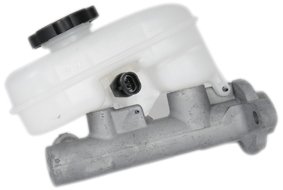
Image: The ACDelco 174-1012 GM Original Equipment Brake Master Cylinder, showing the main unit and the fluid reservoir with its cap. The cap is labeled "DOT 3" and features a brake fluid warning symbol.
Operation
The brake master cylinder is a hydraulic component that converts the mechanical force from the brake pedal into hydraulic pressure. This pressure is then transmitted through the brake lines to the wheel cylinders or calipers, engaging the brake pads or shoes to slow or stop the vehicle. Once properly installed and bled, the master cylinder operates automatically as part of the vehicle's braking system.
Maintenance
Regular maintenance of your vehicle's braking system is crucial for safety and performance. While the master cylinder itself typically requires little direct maintenance beyond proper installation, monitoring the brake fluid is essential.
- Brake Fluid Level: Periodically check the brake fluid level in the master cylinder reservoir. It should be between the "MIN" and "MAX" marks. A consistently low fluid level may indicate a leak in the system or worn brake pads.
- Brake Fluid Condition: Brake fluid can absorb moisture over time, which reduces its effectiveness and can lead to corrosion. Consult your vehicle's service manual for recommended brake fluid flush intervals.
- Inspect for Leaks: Regularly inspect the master cylinder and brake lines for any signs of fluid leaks. Address any leaks immediately.
Troubleshooting
If you experience issues with your braking system after master cylinder replacement, consider the following common problems:
- Spongy or Soft Brake Pedal: This is most commonly caused by air trapped in the brake system. Re-bleed the entire brake system thoroughly, starting with the wheel furthest from the master cylinder.
- Brake Pedal Goes to the Floor: This can indicate a significant air leak, a fluid leak, or an internal failure of the master cylinder. Check for external leaks first. If no external leaks are found and the system has been properly bled, the master cylinder may be faulty.
- Brake Fluid Leaks: Inspect all brake line connections at the master cylinder and throughout the system. Ensure all fittings are tightened to specification. Check the master cylinder body for cracks or damage.
- Brakes Dragging or Sticking: While less common for a new master cylinder, this could indicate a problem with the master cylinder's internal valving or a blockage in the brake lines.
If troubleshooting steps do not resolve the issue, consult a qualified automotive technician.
Specifications
| Feature | Detail |
|---|---|
| Brand | ACDelco |
| Model Number | 174-1012 |
| Manufacturer Part Number | 174-1012 |
| OEM Part Number | 10367561 |
| Product Dimensions | 29.97 x 19.81 x 16 cm |
| Item Weight | 730.28 g |
| Assembly Required | No |
| First Available | 14 August 2012 |
Warranty and Support
For specific warranty information regarding your ACDelco 174-1012 GM Original Equipment Brake Master Cylinder, please refer to the documentation provided with your purchase or contact ACDelco customer support directly. Keep your proof of purchase for warranty claims.
For technical assistance or further inquiries, please visit the official ACDelco website or contact their customer service department.


