
Bowens Esprit 250/500
Instruction Manual: Esprit 250/500 Flashtube, Clear
Model: Esprit 250/500 | Brand: Bowens
Introduction
This manual provides essential information for the safe and effective installation, operation, and maintenance of your Bowens Esprit 250/500 Flashtube. This clear flashtube is designed as a replacement component for Bowens Esprit 250 and Esprit 500 studio flash heads.
Safety Information
Please read and understand all safety warnings before attempting installation or operation. Failure to follow these instructions may result in electric shock, fire, or serious injury.
- Disconnect Power: Always ensure the studio flash head is completely disconnected from the main power supply and has been allowed to discharge fully before attempting to install or remove the flashtube.
- Handle with Care: Flashtubes are made of glass and are fragile. Handle them carefully to avoid breakage. Do not touch the glass portion of the flashtube with bare hands, as oils can reduce its lifespan. Use clean gloves or a soft cloth.
- Correct Model: Ensure you are installing the correct flashtube model (Esprit 250/500 Clear Flashtube) for your specific Bowens Esprit flash head.
- Professional Installation: If you are unsure about any step, consult a qualified technician.
- Disposal: Dispose of old or broken flashtubes according to local environmental regulations.
Package Contents
Verify that all items are present and undamaged upon opening the package:
- 1 x Bowens Esprit 250/500 Flashtube, Clear
Setup and Installation
Follow these steps carefully to replace the flashtube in your Bowens Esprit 250 or 500 flash head:
- Power Off and Unplug: Ensure the flash head is turned off and completely unplugged from the AC power outlet.
- Discharge Capacitor: Fire the flash once or twice after unplugging to ensure any residual charge in the capacitors is dissipated.
- Allow Cooling: If the flash head has been in use, allow it to cool down completely before handling.
- Access Flashtube: Depending on your specific Esprit model, you may need to remove the protective glass dome or reflector to access the flashtube. Refer to your flash head's specific manual for this step.
- Remove Old Flashtube: Gently grasp the base of the old flashtube (avoiding the glass) and pull it straight out from its socket. Note the orientation of the pins.
- Install New Flashtube: Wearing clean gloves or using a soft cloth, carefully align the two metal pins of the new flashtube with the corresponding sockets in the flash head. Gently push the flashtube straight in until it is firmly seated. Do not force it.
- Reassemble: Reattach any protective glass domes or reflectors that were removed.
- Test: Plug the flash head back into the power outlet and turn it on. Perform a test fire to ensure the new flashtube is functioning correctly.
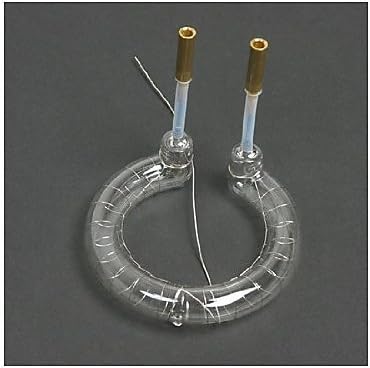
Image: A clear, circular flashtube with two metal pin connectors extending upwards. This is the Bowens Esprit 250/500 Flashtube, designed for studio flash units.
Operating
Once installed, the flashtube operates as an integral part of your Bowens Esprit 250 or 500 studio flash head. Its function is to emit a powerful burst of light when triggered by the flash unit's circuitry.
- Normal Operation: The flashtube will fire in conjunction with your flash head's settings and triggers.
- Recycle Time: Allow the flash head to complete its recycle time between flashes for optimal performance and to prolong the life of the flashtube.
- Modeling Lamp: The flashtube is separate from the modeling lamp. Ensure your modeling lamp is also functioning correctly if you use it for previewing light.
Maintenance
Proper maintenance can extend the lifespan of your flashtube and ensure consistent performance.
- Cleaning: If necessary, gently wipe the glass portion of the flashtube with a clean, dry, lint-free cloth. Avoid using abrasive cleaners or solvents. Ensure the flash head is unplugged and cool before cleaning.
- Inspection: Periodically inspect the flashtube for any signs of damage, cracks, or discoloration. Replace immediately if damage is observed.
- Storage: When not in use, store the flashtube in its original packaging or a protective container to prevent damage.
Troubleshooting
If you encounter issues with your flashtube, consider the following common problems and solutions:
| Problem | Possible Cause | Solution |
|---|---|---|
| Flashtube does not fire. |
|
|
| Inconsistent light output. |
|
|
| Flashtube appears discolored or blackened. | Normal wear and tear, indicating end of life. | Replace the flashtube. |
Specifications
- Product Type: Replacement Flashtube
- Compatibility: Bowens Esprit 250 and Esprit 500 Studio Flash Heads
- Color: Clear
- Manufacturer: Bowens
- ASIN: B000XP0CUA
- First Available: August 14, 2000