
1. Introduction
The Directed Xpresskit XK01 is a programmable SW CAN door lock and override module designed to integrate with vehicle security and remote start systems. This module provides advanced control over vehicle door locks and can act as an override for various vehicle functions, enhancing the functionality of compatible systems.
Key Features:
- Programmable: Configurable for various vehicle applications and functions.
- Door Lock Module: Provides control for vehicle door locking and unlocking mechanisms.
- Override Module: Capable of bypassing certain vehicle systems for remote start or alarm integration.
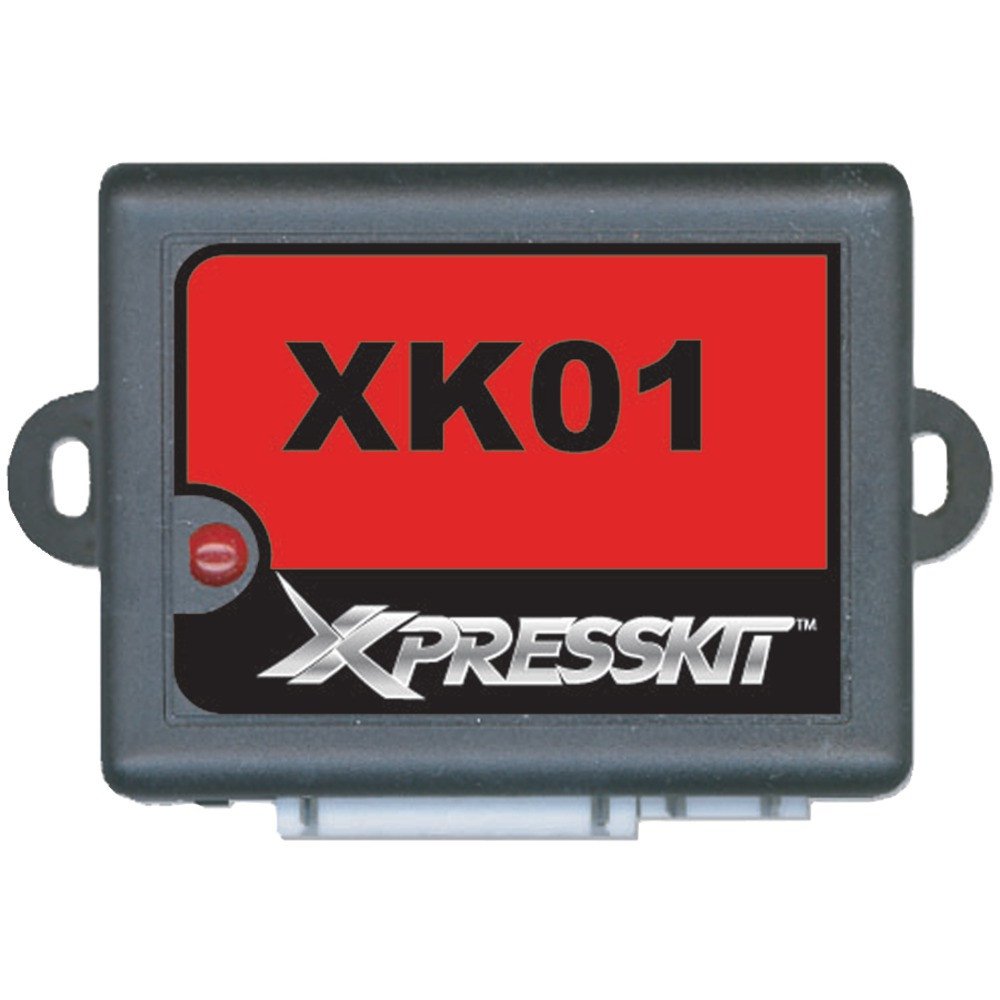
Figure 1: Front view of the Xpresskit XK01 Programmable Interface Module. This image displays the compact design of the module, typically used for vehicle integration.
2. Safety Information
Read all instructions carefully before installation and operation. Failure to follow safety guidelines may result in damage to the product, vehicle, or personal injury.
- Professional Installation Recommended: Installation of this module requires knowledge of vehicle electrical systems and wiring. It is highly recommended that installation be performed by a certified professional.
- Disconnect Battery: Always disconnect the vehicle's negative battery terminal before beginning any electrical installation to prevent short circuits and damage.
- Proper Wiring: Ensure all wiring connections are secure, insulated, and routed away from moving parts or heat sources. Use appropriate gauge wires and fuses.
- Test Functionality: After installation, thoroughly test all vehicle functions to ensure proper operation and no unintended side effects.
- Avoid Moisture: Do not expose the module to water or excessive moisture.
3. Package Contents
Verify that all items are present before proceeding with installation:
- Xpresskit XK01 Programmable Interface Module
- Wiring Harness (may vary by application)
- Installation Guide (this document or similar)
4. Setup and Installation
The XK01 module is designed for integration into a vehicle's electrical system. Specific wiring diagrams and programming steps are vehicle-dependent and typically found in a separate vehicle-specific installation guide or online database provided by Directed.
General Installation Steps:
- Vehicle Preparation: Disconnect the vehicle's negative battery terminal. Access the necessary wiring points in the vehicle (e.g., behind the dashboard, near the steering column).
- Module Placement: Choose a secure, dry location for the XK01 module, away from excessive heat or moisture.
- Wiring Connections: Identify the correct wires in the vehicle's harness according to the vehicle-specific wiring diagram. Connect the XK01's wiring harness to the vehicle's wiring using appropriate connectors (e.g., solder, T-taps, crimp connectors). Ensure all connections are secure and properly insulated.
- Ground Connection: Connect the module's ground wire to a solid chassis ground point in the vehicle.
- Power Connection: Connect the module's power wire to a constant 12V power source, typically fused.
- Data Connections: Connect any required data wires (e.g., CAN bus, SW CAN) as specified by the vehicle-specific diagram.
- Reconnect Battery: Once all wiring is complete and verified, reconnect the vehicle's negative battery terminal.
- Programming: Proceed to the programming steps as outlined in the vehicle-specific instructions. This typically involves a sequence of button presses or using a programming tool to configure the module for the specific vehicle and desired functions.
Note: Incorrect wiring or programming can lead to vehicle malfunctions or damage. Consult a professional installer if you are unsure about any step.
5. Operating Instructions
The Xpresskit XK01 module operates in conjunction with a compatible vehicle security or remote start system. Its primary function is to translate commands from the aftermarket system into signals the vehicle understands for door lock/unlock and other override functions.
Typical Operation:
- Door Lock/Unlock: When a command is sent from the connected security/remote start system (e.g., via a remote fob), the XK01 module interprets this command and sends the appropriate signal to the vehicle's door lock system, resulting in doors locking or unlocking.
- Alarm Interface: The module can interface with the vehicle's alarm system, allowing the aftermarket system to arm/disarm the factory alarm or monitor its status.
- Override Functions: Depending on programming, the XK01 can provide ignition, accessory, or starter bypass signals for remote start applications.
Refer to the user manual of your primary security or remote start system for specific instructions on how to initiate commands that utilize the XK01 module's functions.
6. Maintenance
The Xpresskit XK01 module is designed for maintenance-free operation once properly installed. Follow these general guidelines to ensure longevity:
- Keep Dry: Ensure the module remains in a dry environment, protected from water and excessive humidity.
- Avoid Extreme Temperatures: Do not expose the module to temperatures outside of typical automotive operating ranges.
- Secure Mounting: Verify that the module is securely mounted and not subject to excessive vibration.
- No User Serviceable Parts: The module contains no user-serviceable parts. Do not attempt to open or repair the unit.
7. Troubleshooting
If you experience issues with the XK01 module, consider the following troubleshooting steps:
- No Response from Module:
- Check all power and ground connections.
- Verify that the vehicle's battery is charged.
- Ensure the module is correctly programmed for your specific vehicle.
- Incorrect Door Lock/Unlock Function:
- Re-verify all wiring connections to the vehicle's door lock system.
- Confirm the module is programmed with the correct door lock polarity and timing settings for your vehicle.
- Consult the vehicle-specific installation guide for programming details.
- Remote Start/Alarm Override Issues:
- Ensure the module is correctly connected to the primary remote start/alarm unit.
- Verify that the module is programmed to provide the necessary bypass signals.
- Check for any diagnostic codes from the primary remote start/alarm system.
If problems persist, contact a professional installer or Directed technical support for assistance.
8. Specifications
| Model Number: | XK01 |
| Brand: | Directed |
| Manufacturer: | Directed Electronics Inc |
| Product Dimensions: | 7.62 x 5.08 x 5.08 cm (3 x 2 x 2 inches) |
| Weight: | 68.04 g (2.4 oz) |
| Connector Type: | Interface |
| Special Features: | Alarm, Programmable |
| Battery Requirement: | 1 12V battery (for vehicle system, not module itself) |
9. Warranty and Support
Directed Electronics Inc. provides a limited warranty for the Xpresskit XK01 module against defects in materials and workmanship. The specific terms and duration of the warranty may vary by region and purchase location. Please retain your proof of purchase.
For warranty claims, technical support, or further assistance with installation and programming, please contact Directed customer service or visit their official website. Contact information is typically provided with the product packaging or can be found on the manufacturer's website.
Disclaimer: This manual provides general information. Specific vehicle applications and advanced features may require additional documentation or professional assistance.


