
1. Introduction
This manual provides comprehensive instructions for the proper setup, operation, and maintenance of your Sanyo TRC-5830 Voice Activated Microcassette Slide Switch Recorder. Please read this manual thoroughly before using the device to ensure optimal performance and longevity. Keep this manual for future reference.
2. Safety Information
- Do not expose the unit to extreme temperatures, direct sunlight, dust, or moisture.
- Avoid dropping or subjecting the unit to strong impacts.
- Use only the specified battery type (2 AA batteries). Ensure correct polarity when inserting batteries.
- Remove batteries if the unit will not be used for an extended period to prevent leakage.
- Do not attempt to disassemble or modify the unit. Refer all servicing to qualified personnel.
- Keep the unit away from strong magnetic fields, which can erase recordings.
3. Package Contents
Please check that your package contains the following items:
- Sanyo TRC-5830 Microcassette Recorder
- User Manual
- Microcassette Tape (may be included depending on region/bundle)
4. Product Overview
Familiarize yourself with the various parts of your Sanyo TRC-5830 recorder.
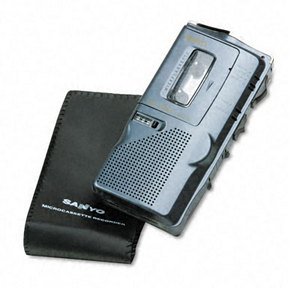
This image shows the front of the Sanyo TRC-5830 Microcassette Recorder, highlighting its compact design and control layout.
Key Components:
- Slide Switch: Controls Record, Play, Stop, Rewind, Fast Forward functions.
- Built-in Microphone: For capturing audio.
- Speaker: For audio playback.
- Volume Control: Adjusts playback volume.
- Cassette Compartment: Holds the microcassette tape.
- Battery Compartment: Holds AA batteries.
- Headphone Jack (3.5mm): For private listening.
5. Setup
5.1. Battery Installation
- Locate the battery compartment cover on the back or bottom of the unit.
- Slide or lift the cover to open the compartment.
- Insert two (2) AA batteries, ensuring the correct polarity (+/-) as indicated inside the compartment.
- Close the battery compartment cover securely.
5.2. Microcassette Insertion
- Ensure the slide switch is in the 'STOP' position.
- Open the cassette compartment door.
- Insert a microcassette tape with the exposed tape facing upwards and the full reel on the left side.
- Gently close the cassette compartment door until it clicks into place.
6. Operating Instructions
6.1. Power On/Off
The unit powers on automatically when the slide switch is moved from 'STOP' to 'PLAY' or 'RECORD'. To power off, move the slide switch to 'STOP'.
6.2. Recording
The TRC-5830 features both manual and voice-activated recording (VOR).
Manual Recording:
- Ensure a microcassette is inserted.
- Slide the switch to the 'RECORD' position. The recording indicator light will illuminate.
- Speak clearly into the built-in microphone.
- To stop recording, slide the switch to 'STOP'.
Voice Activated Recording (VOR):
- Ensure a microcassette is inserted.
- Locate the VOR switch (if present, typically a small toggle or button). Activate VOR mode.
- Slide the main switch to 'RECORD'. The unit will now only record when sound is detected, pausing when there is silence.
- To stop VOR recording, slide the main switch to 'STOP'.
6.3. Playback
- Ensure a recorded microcassette is inserted.
- Slide the switch to the 'PLAY' position. Audio will play through the built-in speaker.
- Adjust the volume using the volume control dial.
- To stop playback, slide the switch to 'STOP'.
6.4. Fast Forward / Rewind
- While the unit is in 'STOP' or 'PLAY' mode, slide the switch to 'FF' (Fast Forward) or 'REW' (Rewind).
- Release the switch to return to 'STOP' when you reach the desired section.
6.5. Erase
To erase a recording, you typically record over it. Some models may have a dedicated erase function or require a bulk eraser.
6.6. Using the Headphone Jack
Insert a 3.5mm stereo or mono headphone plug into the headphone jack for private listening. The built-in speaker will be muted automatically.
7. Maintenance
7.1. Cleaning
- Wipe the exterior of the unit with a soft, dry cloth.
- Do not use liquid cleaners or abrasive chemicals.
- Periodically clean the tape head and pinch roller with a cotton swab lightly dampened with isopropyl alcohol to ensure optimal recording and playback quality.
7.2. Battery Care
- Replace batteries when the recording indicator light dims or audio quality deteriorates.
- Always replace both batteries at the same time.
- Dispose of used batteries according to local regulations.
7.3. Storage
When not in use, store the recorder in a cool, dry place, away from direct sunlight and strong magnetic fields. Remove batteries if storing for extended periods.
8. Troubleshooting
| Problem | Possible Cause | Solution |
|---|---|---|
| Unit does not power on. | Dead or incorrectly inserted batteries. | Replace batteries with new ones, ensuring correct polarity. |
| Poor recording/playback quality. | Dirty tape head/pinch roller; Worn-out tape; Low batteries. | Clean tape head and pinch roller. Try a new microcassette. Replace batteries. |
| Tape does not move. | Tape jammed; Unit in 'STOP' mode; Batteries dead. | Open cassette compartment and check tape. Ensure slide switch is in 'PLAY' or 'RECORD'. Replace batteries. |
| Voice Activated Recording (VOR) not working. | VOR sensitivity too low; VOR mode not activated. | Check VOR switch/setting. Ensure sufficient ambient sound for activation. |
9. Specifications
| Feature | Specification |
|---|---|
| Brand | Sanyo |
| Manufacturer Model Number | TRC-5830 |
| Microphone Operating Mode | Voice recognition |
| Microphone Form Factor | Built-in |
| Format | DAT-Cassette (Microcassette) |
| Headphone Jack | 3.5 millimeters |
| Hardware Interface | 3.5-mm-Audio |
| Number of Batteries | 2 AA Batteries required |
| Battery Life (Average) | 30 Minutes |
| Digital Recording Time | 180 Minutes |
| Compatible Devices | Laptop, MP3-Player, Personal Computer, Smartphone, Tablet (via audio output) |
| UPC | 086483012761 |
| ASIN | B000WFW0L0 |
10. Warranty and Support
For warranty information and technical support, please refer to the documentation provided at the time of purchase or contact Sanyo customer service. Keep your proof of purchase for warranty claims.