
JAMO A 102 HCS 5
Jamo A 102 HCS 5.1 Home Theater Speaker System User Manual
Model: A 102 HCS 5
Introduction
This manual provides comprehensive instructions for the setup, operation, and maintenance of your Jamo A 102 HCS 5.1 Home Theater Speaker System. Please read this manual thoroughly before using the product to ensure proper installation and optimal performance.
The Jamo A 102 HCS 5.1 system is designed to deliver a discreet yet effective home cinema experience, featuring the presence of an identical driver configuration in all five main speakers to ensure optimum timbrel coherence when sounds pan across the room. The included subwoofer will integrate with your electronics, whether connected via a line or speaker-level output.
Package Contents
Verify that all components are present in the package:
- Two (2) Jamo A 102 Satellite Speakers (Front Left/Right)
- Two (2) Jamo A 102 Surround Speakers (Rear Left/Right)
- One (1) Jamo A 10 Center Speaker
- One (1) Jamo SUB 200 Powered Subwoofer
- User Manual (this document)
- Necessary cables (may vary by region/package)
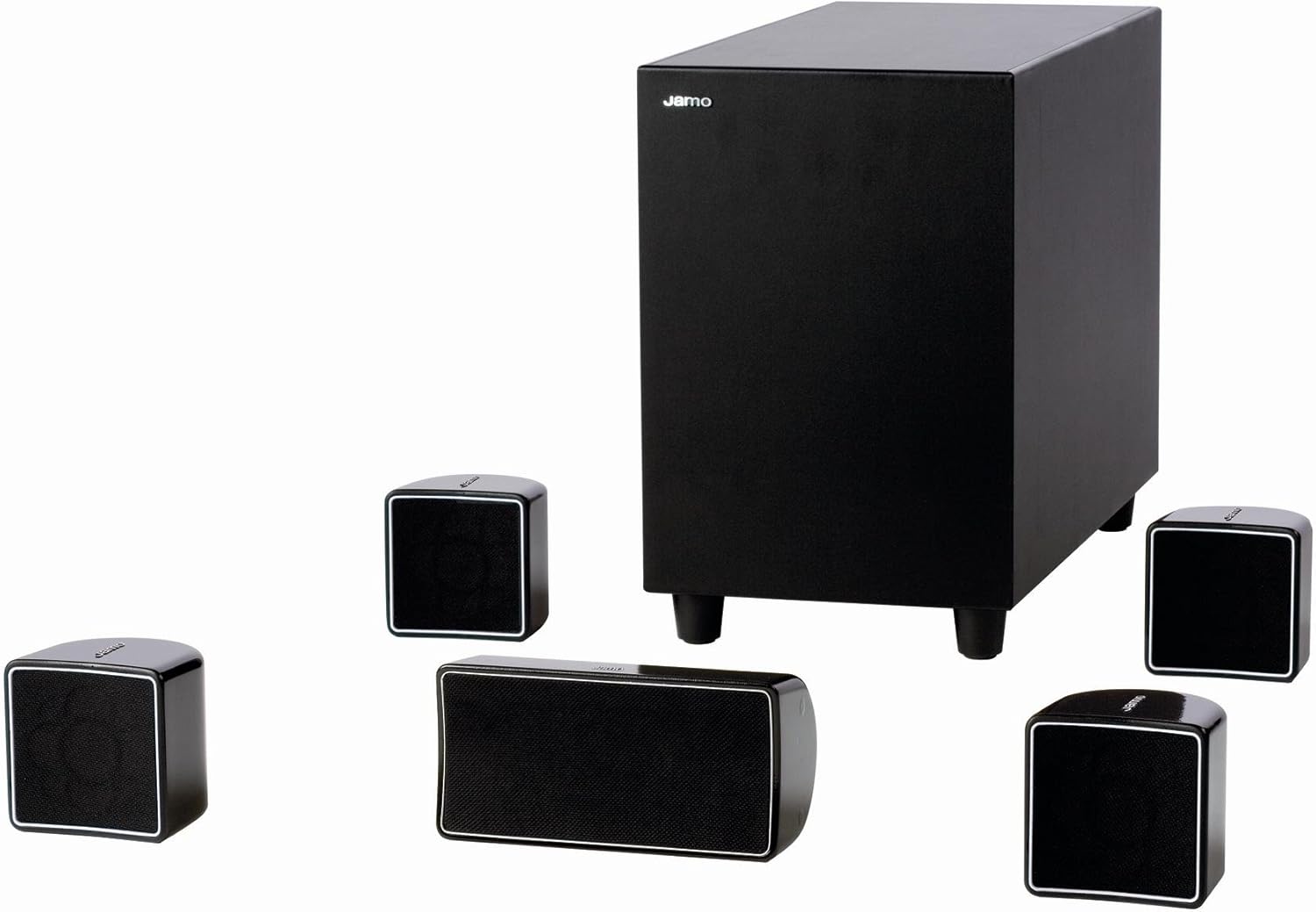
Image: Overview of the Jamo A 102 HCS 5.1 Home Theater Speaker System, showing the subwoofer, two satellite speakers, two surround speakers, and one center speaker.
Setup and Installation
1. Speaker Placement
Optimal speaker placement is crucial for achieving the best sound experience. Consider the following guidelines:
- Front Left/Right Speakers (A 102 Satellites): Place these speakers equidistant from your primary listening position, forming an equilateral triangle with the listener. They should be at ear level when seated.
- Center Speaker (A 10 Center): Position the center speaker directly above or below your television/screen, centered horizontally. Its primary role is to reproduce dialogue.
- Surround Speakers (A 102 Surrounds): Place these speakers to the sides or slightly behind the main listening position, ideally 1-2 feet above ear level.
- Subwoofer (SUB 200): The subwoofer's placement is less critical for imaging but can significantly impact bass response. Experiment with different locations in the room, such as a corner or near a wall, to find the best bass output.

Image: The Jamo A 102 HCS 5.1 system integrated into a living room setup, showing discreet speaker placement around a television.
2. Wiring Connections
Before making any connections, ensure all audio equipment (receiver, TV, etc.) is turned off and unplugged from the power outlet.
- Connect Satellite and Center Speakers: Use appropriate speaker wire to connect each A 102 satellite and the A 10 center speaker to the corresponding speaker terminals on your A/V receiver. Ensure correct polarity (+ to + and - to -) for all connections.
- Connect Subwoofer:
- Line-Level Connection: If your receiver has a dedicated "Subwoofer Out" or "LFE Out" RCA jack, connect it to the "Line In" (LFE) input on the SUB 200 subwoofer using a single RCA cable.
- Speaker-Level Connection: If your receiver lacks a dedicated subwoofer output, connect the receiver's front left/right speaker outputs to the "Speaker Level Input" terminals on the SUB 200, and then connect the front left/right speakers to the "Speaker Level Output" terminals on the subwoofer. Maintain correct polarity.
- Power Connection: Once all audio connections are secure, plug the power cord of the SUB 200 subwoofer into a wall outlet.


Image: Left: A close-up view of a Jamo A 102 satellite speaker, highlighting its compact design. Right: A close-up view of the Jamo A 10 center speaker, showing its horizontal orientation.
Operation
Initial Power On and Configuration
- After connecting all components, power on your A/V receiver and the Jamo SUB 200 subwoofer.
- Access your A/V receiver's speaker setup menu. Configure the speaker settings for a 5.1 channel system.
- Set all satellite and center speakers to "Small" or "Mini" to ensure bass frequencies are redirected to the subwoofer.
- Adjust the subwoofer's crossover frequency (if available on your receiver or subwoofer) to around 80-120 Hz. This ensures a smooth transition between the subwoofer and the satellite speakers.
- Use your receiver's auto-calibration feature (if available) or manually adjust individual speaker levels to achieve balanced sound.
Listening Tips
- Volume Control: Adjust the overall system volume using your A/V receiver's master volume control. The subwoofer's volume knob should be set to blend seamlessly with the satellite speakers, not to overpower them.
- Subwoofer Phase: If the bass sounds weak or muddy, try flipping the phase switch on the subwoofer (if present). This can sometimes improve bass integration with the main speakers.
- Room Acoustics: Room furnishings, wall materials, and room shape can affect sound quality. Experiment with speaker toe-in (angling speakers slightly towards the listening position) and subwoofer placement for optimal results.
Maintenance and Care
Proper care will ensure the longevity and performance of your Jamo speaker system:
- Cleaning: Dust the speaker cabinets regularly with a soft, dry cloth. For stubborn marks, use a slightly damp cloth, but avoid harsh chemicals or abrasive cleaners. Do not spray cleaning solutions directly onto the speakers.
- Grilles: The speaker grilles can be carefully removed for cleaning if necessary. Use a soft brush or vacuum cleaner with a brush attachment to remove dust.
- Placement Environment: Avoid placing speakers in direct sunlight, near heat sources, or in areas with high humidity. Ensure adequate ventilation around the subwoofer, especially if it's in an enclosed space.
- Connections: Periodically check all speaker wire connections to ensure they are secure and free from corrosion. Loose connections can degrade sound quality.
Troubleshooting
If you encounter issues with your Jamo A 102 HCS 5.1 system, refer to the following common problems and solutions:
| Problem | Possible Cause | Solution |
|---|---|---|
| No sound from any speaker. | Receiver not powered on; incorrect input selected; speaker wires disconnected. | Ensure receiver is on and correct input is selected. Check all speaker wire connections at both the receiver and speaker ends. |
| No sound from a specific speaker. | Loose or incorrect speaker wire connection; speaker damaged. | Check the specific speaker's wire connection. Swap the speaker with a working one to determine if the speaker itself is faulty. |
| Subwoofer not producing bass. | Subwoofer not powered on; incorrect connection; volume too low; receiver settings. | Ensure subwoofer is plugged in and powered on. Check RCA or speaker-level connections. Increase subwoofer volume. Verify receiver's speaker settings (subwoofer enabled, main speakers set to "Small"). |
| Distorted or unclear sound. | Overdriven volume; loose connections; incorrect speaker impedance setting on receiver. | Reduce volume. Check all connections. Consult your receiver's manual for correct impedance settings. |
| Humming or buzzing noise. | Ground loop; faulty cable; interference. | Try plugging the subwoofer into a different electrical outlet. Use a different RCA cable. Ensure power cables are not running parallel to audio cables. |
If the problem persists after trying these solutions, please contact Jamo customer support or a qualified service technician.
Specifications
| Feature | Detail |
|---|---|
| System Type | 5.1 Home Theater Speaker System |
| Total Power Output | 600 Watts (Maximum Speaker Output) |
| Satellite/Center Woofer | 3 inches |
| Satellite/Center Tweeter | 3/4 inches |
| Subwoofer Woofer | 8 inches (Long-throw) |
| Subwoofer Amplifier Power | 200 Watts |
| Satellite/Center Frequency Response | 150 Hz - 20 kHz |
| Surround Frequency Response | 150 Hz - 15 kHz |
| Subwoofer Frequency Response | 36 Hz - 15 kHz |
| Subwoofer Enclosure Type | Bass-reflex |
| Color | Black |
| Model Number | A 102 HCS 5 |
| Product Dimensions (Subwoofer) | 61.72 x 48.01 x 45.47 cm (approx. 24.3 x 18.9 x 17.9 inches) |
| Product Weight (Subwoofer) | 3 kg (approx. 6.61 lbs) |
Warranty and Support
For warranty information and technical support, please refer to the warranty card included with your product or visit the official Jamo website. Keep your proof of purchase for warranty claims.
Jamo Official Website: www.jamo.com (Please refer to actual Jamo support channels for the most accurate information)
Ask a question about this manual
Ask about setup, troubleshooting, compatibility, parts, safety, or missing instructions. Manuals+ will review the question and use this page’s manual context to help answer it.