
1. Introduction and Overview
This manual provides essential information for the proper use and care of your Tamron AF 28-300mm F/3.5-6.3 XR Di VC IF Aspherical Macro Stabilized lens (Model 5502) designed for Nikon F-mount cameras. This versatile, ultra-compact zoom lens is suitable for both digital and film SLR cameras, offering a broad focal range from wide-angle to telephoto, along with macro capabilities. Key features include XR (Extra Refractive Index) technology for a compact design, Di (Digitally Integrated) for optimized digital performance, VC (Vibration Compensation) for image stabilization, and IF (Internal Focusing) for consistent lens length during focusing.

Figure 1: Tamron AF 28-300mm F/3.5-6.3 XR Di VC IF Aspherical Macro Stabilized Lens. This image shows the lens mounted on a camera body, highlighting its compact design.

Figure 2: Side view of the Tamron AF 28-300mm lens, illustrating its profile and control rings.
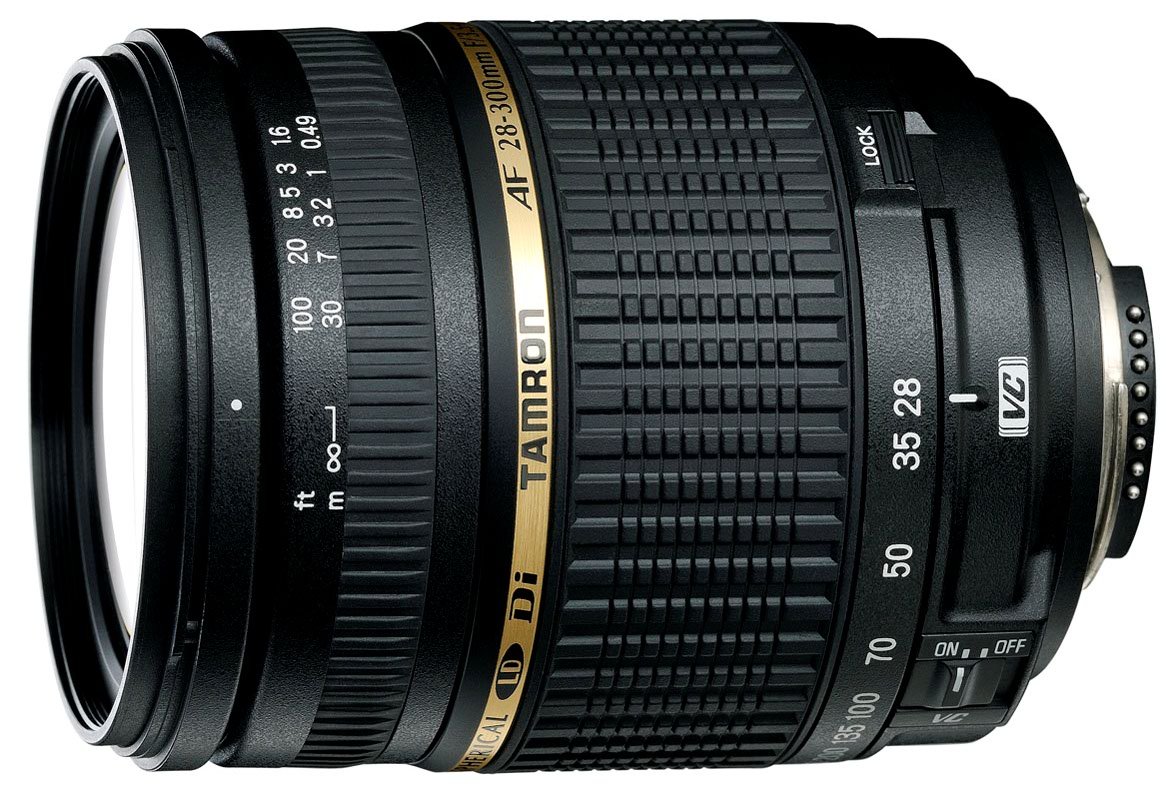
Figure 3: EISA Best Product 2008-2009 Consumer Lens Award badge, recognizing the Tamron AF 28-300mm f/3.5-6.3 XR VC Di LD Macro lens.
2. Setup
2.1 Attaching the Lens
- Ensure both the camera and lens are clean and free of dust.
- Align the mounting index mark on the lens barrel with the corresponding mark on the camera body.
- Rotate the lens clockwise (for Nikon F-mount) until it clicks into place. Do not force the lens.
2.2 Detaching the Lens
- Press and hold the lens release button on the camera body.
- Rotate the lens counter-clockwise until it stops, then carefully remove it from the camera body.
- Attach the front and rear lens caps immediately to protect the lens elements.
2.3 Attaching the Lens Hood
Align the lens hood with the front of the lens and twist it until it locks securely. The lens hood helps to prevent flare and ghosting by blocking extraneous light. It can also be reversed and stored on the lens when not in use, though this will prevent the use of the zoom lock.
3. Operating the Lens
3.1 Focusing
- Autofocus (AF): Set the camera's focus mode to AF. The lens will automatically focus when the shutter button is half-pressed.
- Manual Focus (MF): Set the camera's focus mode to MF. Rotate the focus ring on the lens to achieve sharp focus.
- The lens features Internal Focusing (IF), meaning the overall length of the lens does not change during focusing.
3.2 Zooming
Rotate the zoom ring to adjust the focal length between 28mm and 300mm. The lens extends as you zoom towards the telephoto end.
3.3 Vibration Compensation (VC)
The VC (Vibration Compensation) mechanism helps reduce blur caused by camera shake, especially useful in low light or at longer focal lengths. Activate VC via the switch on the lens barrel. Note that continuous use of VC may consume battery power more rapidly. For optimal results, ensure VC is turned off when using a tripod.
3.4 Zoom Lock Mechanism
To prevent the lens from extending under its own weight during transport or when pointed downwards, use the zoom lock switch. This locks the lens at the 28mm wide-angle position. Engage the lock when not actively shooting.
4. Maintenance
- Cleaning Lens Elements: Use a soft, clean lens cloth and a specialized lens cleaning solution. Gently wipe in a circular motion from the center outwards. Avoid touching the glass with bare fingers.
- Cleaning Lens Body: Use a soft, dry cloth to wipe the exterior of the lens. Do not use organic solvents like paint thinner or benzene.
- Storage: Store the lens in a cool, dry place away from direct sunlight and extreme temperatures. Use front and rear lens caps to protect the elements. If storing for extended periods, consider a dehumidified environment to prevent mold growth.
- Handling: Avoid dropping or subjecting the lens to strong impacts. Protect it from water and excessive dust.
5. Troubleshooting
- Lens not focusing:
- Ensure the camera is set to the correct focus mode (AF or MF).
- Check if the lens is securely mounted to the camera body.
- Verify there is sufficient light for autofocus to operate.
- Images are blurry:
- Check if Vibration Compensation (VC) is enabled in low light or at long focal lengths.
- Ensure shutter speed is appropriate for the focal length to avoid camera shake.
- Clean the lens elements if smudges are present.
- Confirm focus is accurately achieved.
- Zoom ring is stiff or loose:
- A slight stiffness or looseness can be normal for zoom lenses.
- Ensure the zoom lock is disengaged when attempting to zoom.
- If the issue significantly impacts operation, contact customer support.
- VC not working:
- Ensure the VC switch on the lens is set to ON.
- Check camera battery level, as VC requires power.
6. Specifications
| Feature | Detail |
|---|---|
| Model Number | 5502 (A20E) |
| Focal Length | 28-300mm |
| Maximum Aperture | F/3.5-6.3 |
| Optical Zoom | 10.7x |
| Lens Construction | 18 elements in 13 groups |
| Minimum Focus Distance | 49 cm (19.3 inches) |
| Image Stabilization | Optical (VC - Vibration Compensation) |
| Mount Type | Nikon F |
| Focus Type | Autofocus, Manual Focus |
| Dimensions (L x D) | Approx. 9.9 cm x 7.81 cm (3.9 in x 3.07 in) |
| Weight | Approx. 560 grams (1.23 lbs) |
7. Warranty and Support
7.1 Manufacturer's Warranty
This Tamron lens comes with a manufacturer's warranty. Please refer to the warranty card included with your product for specific terms and conditions, including the warranty period (typically 2 years). Keep your proof of purchase for warranty claims.
7.2 Customer Support
For technical assistance, service, or inquiries regarding your Tamron lens, please visit the official Tamron website or contact your local Tamron authorized service center. Contact information can typically be found on the Tamron global website or regional support pages.


