
1. Product Overview
The HP J4858C Mini-GBIC Transceiver Module is a Small Form-Factor Pluggable (SFP) gigabit SX transceiver. It is designed to provide a full-duplex gigabit solution, enabling high-speed data transmission over multimode fiber optic cables.

Figure 1: Front view of the HP J4858C Mini-GBIC Transceiver Module, displaying its label with model and serial information.
This module supports distances up to 550 meters when used with appropriate multimode fiber. It is commonly used in networking environments to connect switches, routers, and other network devices via fiber optic links.
2. Key Features
- Interface: 1 x LC 1000Base-SX port for fiber optic connection.
- Media Type: Supports Optical Fiber.
- Fiber Optic Cable Standard: Compatible with 62.5/125 µm multimode fiber.
- Operation Mode: Multimode operation for short to medium-range fiber connections.
- Form Factor: Small Form-Factor Pluggable (SFP) for hot-swappable installation.
3. Setup and Installation
Follow these steps to properly install the HP J4858C Mini-GBIC Transceiver Module into a compatible network device.
- Preparation: Ensure the network device (switch, router) is powered off or in a state where SFP module hot-swapping is supported and safe. Consult your device's manual for specific instructions.
- Unpack the Module: Carefully remove the J4858C module from its packaging. Handle it by the metal casing to avoid touching the electrical contacts or optical interfaces.
- Remove Protective Cap: Remove the protective dust cap from the optical interface of the module. Store the cap for future use if the module needs to be removed.
- Insert the Module: Orient the module correctly and gently slide it into an available SFP port on your network device until it clicks into place. Ensure it is fully seated.
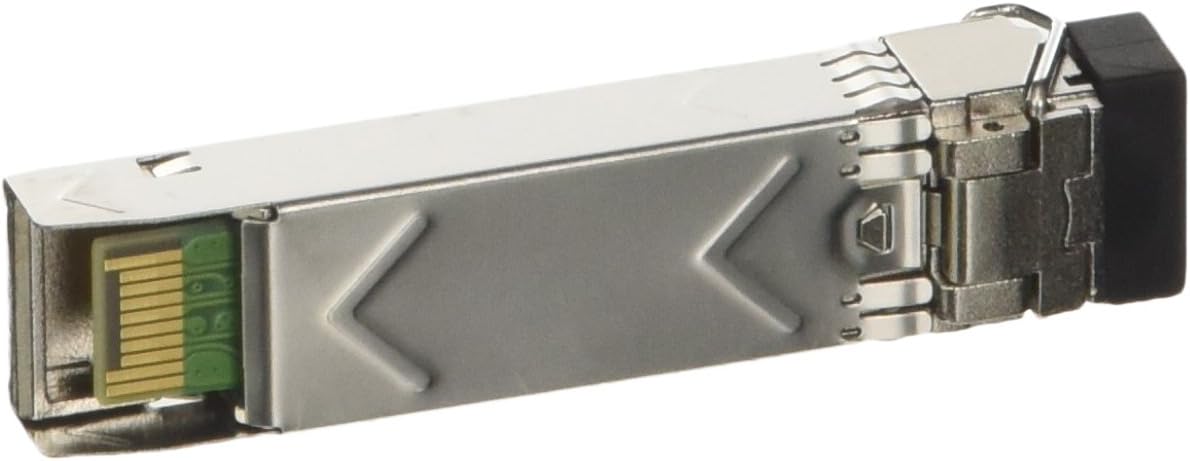
Figure 2: Rear view of the HP J4858C Mini-GBIC Transceiver Module, highlighting the electrical connector for insertion into a host device.
- Connect Fiber Optic Cable: Connect a compatible LC multimode fiber optic cable to the module's LC port. Ensure the cable is clean and free of dust.
- Verify Connection: Power on the network device (if it was off) and check the link status indicators (LEDs) on both the module port and the connected device. A solid green or amber light typically indicates a successful link.
4. Operating Instructions
The HP J4858C Mini-GBIC Transceiver Module operates as a transparent layer 1 device, converting electrical signals to optical signals and vice-versa. Once installed and connected, it typically requires no further user interaction for basic operation.
- Link Status: Monitor the link status LEDs on your network device. A steady light indicates an active fiber optic link.
- Data Transmission: Data will automatically flow through the module once a stable link is established between the connected devices.
- Compatibility: Ensure the module is used with compatible HP networking equipment and multimode fiber optic cables (62.5/125 µm).
5. Maintenance
Proper maintenance ensures optimal performance and longevity of your transceiver module.
- Keep Clean: Always keep the optical interfaces of the module and fiber optic cables clean. Dust and contaminants can significantly degrade optical performance. Use only approved fiber optic cleaning tools and methods.
- Protective Caps: When the module or fiber optic cable is not in use, always cover the optical ports with their protective dust caps.
- Handle with Care: Avoid dropping or subjecting the module to physical shock. Handle by the metal casing, not by the optical port or latch mechanism.
- Environmental Conditions: Operate the module within its specified temperature and humidity ranges to prevent damage.
6. Troubleshooting
If you encounter issues with your HP J4858C Mini-GBIC Transceiver Module, consider the following troubleshooting steps:
- No Link Light:
- Ensure the module is fully seated in the SFP port. Remove and re-insert it.
- Verify that the fiber optic cable is securely connected at both ends.
- Check the fiber optic cable for damage (kinks, sharp bends).
- Clean the optical connectors on both the module and the fiber cable.
- Confirm that the connected device (e.g., another switch) is powered on and its corresponding fiber port is active.
- Test with a known-good fiber cable or module if available.
- Intermittent Connection or Poor Performance:
- Check for excessive bending or stress on the fiber optic cable.
- Ensure all optical connections are clean.
- Verify that the fiber cable length does not exceed the module's maximum supported distance (550 meters for multimode SX).
- Confirm that both transceivers (at each end of the fiber link) are compatible and operating at the same speed and wavelength.
- Module Not Recognized:
- Ensure the network device's firmware is up to date and supports the J4858C module.
- Try inserting the module into a different SFP port on the same device, or into a different compatible device.
If problems persist after attempting these steps, contact HP technical support or your product vendor for further assistance.
7. Technical Specifications
| Feature | Specification |
|---|---|
| Model Number | J4858C |
| Brand | HP |
| Product Type | Mini-GBIC (SFP) Transceiver Module |
| Operation Mode | Multimode |
| Connector Type | LC (1x SFP Male) |
| Interfaces/Ports | 1 x LC 1000Base-SX |
| Media Type Supported | Optical Fiber |
| Fiber Optic Cable Standard | 62.5/125 µm |
| Dimensions (L x W x H) | 1 x 2 x 1 inches (2.54 x 5.08 x 2.54 cm) |
| Item Weight | 0.705 ounces (20 grams) |
| Contact Material | Gold |
| Upper Temperature Rating | 70°C (158°F) |
| International Protection Rating | IP54 |
8. Warranty and Support
For information regarding the warranty coverage for your HP J4858C Mini-GBIC Transceiver Module, please refer to the warranty documentation provided with your purchase or visit the official HP support website. Warranty terms and conditions may vary based on region and point of purchase.
For technical support, product registration, or to access additional resources, please visit the official HP support portal:
When contacting support, please have your product model number (J4858C) and any relevant serial numbers ready.