
1. Product Overview
The Gira 117600 is a universal dimmer insert designed for switching and dimming various light sources. This device integrates into your electrical system to provide flexible control over lighting levels.
Key Features:
- Universal dimmer for various light sources.
- Push/Rotary switch operation for intuitive control.
- Soft start function for lamps, extending their lifespan.
- Electronic short-circuit protection.
- Automatic overheating protection.
- Expansion control possible with extension insert 1177 00.
- Equipped with spring terminals for secure wiring.
Compatible Light Sources:
- Incandescent lamps
- HV halogen lamps
- LV halogen lamps with Gira Tronic transformers
- LV halogen lamps with conventional transformers
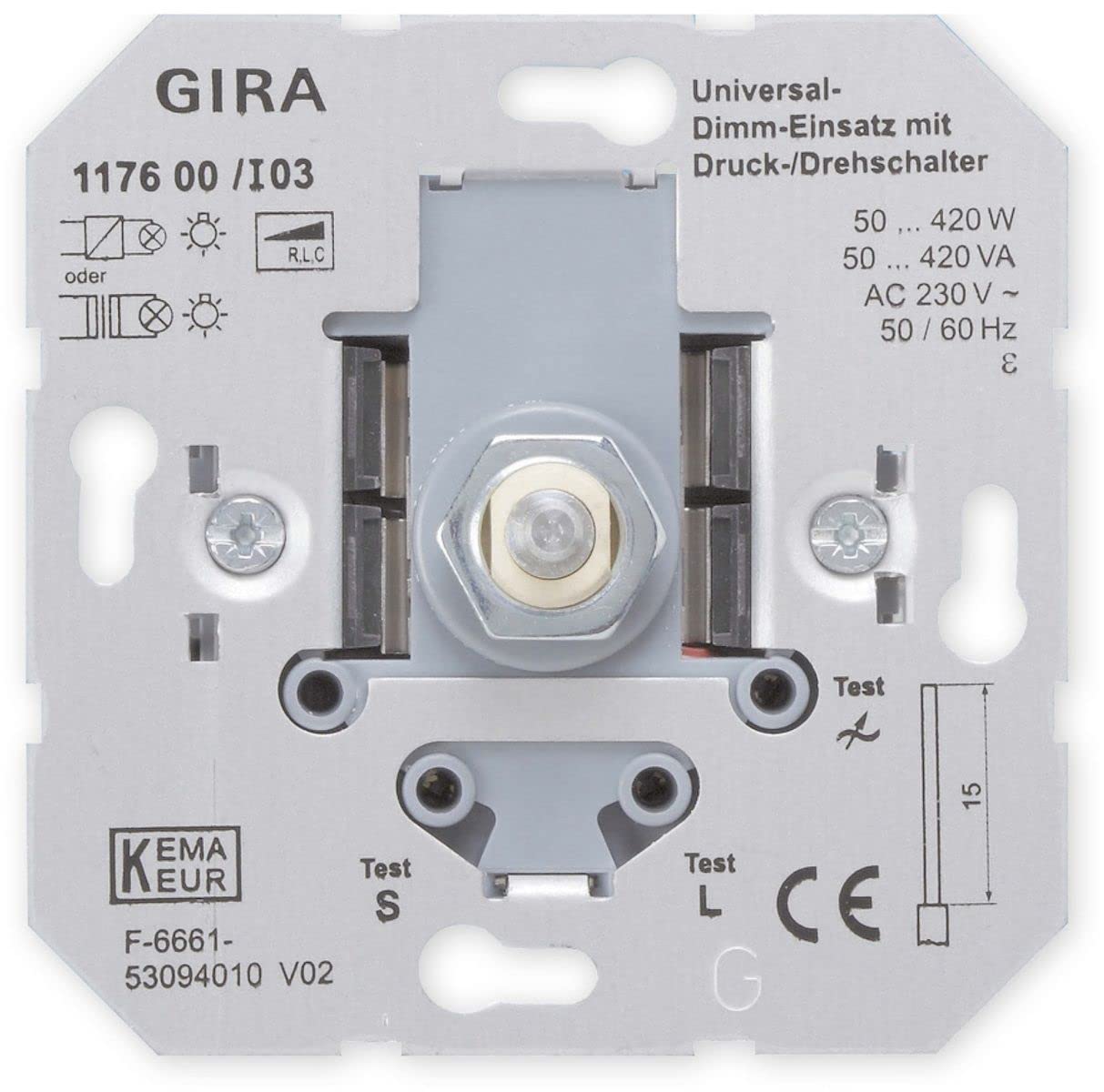
Image 1.1: The Gira 117600 Universal Dimmer Insert, a compact electrical component designed for integration into a wall switch system.
2. Setup and Installation
WARNING: Installation of this device involves working with mains electricity. For your safety, installation should only be performed by a qualified electrician in accordance with local wiring regulations and standards. Always switch off the main power supply before beginning any installation work.
The Gira 117600 dimmer insert is designed for integration into a standard flush-mounted box. Follow the wiring diagram provided with the product packaging for correct connection.
Installation Steps (General Guidance):
- Disconnect Power: Ensure the main power supply to the circuit is switched off at the consumer unit/fuse box. Verify with a voltage tester.
- Prepare Wiring: Strip the ends of the electrical wires (phase, neutral, switched phase) according to the dimmer's terminal requirements.
- Connect Wires: Use the spring terminals to securely connect the wires to the dimmer insert. Refer to the specific wiring diagram for your setup.
- Mount Dimmer: Carefully place the dimmer insert into the flush-mounted box.
- Install Cover Plate: Attach the appropriate Gira cover frame and operating element (push/rotary knob) to the dimmer insert.
- Restore Power: Switch the main power supply back on.
Important Considerations:
- Do not connect capacitive loads (e.g., Gira Tronic transformers) and inductive loads (e.g., conventional transformers) simultaneously to the universal dimmer insert.
- An extension control is possible by connecting up to 5 extension inserts (e.g., Gira 1177 00). The maximum cable length between the main dimmer and the last extension should not exceed 100 meters.
- Ensure the total connected load (W/VA) does not exceed the dimmer's maximum switching capacity.
3. Operating Instructions
The Gira 117600 dimmer insert is operated via a compatible push/rotary control element (not included with the insert itself).
- Switching On/Off: Press the rotary knob briefly to switch the connected lights on or off.
- Dimming: Rotate the knob clockwise to increase the light intensity and counter-clockwise to decrease it.
- Soft Start: When switched on, the dimmer features a soft start function, gradually increasing the light intensity to the last set level, which helps to prolong the life of the light sources.
4. Maintenance
The Gira 117600 dimmer insert is designed for long-term, maintenance-free operation once correctly installed.
- Cleaning: To clean the visible operating element (rotary knob and frame), use a soft, damp cloth. Do not use abrasive cleaners, solvents, or harsh chemicals, as these can damage the surface.
- Internal Components: Do not attempt to open or service the dimmer insert yourself. There are no user-serviceable parts inside.
5. Troubleshooting
If you experience issues with your Gira 117600 dimmer, please review the following common problems and solutions:
- Lights do not turn on:
- Check if the main power supply is on.
- Verify that the light bulb(s) are functional and correctly installed.
- Ensure the dimmer is correctly wired according to the installation instructions.
- The dimmer may have activated its electronic short-circuit protection. Disconnect the load, check for short circuits, and then reconnect.
- Lights do not dim or dim incorrectly:
- Confirm that the connected light sources are dimmable.
- Check if the total wattage/VA of the connected lights is within the dimmer's specified range (50-420 W/VA).
- Ensure that capacitive and inductive loads are not connected simultaneously.
- Dimmer feels hot:
- The dimmer has automatic overheating protection. If it becomes too hot, it will reduce power or switch off. This usually indicates an overload or insufficient ventilation.
- Reduce the connected load or ensure adequate air circulation around the dimmer.
If problems persist, consult a qualified electrician or contact Gira customer support.
6. Specifications
| Parameter | Value |
|---|---|
| Brand | Gira |
| Model Number | 117600 |
| Nominal Voltage | AC 230 V, 50/60 Hz |
| Switching Capacity | 50 - 420 W/VA |
| Number of Extensions | Max. 5 |
| Max. Cable Length (Main to Branch) | 100 meters |
| Special Features | Dimmable, Soft Start, Electronic Short-Circuit Protection, Automatic Overheating Protection |
| Color | Grey |
7. Warranty and Support
Warranty Information: Specific warranty terms and conditions for the Gira 117600 Universal Dimmer Insert are typically provided by the manufacturer (Gira) or the retailer at the time of purchase. Please refer to your purchase documentation or the official Gira website for detailed warranty information.
Customer Support: For technical assistance, installation queries, or troubleshooting beyond the scope of this manual, please contact Gira customer support or your authorized Gira dealer. Contact details can usually be found on the official Gira website (www.gira.com) or through your retailer.


