
1. Product Overview
The Honeywell TH8110U1003 Vision Pro 8000 is a universal programmable thermostat designed for precise temperature control in heating and cooling systems. It features an automatic/manual changeover and supports up to 1 Heat/1 Cool stages. This thermostat is compatible with R, RC, C, W, (O/B), Y, G, S1, S2 terminals.
Key Features:
- Effortless, Menu-Driven Programming: Simplifies the setup and adjustment of temperature schedules.
- 7-Day Programming: Allows for customized temperature settings for each day of the week.
- Large, Clear Backlit Digital Display: Ensures easy readability in various lighting conditions.
- Change/Check Reminders: Provides timely notifications for filter replacement, battery checks, and other maintenance tasks.
- Multiple HOLD Options: Offers flexibility to temporarily override the programmed schedule with temporary or vacation hold settings.
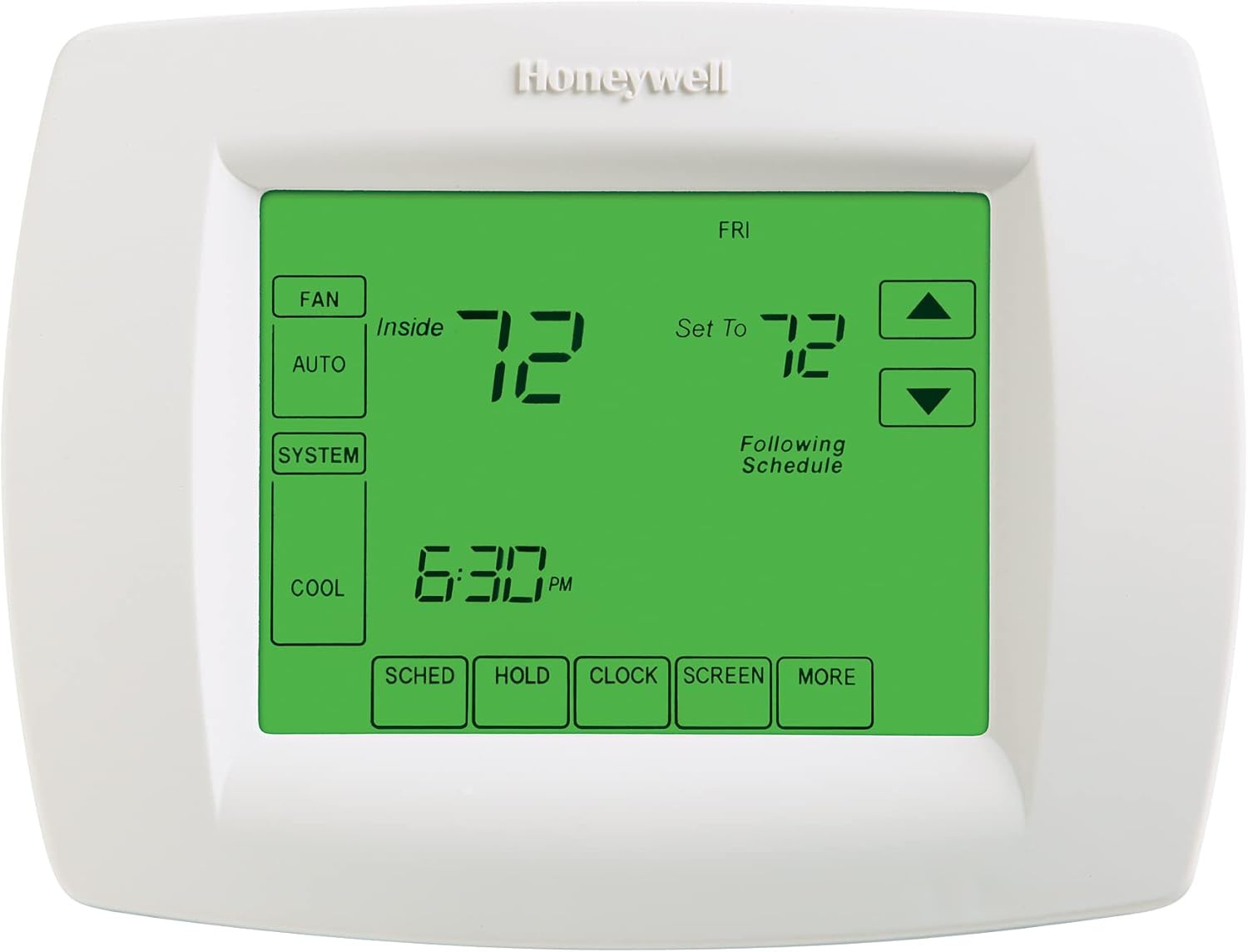
Image 1.1: Front view of the Honeywell Vision Pro 8000 Thermostat, showing the digital display in Cool mode with an indoor temperature of 72 degrees Fahrenheit.
2. Installation
Installation of the Honeywell TH8110U1003 thermostat involves mounting the unit and connecting the wiring. This thermostat operates on 24 volts and requires 3 AAA batteries for power. Ensure power to the HVAC system is turned off before beginning installation.
Wiring:
The thermostat supports R, RC, C, W, (O/B), Y, G, S1, S2 terminals. Refer to the wiring diagram provided with your specific HVAC system and the thermostat's installation guide for correct connections. A small 3mm screwdriver may be required for terminal connections.

Image 2.1: Rear view of the Honeywell Vision Pro 8000 Thermostat, illustrating the wiring terminal block for system connections.
Power Source:
The thermostat is primarily powered by your HVAC system (24V). Three AAA batteries are required for backup power and to maintain settings during power outages. Ensure fresh batteries are installed upon initial setup and replaced as indicated by the thermostat's reminders.
3. Operation
The Vision Pro 8000 thermostat features a menu-driven interface for easy navigation and programming.
Setting the Schedule:
Utilize the 7-day programming feature to set distinct temperature schedules for each day. Access the "SCHED" button on the display to enter programming mode and follow the on-screen prompts to adjust time and temperature settings for different periods (e.g., Wake, Leave, Return, Sleep).

Image 3.1: Front view of the Honeywell Vision Pro 8000 Thermostat, showing the digital display in Heat mode with an indoor temperature of 65 degrees Fahrenheit.
HOLD Options:
- Temporary Hold: Press the "HOLD" button and adjust the temperature. The thermostat will maintain this temperature until the next scheduled program period.
- Permanent Hold (Vacation Hold): Press the "HOLD" button multiple times or follow on-screen instructions to set a permanent hold or a hold for a specified duration (e.g., vacation). This overrides the schedule until manually cancelled.
System Modes:
The thermostat typically offers modes such as Heat, Cool, Auto (automatic changeover between heating and cooling), and Off. Select the desired mode using the "SYSTEM" button on the display.
Fan Operation:
Fan settings usually include Auto (fan runs only when heating or cooling is active) and On (fan runs continuously). Use the "FAN" button to cycle through options.
4. Maintenance
Regular maintenance ensures optimal performance and longevity of your thermostat and HVAC system.
Battery Replacement:
The thermostat will display a low battery indicator when the three AAA batteries need replacement. Replace all three batteries simultaneously with fresh alkaline batteries to ensure proper operation and prevent data loss during power outages.
Filter Change Reminders:
The thermostat can be programmed to remind you when to change your HVAC system's air filter. Follow the on-screen prompts to reset the reminder after changing the filter.
5. Troubleshooting
This section addresses common issues you might encounter with your Honeywell Vision Pro 8000 thermostat.
- Display is Blank: Check if the 24V power supply to the thermostat is active. Ensure batteries are correctly installed and not depleted. Replace batteries if necessary.
- System Not Responding (No Heating/Cooling): Verify the system mode (Heat, Cool, Auto) is correctly selected. Check circuit breakers for your HVAC system. Ensure wiring connections are secure.
- Temperature Inaccuracy: Ensure the thermostat is not exposed to direct sunlight, drafts, or heat sources that could affect its temperature sensor.
- Touchscreen Responsiveness: If the touchscreen becomes unresponsive or flaky, try removing and reinserting the batteries to perform a soft reset. If the issue persists, consult the full product manual or contact support.
- Loud Clicking Sound: The thermostat uses internal relays to switch your HVAC system on and off. A clicking sound is normal operation. If the sound is excessively loud or frequent, ensure the "Cycles Per Hour (CPH)" setting is appropriate for your system (refer to advanced settings in the full manual).
- Frequent Cycling: If your system turns on and off too frequently, adjust the "Cycles Per Hour (CPH)" setting in the installer setup menu. A lower CPH value will result in longer, less frequent cycles.
6. Specifications
| Feature | Detail |
|---|---|
| Brand | Honeywell Home |
| Model Number | TH8110U1003 |
| Controller Type | Hand Control |
| Special Feature | Programmable |
| Color | Premier White |
| Specific Uses For Product | Furnace |
| Temperature Control Type | Heating and Cooling |
| Connectivity Technology | Wi-Fi (Note: Product description mentions Wi-Fi, but other specs like "Button Control" and "Remote" might imply a different model or feature set. Please verify Wi-Fi functionality with product packaging or official documentation if critical.) |
| Power Source | Battery Powered (3 AAA batteries required) |
| Voltage | 24 Volts |
| Display Type | Digital |
| Control Type | Button Control |
| Mounting Type | Wall Mount |
| Backlight | Yes |
| Item Weight | 1.12 pounds |
| Product Dimensions | 2 x 7.5 x 5.5 inches |

Image 6.1: Excerpt from the Honeywell Vision Pro 8000 Product Data Sheet (Document 69-1894EFS-01), detailing features and application information. For complete specifications, refer to the full document.
A full product data sheet can be found here (external link, verify content).
7. Warranty and Support
For warranty information and technical support regarding your Honeywell TH8110U1003 Vision Pro 8000 Digital Thermostat, please refer to the documentation included with your product or visit the official Honeywell Home support website. As this model may be considered a contractor-grade product, direct end-user support might vary. It is recommended to consult with your installer or an authorized HVAC technician for complex issues.
For general inquiries or to locate official support resources, please visit the Honeywell Home website.