
1. Introduction
Thank you for choosing the TFA Dostmann Digital Roast Thermometer 14.1500. This device is designed to accurately measure the internal temperature of food during cooking, ensuring optimal results for roasts, steaks, poultry, and other dishes. It features adjustable alarm limits, a timer, and a stopwatch function for versatile use in your kitchen.
Please read this manual carefully before using the device to ensure proper operation and to maintain its longevity.
2. Product Overview
The TFA Dostmann Digital Roast Thermometer 14.1500 consists of the main display unit and a stainless steel probe with a heat-resistant cable. Key features include:
- Digital display for clear temperature readings.
- High-quality stainless steel probe with a 1-meter heat-resistant cable.
- Adjustable upper and lower temperature alarm limits.
- Integrated clock, timer, and stopwatch functions.
- Magnetic attachment and stand for flexible placement.

Image: The main display unit of the TFA Dostmann Digital Roast Thermometer 14.1500 with its stainless steel probe and cable.

Image: Examples of various food items such as fries, soup, fish, bread, steak, and tea, illustrating the versatile applications of the thermometer in food preparation.
3. Setup
3.1 Battery Installation
- Locate the battery compartment on the back of the main unit.
- Open the compartment cover.
- Insert 1 x 1.5V AAA battery, ensuring correct polarity (+/-).
- Close the battery compartment cover securely.
The device will power on automatically once the battery is inserted. There is no dedicated on/off button; to turn off, remove the battery.
3.2 Probe Connection
Connect the stainless steel probe cable to the designated port on the main unit. Ensure the connection is firm.
4. Operating Instructions
4.1 Temperature Measurement
- Insert the stainless steel probe into the thickest part of the food, avoiding bone.
- Place the food in the oven or on the grill. Ensure the heat-resistant cable is routed safely and not pinched.
- Position the main unit outside the oven/grill, using its magnetic back to attach it to a metal surface or the integrated stand for tabletop use.
- The current internal temperature will be displayed on the screen.
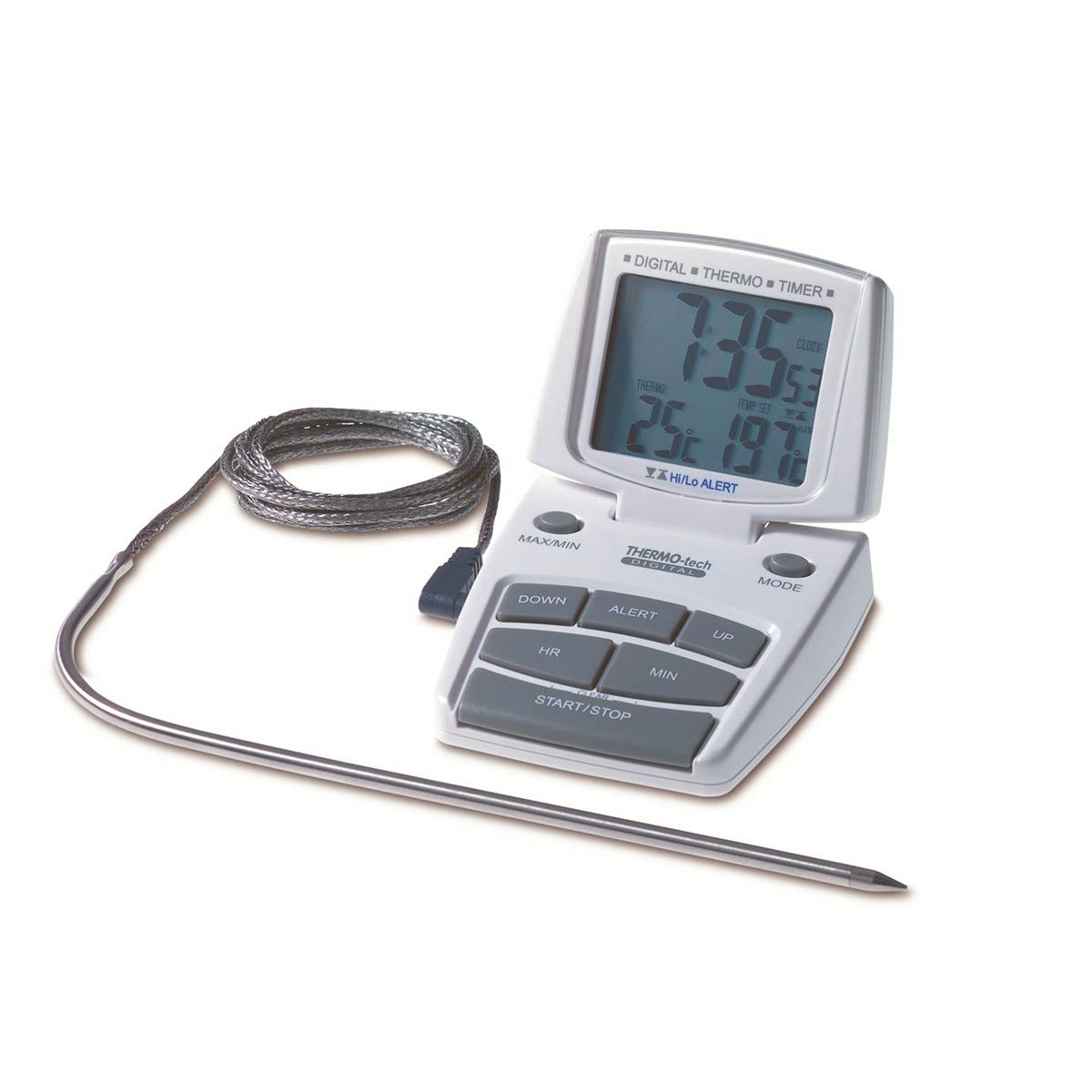
Image: The TFA Dostmann Digital Roast Thermometer 14.1500 main unit attached to an oven, with its probe inserted into a roast inside the oven.
4.2 Setting Temperature Alarms
The device allows you to set both an upper and a lower temperature limit. An alarm will sound when the measured temperature reaches or exceeds the upper limit, or falls below the lower limit.
- Press the "SET" button to enter alarm setting mode.
- Use the "UP" and "DOWN" buttons to adjust the desired upper temperature limit.
- Press "SET" again to confirm the upper limit and move to the lower limit setting (if applicable).
- Adjust the lower temperature limit using "UP" and "DOWN".
- Press "SET" to exit alarm setting mode.
4.3 Using the Timer and Stopwatch
The thermometer includes a built-in timer and stopwatch function for additional cooking control.
- Timer: Press the "MODE" button to switch to timer mode. Use the "SET", "UP", and "DOWN" buttons to set the desired countdown time. Press "START/STOP" to begin or pause the countdown. An alarm will sound when the timer reaches zero.
- Stopwatch: In stopwatch mode (accessible via "MODE"), press "START/STOP" to begin counting up. Press again to pause. Press "RESET" to clear the stopwatch.
- Clock: The device also displays the current time. Refer to the full instruction manual for setting the clock.
5. Maintenance
To ensure the longevity and accuracy of your thermometer, follow these maintenance guidelines:
- Cleaning: Wipe the main unit with a soft, damp cloth. Do not immerse the main unit in water. The stainless steel probe can be cleaned with warm soapy water. Ensure the probe connector is dry before reattaching to the main unit.
- Storage: Store the device in a dry place at room temperature when not in use.
- Battery: If the device will not be used for an extended period, remove the battery to prevent leakage.
6. Troubleshooting
- No display/Device not turning on:
- Check if the battery is inserted correctly with the right polarity.
- Replace the battery with a new 1.5V AAA battery.
- Inaccurate temperature readings:
- Ensure the probe is fully inserted into the thickest part of the food and not touching bone or the cooking vessel.
- Verify the probe cable is securely connected to the main unit.
- Avoid exposing the main unit directly to high heat or steam.
- If readings fluctuate significantly, ensure the probe tip is fully immersed in the substance being measured and that there are no drafts or rapid temperature changes around the probe.
- Alarm not sounding:
- Check if the alarm limits are set correctly.
- Ensure the volume is not muted (if applicable, refer to the full manual for specific models).
If you continue to experience issues, please refer to the full instruction manual or contact customer support.
7. Specifications
- Model: 14.1500
- Temperature Measuring Range: -10°C to +200°C (+14°F to +392°F)
- Resolution: 1°C
- Response Time: Approximately 60 seconds
- Probe Material: Stainless Steel
- Cable Length: 1 meter
- Power Source: 1 x 1.5V AAA battery (included)
- Dimensions: 68 x 22 (76) x 121 (70) mm (Length x Width x Height)
- Weight: 88 g
- Material: Plastic, Stainless Steel
- Special Features: High precision, large display, adjustable alarm limits, timer, stopwatch, magnetic attachment, stand.
8. Warranty and Support
TFA Dostmann products are manufactured with high-quality standards. For warranty information or technical support, please refer to the complete documentation included with your product or visit the official TFA Dostmann website. You may also contact your retailer for assistance.
Please retain your proof of purchase for any warranty claims.


