
BOYO VISION VTM600M
Boyo VTM600M Rear View Mirror with 6-Inch LCD User Manual
Model: VTM600M
1. Introduction
This user manual provides comprehensive instructions for the installation, operation, and maintenance of your BOYO VISION VTM600M Rear View Mirror with 6-Inch LCD. Please read this manual thoroughly before using the product to ensure proper functionality and safety.
2. Safety Information
Always observe the following safety precautions to prevent injury or damage to the product:
- Ensure professional installation if you are not familiar with automotive electrical systems.
- Do not attempt to disassemble or modify the unit. This may void the warranty and cause damage.
- Keep the mirror and screen clean to ensure clear visibility.
- This device is intended as an aid and should not replace careful driving and proper use of your vehicle's standard mirrors.
- Operating temperature range: -20°C to +65°C. Avoid extreme temperatures.
3. Product Overview
3.1 Features
- 6-inch Color TFT LCD display.
- Definition: 1200(W) x 234(H) pixels.
- System compatibility: PAL/NTSC.
- Includes remote control for convenient operation.
- Two AV inputs for connecting multiple video sources.
- Automatic reverse gear shift display function.
- Power consumption: 8W Max.
- Nominal Voltage: 9-15V.
3.2 Components
The BOYO VTM600M unit includes the main mirror assembly with integrated LCD, a remote control, and necessary wiring for installation.
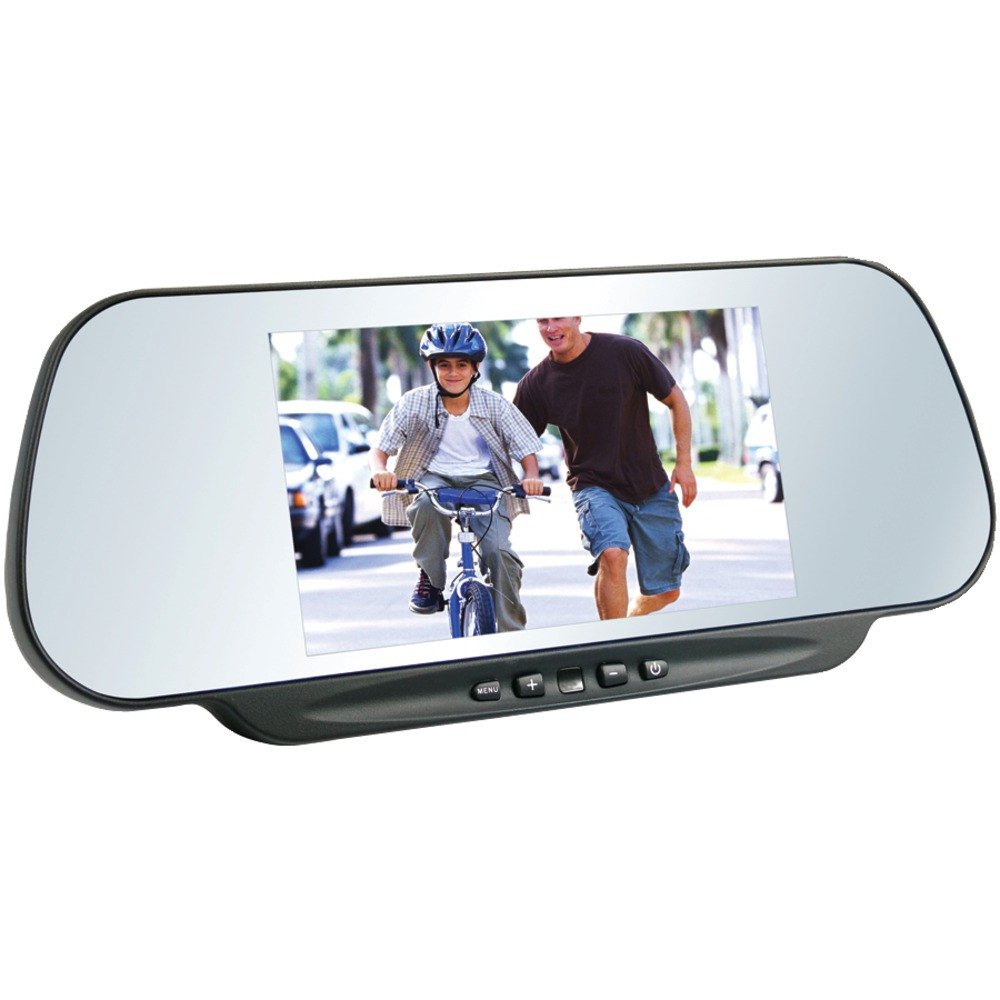
Figure 1: BOYO VTM600M Rear View Mirror with 6-Inch LCD. The image shows the mirror with its integrated 6-inch LCD screen displaying a scene of a child riding a bicycle with an adult walking alongside. Control buttons for menu, volume, and power are visible at the bottom of the mirror frame.
4. Setup and Installation
Installation of the VTM600M should ideally be performed by a qualified automotive technician. Incorrect installation can lead to damage to the unit or vehicle electrical system.
4.1 Mounting
The mirror is designed for windshield mount. Ensure the mounting location provides clear visibility and does not obstruct the driver's view or airbag deployment.
4.2 Wiring Connections
The unit requires connection to your vehicle's 9-15V power supply. It features two AV inputs for video sources, typically one for a rear-view camera and another for an auxiliary video input. A trigger wire is usually connected to the reverse light circuit to enable automatic display of the rear-view camera when the vehicle is in reverse.
- Power (Red Wire): Connect to a switched 12V power source.
- Ground (Black Wire): Connect to a vehicle chassis ground.
- Reverse Trigger (Green/Blue Wire - typical): Connect to the vehicle's reverse light positive wire.
- AV1/AV2 Inputs (Yellow RCA): Connect your video sources (e.g., backup camera, DVD player).
5. Operating Instructions
5.1 Basic Operation
The VTM600M can be controlled via the buttons located on the bottom of the mirror frame or using the included remote control.
- Power Button (⏻): Press to turn the LCD display on or off. The mirror functions as a standard rear-view mirror when the display is off.
- MENU Button: Press to access the on-screen display (OSD) menu for adjusting settings.
- '+' Button: Used to increase values or navigate up/right in the OSD menu.
- '-' Button: Used to decrease values or navigate down/left in the OSD menu.
- Source/Mode Button: Used to switch between AV1 and AV2 inputs.
5.2 Automatic Reverse Shift
When properly wired, the display will automatically activate and show the video feed from the connected rear-view camera when the vehicle is shifted into reverse gear. The display will return to its previous state (off or other AV input) when the vehicle is taken out of reverse.
6. Maintenance
6.1 Cleaning the Mirror and Screen
To clean the mirror surface and LCD screen, use a soft, lint-free cloth. For stubborn smudges, dampen the cloth slightly with a mild, non-abrasive glass cleaner. Do not spray cleaner directly onto the unit.
6.2 General Care
Avoid exposing the unit to direct sunlight for prolonged periods when not in use, as this can affect the lifespan of the display and plastic components. Ensure the mirror is securely mounted and does not vibrate excessively during driving.
7. Troubleshooting
If you encounter issues with your VTM600M, please refer to the following common problems and solutions:
| Problem | Possible Cause | Solution |
|---|---|---|
| No image on screen. | No power; incorrect video input selected; loose video cable; faulty camera. | Check power connections. Ensure correct AV input is selected. Verify video cable connections. Test camera if possible. |
| Image is washed out or difficult to see in daylight. | High ambient light; screen brightness settings. | This is a common characteristic of LCDs in direct sunlight. Adjust brightness/contrast via OSD menu. Consider a sunshade if possible. |
| Image is grainy or unclear at night. | Low light conditions; camera sensitivity; screen settings. | Ensure your camera has good low-light performance. Adjust screen brightness/contrast. |
| Mirror position shifts during driving. | Mounting bracket loose; excessive vibration. | Tighten mounting screws. Ensure the mounting surface is stable. |
| Remote control not working. | Dead battery; obstructed signal; remote sensor blocked. | Replace remote battery. Ensure line of sight to the mirror's IR sensor. |
8. Specifications
| Attribute | Detail |
|---|---|
| Model Number | VTM600M |
| Display Technology | 6-inch Color TFT LCD |
| Resolution | 1200(W) x 234(H) pixels |
| System | PAL/NTSC |
| Nominal Voltage | 9-15V |
| Power Consumption | 8W Max |
| Control Method | Push Button or Remote Control |
| Working Environment Temperature | -20°C ~ +65°C |
| Dimensions (L x W x H) | 12.2 x 3.5 x 8.8 inches |
| Item Weight | 1.9 Pounds |
| Mounting Type | Windshield Mount |
| Lens Curvature | Convex |
9. Warranty and Support
For warranty information, technical support, or service inquiries, please contact BOYO VISION directly or refer to their official website. Keep your purchase receipt as proof of purchase for warranty claims.
You can visit the official BOYO VISION store for more information: BOYO VISION Store
Related documentsVTM600M


Ask a question about this manual
Ask about setup, troubleshooting, compatibility, parts, safety, or missing instructions. Manuals+ will review the question and use this page’s manual context to help answer it.