
1. Introduction
This manual provides detailed instructions for the installation, setup, operation, and maintenance of your ADEL LA9-388 Fingerprint Keypad Lockset. This advanced lock system offers multiple access methods including fingerprint recognition, keypad PIN entry, and traditional mechanical key access, ensuring enhanced security and convenience for residential and commercial applications. Please read this manual thoroughly before installation and use to ensure proper function and longevity of your lockset.
2. Safety Information
- Do not attempt to disassemble or modify the lockset. Unauthorized modifications may void the warranty and compromise security.
- Ensure all components are installed correctly according to the instructions to prevent malfunction.
- Keep mechanical keys in a secure location away from the lockset.
- Avoid exposing the lockset to extreme temperatures, direct sunlight for prolonged periods, or corrosive substances.
- Replace batteries promptly when the low battery indicator appears to avoid loss of function.
3. Package Contents
Verify that all components are present before beginning installation:
- ADEL LA9-388 Fingerprint Keypad Lockset (Front and Rear Assemblies)
- Mortise Latch
- Strike Plate
- Mounting Screws
- Mechanical Keys (2-3)
- Keycap Puller (for battery compartment access)
- Installation Template
- User Manual (this document)
4. Product Overview
The ADEL LA9-388 lockset integrates advanced security features with user-friendly access. It features a robust satin chrome finish and is designed for left-hand door configurations.
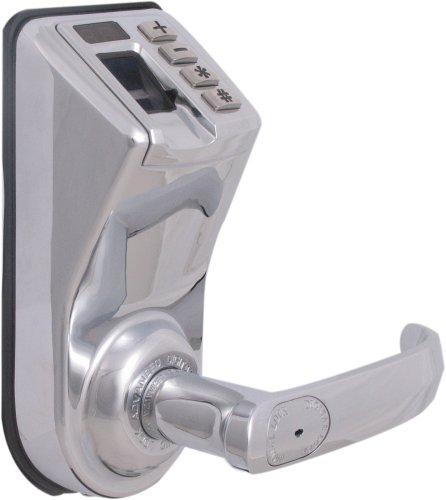
Figure 4.1: ADEL LA9-388 Fingerprint Keypad Lockset
This image displays the ADEL LA9-388 Fingerprint Keypad Lockset. The lock features a satin chrome finish. Visible components include the fingerprint scanner, a four-button keypad (+, -, *, #), an LCD display, and the door handle with a keyhole. The design is sleek and modern, suitable for residential and commercial doors.
Key Features:
- Fingerprint Recognition: Stores up to 99 unique fingerprints, each assigned a number (00-99) displayed on the LCD.
- Keypad Access: Secure PIN code entry.
- Mechanical Key Override: Traditional key access for emergency or backup.
- Infrared Detector: Automatically activates the fingerprint scanner upon sensing a finger.
- LCD Readout: Provides user feedback and programming guidance.
- Easy Installation: Designed for straightforward setup with minimal wiring.
5. Installation
The ADEL LA9-388 lockset is designed for easy installation, typically requiring only one wire connection. Follow these general steps:
- Prepare the Door: Use the provided template to mark and drill holes on the door if necessary. Ensure the door thickness and backset are compatible with the lockset.
- Install the Mortise Latch: Insert the latch into the edge of the door and secure it with screws.
- Install the Front Assembly: Position the exterior part of the lockset, ensuring the spindle and cable pass through the door holes.
- Connect Wiring: Connect the single wire from the front assembly to the rear assembly. Ensure the connection is secure.
- Install the Rear Assembly: Mount the interior part of the lockset, aligning it with the front assembly and securing it with mounting screws.
- Install Batteries: Open the battery compartment (usually on the interior side) and insert the required batteries (e.g., 4 AA batteries).
- Test Operation: After installation, test the mechanical key, keypad, and fingerprint functions to ensure smooth operation before closing the door.
Refer to the detailed diagrams in the printed manual for precise hole placement and component orientation.
6. Setup and Programming
The lockset requires initial setup to register fingerprints and PIN codes. The LCD readout will guide you through the programming process.
6.1. Initializing the Lockset
Upon first power-up or after a factory reset, the lockset may require initialization. Follow the on-screen prompts on the LCD.
6.2. Registering Fingerprints
The lock can store up to 99 fingerprints, each assigned a unique ID from 00 to 99.
- Press the + button to enter programming mode.
- Follow the LCD instructions to select 'Add Fingerprint'.
- Place your finger on the scanner when prompted. You will need to lift and place your finger multiple times for accurate registration.
- The LCD will display the assigned fingerprint ID (e.g., 'FP 01'). Note this ID for future reference.
- Repeat for additional fingerprints.
6.3. Setting PIN Codes
You can set multiple PIN codes for keypad access.
- Press the + button to enter programming mode.
- Follow the LCD instructions to select 'Add PIN Code'.
- Enter your desired PIN (typically 6-10 digits) and confirm it.
- The LCD will confirm successful PIN registration.
6.4. Deleting Fingerprints or PINs
To remove a registered fingerprint or PIN:
- Press the - button to enter deletion mode.
- Select 'Delete Fingerprint' or 'Delete PIN Code' from the LCD menu.
- Enter the specific fingerprint ID or PIN code you wish to delete.
- Confirm deletion when prompted.
7. Operation
Operating the ADEL LA9-388 lockset is straightforward once programmed.
7.1. Unlocking with Fingerprint
- Place a registered finger on the fingerprint scanner. The infrared detector will sense your finger and activate the scanner.
- If the fingerprint is recognized, the lock will unlock, and the handle can be turned.
- The lock will automatically re-lock after a few seconds or upon closing the door, depending on the setting.
7.2. Unlocking with PIN Code
- Press any button on the keypad to activate it.
- Enter your registered PIN code followed by the # button.
- If the PIN is correct, the lock will unlock.
7.3. Unlocking with Mechanical Key
In case of battery depletion or electronic malfunction, the mechanical key provides emergency access.
- Insert the mechanical key into the keyhole on the exterior handle.
- Turn the key to unlock the door.
7.4. Locking the Door
The lockset typically features an auto-locking mechanism. Ensure the door is fully closed for the lock to engage.
8. Maintenance
Regular maintenance ensures optimal performance and extends the lifespan of your lockset.
- Battery Replacement: When the low battery indicator appears on the LCD, replace all batteries promptly. Use high-quality alkaline batteries. To access the battery compartment, you may need to use the provided keycap puller or follow specific instructions for your model.
- Cleaning: Wipe the lockset's exterior with a soft, dry cloth. Avoid abrasive cleaners, solvents, or harsh chemicals that could damage the finish or electronic components.
- Fingerprint Scanner: Keep the fingerprint scanner clean and free of dirt or moisture for accurate recognition.
9. Troubleshooting
If you encounter issues with your ADEL LA9-388 lockset, refer to the following common problems and solutions:
| Problem | Possible Cause | Solution |
|---|---|---|
| Lock does not respond. | Dead batteries. | Replace batteries. Use mechanical key for access. |
| Fingerprint not recognized. | Finger not placed correctly; dirty scanner; unregistered fingerprint. | Ensure finger is clean and dry. Place finger firmly and completely on scanner. Clean scanner surface. Re-register fingerprint if necessary. |
| Keypad not responding. | Incorrect PIN; keypad not activated. | Ensure correct PIN is entered. Press any button to activate keypad before entering PIN. |
| Lock does not engage/disengage. | Misalignment; obstruction; mechanical issue. | Check door alignment and ensure no obstructions. Verify installation. If issue persists, contact support. |
| LCD display is blank. | Batteries are dead or incorrectly installed. | Check battery orientation and replace if necessary. |
10. Specifications
| Feature | Detail |
|---|---|
| Brand | Adel |
| Model Number | LA9-388 |
| Lock Type | Fingerprint, Keypad, Key |
| Material | Chrome |
| Finish Type | Polished, Satin Chrome |
| Controller Type | Finger Print Control |
| Control Method | Touch |
| Fingerprint Capacity | Up to 99 |
| Recommended Uses | Residential Doors, Commercial Doors |
| Item Weight | 2.83 kg (approx. 6.24 lbs) |
| UPC | 898032001023 |
11. Warranty and Support
The ADEL LA9-388 Fingerprint Keypad Lockset comes with a 1-Year Warranty from the date of purchase. This warranty covers manufacturing defects and malfunctions under normal use. Please retain your proof of purchase for warranty claims.
For technical support, warranty claims, or further assistance, please contact your retailer or the manufacturer's customer service department. Contact information can typically be found on the product packaging or the official Adel website.


