

Introduction
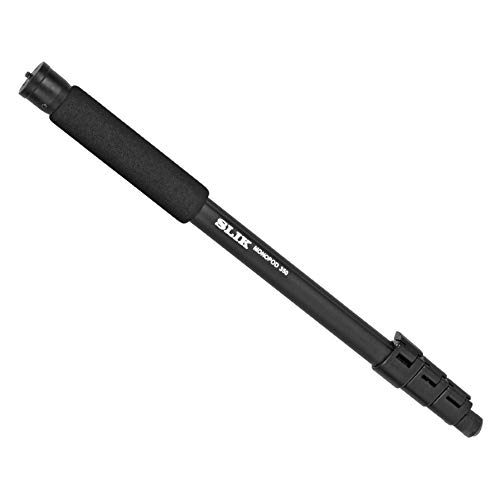
The Kenko Slik Monopod 350 is a lightweight and versatile camera support designed for photographers seeking stability and portability. Constructed from aluminum, this monopod is suitable for use with lighter weight DSLRs, mirrorless interchangeable lens cameras (ILC), and compact cameras. Its design emphasizes quick setup and breakdown, making it an ideal tool for various shooting environments.
This manual provides essential information on how to properly set up, operate, and maintain your Slik Monopod 350 to ensure optimal performance and longevity.
Product Features
- Lightweight Aluminum Construction: Ensures portability without compromising stability.
- Soft Padded Grip: Provides comfortable and secure handling.
- Grooved Tubular Legs: Prevents individual leg sections from rotating during adjustment.
- Speed Release Leg Locks: Facilitates fast and easy setup and retraction.
- Compact Folded Length: Retracts to 20 inches for convenient transport.
- Extended Height: Reaches up to 63 inches for versatile shooting angles.
Setup
Follow these steps to set up your Slik Monopod 350:
- Unfolding the Monopod: Hold the monopod by the padded grip. Release the speed release leg locks on each section. Gently pull each leg section downwards until fully extended. Securely close each leg lock to prevent collapse.
- Adjusting Height: To adjust the monopod's height, open the speed release leg locks, extend or retract the leg sections to your desired height, and then firmly close the locks. Ensure all locks are engaged before attaching your camera.
- Attaching Your Camera: Locate the mounting screw at the top of the monopod. Carefully align your camera's tripod socket with the screw and rotate your camera clockwise until it is securely fastened. Do not overtighten.


Operating
Proper operation of your monopod enhances stability and image quality:
- Holding the Monopod: Grip the monopod firmly by the soft padded handle. For maximum stability, position the monopod directly beneath the camera's center of gravity.
- Achieving Stability: Lean the monopod slightly forward or backward, or to the side, and use your body as a third point of contact. This creates a stable triangle, significantly reducing camera shake.
- Movement: The monopod allows for quick repositioning and panning, making it suitable for dynamic shooting situations where a tripod might be too cumbersome.
- Compatible Devices: This monopod is designed for lighter weight DSLRs, mirrorless interchangeable lens cameras (ILC), and compact cameras. Ensure your camera's weight does not exceed the monopod's capacity for safe operation.
Maintenance
Regular maintenance helps preserve your monopod's condition:
- Cleaning: After use, especially in dusty or sandy environments, wipe down the monopod with a soft, dry cloth. For stubborn dirt, a slightly damp cloth can be used, followed by immediate drying.
- Lubrication: The leg locks and moving parts are generally maintenance-free. Avoid applying lubricants unless specifically recommended by the manufacturer, as this can attract dirt.
- Storage: Store the monopod in a clean, dry place, away from extreme temperatures and humidity. Ensure it is fully retracted before storage to protect the leg sections.
- Inspection: Periodically check all screws and connections to ensure they are tight. Do not overtighten.
Troubleshooting
If you encounter issues with your monopod, consider the following:
- Leg Sections Not Extending/Retracting Smoothly: Ensure the speed release leg locks are fully open before attempting to extend or retract. Check for any debris or foreign objects lodged within the leg sections. Clean as per maintenance instructions.
- Camera Not Stable: Verify that the camera is securely attached to the mounting screw and that all leg locks are firmly closed. Ensure the monopod is positioned correctly to provide adequate support.
- Loose Parts: If any part feels loose, gently check for screws that may need tightening. Do not force any components. If a part is broken, contact customer support.
Specifications
| Feature | Specification |
|---|---|
| Brand | Kenko |
| Model Number | Monopod 350 |
| Material | Aluminium |
| Color | Black |
| Item Weight | 350 g |
| Extended Height | 63 inches (approx. 160 cm) |
| Folded Length | 20 inches (approx. 51 cm) |
| Compatible Devices | Lighter weight DSLRs, mirrorless interchangeable lens cameras (ILC), compact cameras |
| Manufacturer | SLIK Corporation |
| Country of Origin | Thailand |
Warranty and Support
For warranty information, please refer to the documentation provided with your purchase or contact your retailer. Specific warranty terms may vary by region and retailer.
For technical support or inquiries, please contact the manufacturer, SLIK Corporation, or the official importer in your region, Kenko Tokina Imaging India Pvt Ltd.