
1. Introduction
This manual provides essential information for operating your Canon PowerShot S5 IS digital camera. Please read it thoroughly to ensure proper use and to maximize your camera's capabilities. The PowerShot S5 IS is an 8.0-megapixel digital camera featuring a 12x optical zoom lens with optical image stabilization, a vari-angle LCD, and advanced shooting modes.

Figure 1.1: Front view of the Canon PowerShot S5 IS digital camera.
2. Setup
2.1 Installing Batteries
The PowerShot S5 IS requires four AA batteries. Ensure the batteries are inserted with the correct polarity as indicated inside the battery compartment.
2.2 Inserting a Memory Card
Open the memory card slot cover. Insert a compatible SD/SDHC memory card until it clicks into place. Close the cover securely.
2.3 Initial Power On
Press the power button to turn on the camera. Follow any on-screen prompts to set the date, time, and language.
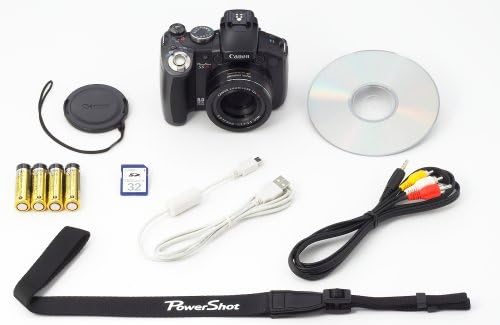
Figure 2.1: Contents of the Canon PowerShot S5 IS package.
3. Basic Operation
3.1 Taking Photos
- Power On: Press the POWER button.
- Select Mode: Rotate the mode dial to your desired shooting mode (e.g., Auto, Program).
- Frame Your Shot: Use the 2.5-inch vari-angle LCD or electronic viewfinder to compose your image.
- Focus: Press the shutter button halfway down to focus. The camera will beep and the focus frame will turn green when focus is achieved.
- Shoot: Press the shutter button fully to take the picture.
3.2 Using the Vari-Angle LCD
The 2.5-inch vari-angle LCD screen can be rotated and tilted to facilitate shooting from various angles, including high, low, or self-portrait positions. This is particularly useful for creative compositions or when shooting over crowds.

Figure 3.1: The vari-angle LCD screen in an articulated position.
3.3 Zoom Operation
The camera features a 12x optical zoom lens. Use the zoom lever located around the shutter button to zoom in (telephoto) or out (wide-angle). The ultrasonic motor drive ensures fast and quiet zooming.
3.4 Flash Modes
The built-in flash can be raised manually. Access flash settings through the FUNC. menu to select modes such as Auto, Fill-in, Slow Sync, or Flash Off. For more advanced lighting, the camera includes a hot shoe adapter for compatible Canon Speedlite EX Series external flashes.

Figure 3.2: Canon PowerShot S5 IS with the built-in flash raised.
4. Advanced Features
4.1 Shooting Modes
The PowerShot S5 IS offers 22 shooting modes, including 9 Special Scene Modes, to adapt to various photographic situations:
- Auto: Camera sets all parameters automatically.
- Program (P): Access advanced exposure compensation while shooting mostly automatically.
- Aperture-priority (Av): You define the aperture; camera sets shutter speed.
- Shutter-priority (Tv): You select the shutter speed; camera finds appropriate aperture.
- Manual (M): Full control over ISO, exposure compensation, and white balance.
- Custom (C): Define and store your own settings.
- Portrait: Blurs background to emphasize subject.
- Landscape: Sets small aperture for front-to-back sharpness.
- Sports: Ensures accurate autofocus for fast-moving subjects.
- Night Snapshot: Brighter backgrounds with flash-lit subjects.
- Super Macro: For extreme close-up photography.
- Stitch Assist: For creating panoramic images.
- Movie: Records video.
- Night Scene: Exposes background properly and uses slow-sync flash.
- Foliage: Optimizes for vibrant greens and autumn colors.
- Snow: Prevents darkened subjects or bluish tint in snow scenes.
- Beach: Clear shots of people at a sunny beach without darkened faces.
- Fireworks: Captures brilliant images of fireworks.
- Aquarium: Achieves proper flash-free exposure and natural hues at indoor aquariums.
- Indoor: Reduces blur and improves color accuracy when shooting handheld indoors.
- Color Accent: Retains a single color while others turn monochrome.
- Color Swap: Replaces a selected color with another specified color.
4.2 DIGIC III Image Processor and Face Detection
The DIGIC III Image Processor enhances image quality, camera efficiency, and battery life. It also powers Canon's improved Face Detection Technology, which automatically identifies faces in the frame to optimize focus, exposure, and flash settings for natural-looking portraits. Red-eye Correction can be applied during playback.
4.3 Optical Image Stabilization (IS)
Canon's Optical Image Stabilizer Technology automatically detects and corrects camera shake, reducing blur in photos, especially when using the zoom or shooting in low light. This feature works with or without flash and is also active during video recording.
4.4 External Flash Support
The integrated hot shoe adapter allows for the attachment of compatible Canon Speedlite EX Series external flashes (e.g., 220EX, 430EX, 580EX, 580EX II). This expands creative lighting options and can significantly improve results in challenging lighting conditions. Flash settings are controllable via the camera's LCD.

Figure 4.1: PowerShot S5 IS with an external Speedlite flash.
5. Video Recording
The PowerShot S5 IS can record movies with sound. To start recording, simply press the dedicated Movie button. Available video modes include:
- VGA (640 x 480 pixels): 30 frames per second (fps) or 30 fps LP (Long Play).
- QVGA (320 x 240 pixels): 60 fps or 30 fps.
Videos can be recorded for up to 1 hour or 4GB in size. The optical zoom and image stabilization function during video recording.
6. Printing and Connectivity
6.1 Direct Printing with Print/Share Button
The Print/Share button simplifies direct printing. Connect the camera to a compatible Canon CP, SELPHY, or PIXMA Photo Printer, or any PictBridge-compatible printer. Press the lighted Print/Share button to initiate printing. You can print ID photos in 28 sizes or multiple stills from a recorded movie using a Canon SELPHY printer.
6.2 Image Transfer to Computer
Use the Print/Share button to transfer images to a Windows or Macintosh computer. The camera supports USB 2.0 Hi-Speed for fast data transfer.
7. Maintenance
7.1 Cleaning the Camera
- Camera Body: Wipe with a soft, dry cloth. For stubborn dirt, use a cloth lightly dampened with water.
- Lens: Use a lens brush to remove dust, then gently wipe with a lens cleaning cloth. Avoid touching the lens surface with your fingers.
- LCD Screen: Use a soft, dry cloth.
7.2 Storage
When not in use for extended periods, remove the batteries and store the camera in a cool, dry, well-ventilated area, away from direct sunlight and extreme temperatures.
8. Troubleshooting
If you encounter issues with your camera, refer to the following common solutions:
- Camera does not power on: Check battery installation and charge level. Ensure the battery compartment is closed securely.
- Images are blurry: Ensure Optical Image Stabilization is enabled. Check focus. Use a higher shutter speed or tripod in low light.
- Flash does not fire: Check flash mode settings. Ensure the flash is raised if using the built-in flash.
- Memory card error: Reinsert the memory card. Try a different compatible memory card. Ensure the card is not locked.
For more detailed troubleshooting, please consult the comprehensive user manual available on the Canon support website.
9. Specifications
| Feature | Specification |
|---|---|
| Product Dimensions | 4.61 x 3.07 x 3.15 inches |
| Item Weight | 1.21 pounds |
| ASIN | B000Q3043Y |
| Item Model Number | 2077B001 |
| Batteries | 4 AA batteries required |
| Date First Available | May 7, 2007 |
| Manufacturer | Canon Cameras US |
| Compatible Mountings | Canon |
| Aspect Ratio | 1.27:1 |
| Photo Sensor Technology | CCD |
| Supported File Format | JPEG (Exif 2.2), AVI, DPOF, WAVE |
| Image Stabilization | Optical |
| Maximum Focal Length | 432 Millimeters |
| Optical Zoom | 12 x |
| Maximum Aperture | 2.8 Millimeters |
| Expanded ISO Minimum | 80 |
| Metering Description | Center Weighted |
10. What's in the Box
The standard package for the Canon PowerShot S5 IS includes:
- Canon PowerShot S5 IS Digital Camera
- Hot Shoe Adapter
- Lens Cap
- Neck Strap
- USB Cable
- AV Cable
- Software CD-ROM
- 4 AA-size Alkaline Batteries