
1. Introduction
This manual provides comprehensive instructions for the proper use and care of your Sakar Digital Concepts VGA Micro Digital Camera, Model 24282. This device functions as a 3-in-1 unit, capable of operating as a digital camera, a video camera, and a PC web camera. Please read this manual thoroughly before operating the device to ensure optimal performance and longevity.
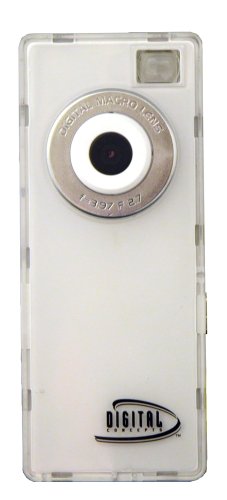
This image displays the white Digital Concepts VGA Micro Digital Camera, highlighting its compact design and key features such as 3-in-1 functionality (digital camera, PC web camera, video camera), ability to shoot video clips, store up to 102 photos, and facilitate video chat. The packaging also indicates the inclusion of PhoTags Photo Editing Software.
2. Setup
2.1 Unpacking and Initial Inspection
Carefully remove all components from the packaging. Verify that all items are present and undamaged. The package should contain the Digital Concepts VGA Micro Digital Camera and the PhoTags Photo Editing Software.
2.2 Powering the Device
The camera is powered by an internal battery. Connect the camera to a computer's USB port using a compatible VGA to USB cable (not explicitly listed as included, but implied for PC connection) to charge the internal battery. Ensure the connection is secure. A full charge is recommended before first use.
2.3 Software Installation
To utilize the full functionality of your camera, including photo editing and webcam features, install the included PhoTags Photo Editing Software on your computer. Follow the on-screen instructions provided with the software for installation.
2.4 Connecting to a Computer
To transfer images, videos, or use the camera as a webcam, connect the camera to your computer via the VGA interface. Ensure your computer has the necessary drivers installed, which are typically provided with the PhoTags software or available through your operating system's automatic updates.
3. Operating Instructions
3.1 Turning On/Off
Locate the power button on the camera. Press and hold the power button for approximately 3 seconds to turn the camera on. Repeat this action to turn the camera off.
3.2 Taking Photos
With the camera powered on, aim the lens at your subject. Press the shutter button firmly to capture a still image. The camera has a VGA resolution and can store approximately 102 photos internally.
3.3 Recording Videos
To record video clips, switch the camera to video mode (refer to the device's interface for mode selection). Press the record button to start recording and press it again to stop. Videos are recorded at 720p resolution at 30 frames per second (FPS) in AVI format.
3.4 Using as a Web Camera
Connect the camera to your computer. Once recognized by your operating system and the PhoTags software, select the camera as your video input device within your preferred video conferencing application. This allows for video chat functionality.
3.5 Transferring Images and Videos
Connect the camera to your computer. The camera's internal memory should appear as a removable drive. You can then drag and drop files to your computer. Alternatively, use the PhoTags Photo Editing Software for organized transfer and management of your media.
4. Maintenance
4.1 Cleaning the Camera
Use a soft, dry cloth to clean the camera body. For the lens, use a specialized lens cleaning cloth and solution to avoid scratches. Do not use abrasive cleaners or solvents.
4.2 Storage
Store the camera in a cool, dry place away from direct sunlight and extreme temperatures. Ensure the camera is turned off before storage. If storing for extended periods, periodically charge the battery to maintain its health.
5. Troubleshooting
- Camera does not turn on: Ensure the internal battery is sufficiently charged. Connect the camera to a USB power source and allow it to charge for at least 30 minutes before attempting to power it on again.
- Cannot connect to computer: Verify that the VGA cable is securely connected to both the camera and the computer. Ensure the PhoTags software and necessary drivers are installed. Try a different USB port on your computer.
- Poor image/video quality: Ensure the lens is clean and free from smudges. Operate the camera in well-lit environments.
- Software issues: Reinstall the PhoTags Photo Editing Software. Ensure your computer meets the minimum system requirements for the software.
- Device falls apart during use: This indicates a potential manufacturing defect. Refer to the warranty information for repair or replacement options.
6. Specifications
| Brand | Sakar |
| Model Number | 24282 |
| Effective Still Resolution | 16 MP (Interpolated) / VGA (Native) |
| Video Capture Resolution | 720p |
| Continuous Shooting Speed | 30 FPS |
| Supported File Formats | JPEG (Still), AVI (Video) |
| Connectivity Technology | VGA |
| Image Stabilization | Digital |
| Exposure Control Type | Automatic |
| Form Factor | Compact |
| Included Software | PhoTags Photo Editing Software |
7. Warranty and Support
7.1 Warranty Information
This product comes with a one-year warranty from the date of purchase. This warranty covers manufacturing defects under normal use. It does not cover damage caused by misuse, accidents, unauthorized modifications, or improper maintenance.
7.2 Customer Support
For technical assistance, warranty claims, or further inquiries, please contact Sakar International Inc. customer support. Refer to the product packaging or the manufacturer's official website for current contact information.