
Introduction
This manual provides detailed instructions for the safe and efficient operation of your Panasonic NI-L70SR Cordless 1500W Steam/Dry Iron. Please read all instructions carefully before use and retain this manual for future reference.
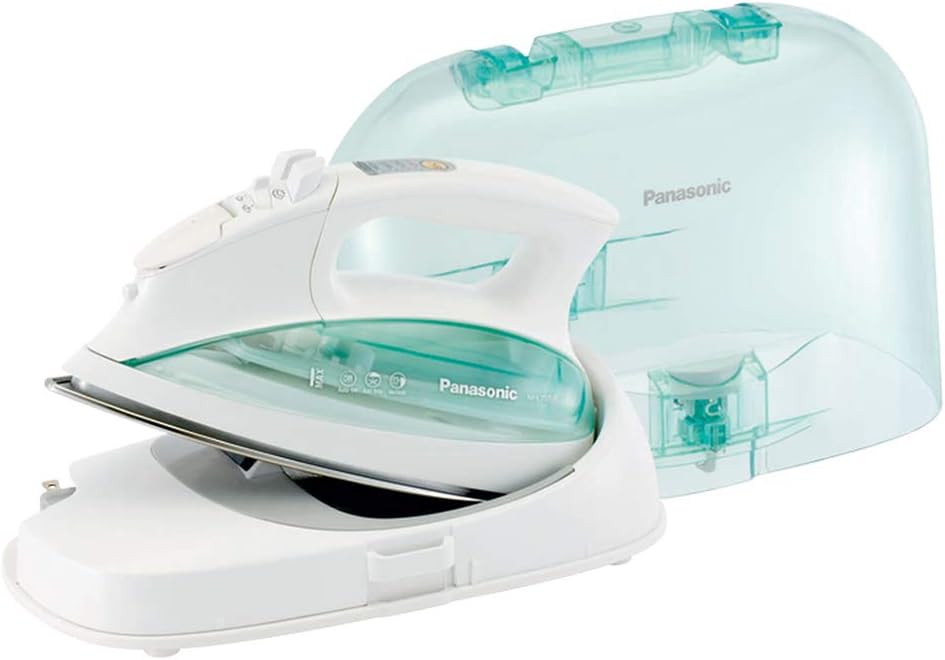
Figure 1: Panasonic NI-L70SR Cordless Steam/Dry Iron with Power Base and Carrying Case.
Key Features
- Cordless Operation: Enjoy unrestricted movement without tangled cords, ideal for various ironing tasks.
- Contoured Stainless Steel Soleplate: Designed for smooth gliding over fabrics, effectively removing wrinkles and creases.
- Vertical Steam Feature: Provides a powerful burst of steam for refreshing hanging garments, curtains, and drapes.
- Electronic Temperature Control: Easily select and adjust temperature settings for a wide range of fabrics.
- Detachable Water Tank: Simplifies refilling and cleaning, preventing spills.
- Lightweight Carrying Case: Offers convenient portability and heat-resistant storage.
- Auto Shut-Off: Enhances safety by automatically powering off after 10 minutes of inactivity.
- Retractable Cord Reel: Integrated into the power base for neat and easy cord storage.

Figure 2: Overview of the iron's primary features.

Figure 3: The contoured stainless steel soleplate for smooth ironing.
Setup
1. Filling the Water Tank
- Ensure the iron is unplugged and cool.
- Detach the water tank from the iron by gently pulling it out.
- Fill the water tank with tap water up to the MAX line. Distilled water is recommended to prevent mineral buildup.
- Reinsert the water tank firmly into the iron until it clicks into place.

Figure 4: Detaching the water tank for easy filling.
2. Connecting the Power Base
- Place the power base on a stable, heat-resistant surface, such as an ironing board.
- Extend the power cord from the retractable reel on the base and plug it into a standard 120V AC outlet.
- Place the iron securely onto the power base.

Figure 5: The power base with its retractable cord reel.
Operating Instructions
1. Temperature and Steam Settings
- With the iron on its base, press the "SET" button to cycle through temperature settings: OFF, LOW, MED, HIGH.
- The indicator light will illuminate red when heating and turn off when the selected temperature is reached.
- Adjust the steam selector switch on the iron's handle for desired steam output (Dry, Low Steam, High Steam).
- For dry ironing, set the steam selector to "Dry" and ensure the water tank is empty or the steam function is not activated.

Figure 6: Electronic temperature and steam controls.
2. Cordless Ironing
Once the iron reaches the desired temperature, lift it from the power base. The iron will maintain its heat for a period, allowing for free movement. Return the iron to the base periodically to reheat and maintain optimal temperature, especially during longer ironing sessions.
3. Vertical Steaming
For vertical steaming, hold the iron upright, close to the fabric (e.g., hanging clothes, curtains). Press the steam burst button to release a powerful jet of steam. This feature is effective for removing wrinkles from delicate fabrics or items that are difficult to iron flat.
4. Auto Shut-Off
The iron is equipped with an auto shut-off safety feature. If left idle on its base for approximately 10 minutes, the power base will automatically turn off. To resume operation, simply lift the iron from the base and place it back, then select your desired temperature.

Figure 7: Auto Shut-Off mechanism for safety.
5. Ideal for Quilting and Crafting
The cordless design and precise temperature control make this iron particularly suitable for quilting, sewing, and crafting projects, allowing for easy maneuverability around fabric pieces.

Figure 8: The iron is ideal for quilting and crafting.
Maintenance
1. Cleaning the Soleplate
To clean the soleplate, ensure the iron is cool and unplugged. Wipe the soleplate with a damp cloth and a mild, non-abrasive cleaner if necessary. Do not use harsh chemicals or abrasive pads, as this can damage the soleplate finish.
2. Anti-Calc System
The iron features an anti-calc system to prevent mineral buildup in the steam vents. Regular use of distilled water can further minimize mineral deposits and prolong the iron's lifespan. If mineral buildup occurs, refer to the self-cleaning instructions in the full user guide (link provided in product details).

Figure 9: The Anti-Calc system helps prevent clogging.
3. Storage
After use, allow the iron to cool completely. Empty any remaining water from the tank. The heat-resistant carrying case snaps onto the iron and base for convenient storage and portability.

Figure 10: The iron stored in its carrying case.
Troubleshooting
| Problem | Possible Cause | Solution |
|---|---|---|
| Iron does not heat up. | Not properly seated on base; power cord unplugged; auto shut-off activated. | Ensure iron is correctly seated on the base. Check power cord connection. Lift iron off base and place back to reset auto shut-off. |
| No steam or insufficient steam. | Water tank empty; steam setting too low; temperature too low; steam vents clogged. | Refill water tank. Adjust steam selector. Allow iron to reach higher temperature. Perform self-cleaning cycle. |
| Water leaking from soleplate. | Temperature too low for steam; water tank overfilled or not properly seated. | Ensure iron is at proper steam temperature. Do not overfill water tank. Re-seat water tank securely. |
| Iron not removing wrinkles effectively. | Temperature setting too low for fabric; insufficient steam. | Increase temperature setting. Use appropriate steam level for fabric. |
For further assistance, please contact Panasonic customer support.
Specifications
| Brand | Panasonic |
| Model Name | Cordless Steam Iron |
| Model Number | NI-L70SR |
| Power | 1500 Watts |
| Voltage | 120 Volts |
| Frequency | 60 Hz |
| Water Tank Capacity | 0.154 Liters |
| Soleplate Material | Stainless Steel |
| Special Features | Auto Shutoff, Vertical Steam, Detachable Water Tank, Retractable Cord Reel |
| Product Dimensions | 11.8"L x 6.25"W |
| Item Weight | 5 pounds |
| Color | Green/White |

Figure 11: Product dimensions.
Warranty and Support
For information regarding warranty coverage, product registration, or technical support, please refer to the official Panasonic website or contact their customer service department. Keep your purchase receipt as proof of purchase for warranty claims.
You can also find additional resources and a full user manual (PDF) at the following link: Panasonic NI-L70SR User Guide