
Power Acoustik PS4-300
Instruction Manual
Power Acoustik PS4-300 Amplifier
4-Channel Class A/B Power Series 300-Watt Amplifier
Introduction
The Power Acoustik PS4-300 is a 4-channel Class A/B amplifier designed to deliver robust audio performance for your vehicle's sound system. It features 40W x 4 at 4 ohms and 50W x 4 at 2 ohms, offering stable operation and versatile configuration options. This amplifier includes a 3-way protection circuit, a system distress indicator, variable high-pass/low-pass filters, selectable crossover, and a variable 18dB bass boost at 40 Hz. High/low level inputs with floating ground and line output are also integrated, along with platinum RCA connectors and spade terminals for reliable connections. This manual provides essential information for proper installation, operation, and maintenance.
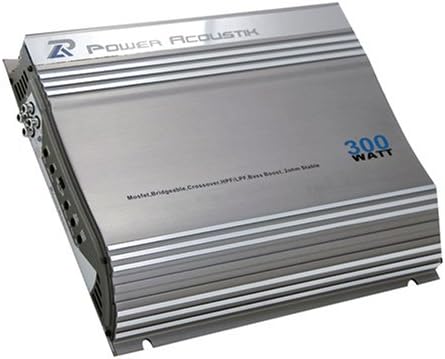
An image of the Power Acoustik PS4-300 amplifier, showcasing its silver-grey casing with ribbed heat sinks, the 'Power Acoustik' logo, and '300 WATT' text. Input and output terminals are visible on the side.
Safety Instructions
Please read and understand all safety instructions before installing or operating this amplifier. Failure to follow these guidelines may result in injury or damage to the product or vehicle.
- Professional Installation Recommended: For optimal performance and safety, professional installation by a qualified technician is highly recommended.
- Ventilation: Ensure adequate ventilation around the amplifier to prevent overheating. Do not mount in enclosed spaces without airflow.
- Power Connections: Always disconnect the vehicle's battery before making any power connections. Use appropriate gauge wiring and fuses as specified.
- Moisture and Heat: Avoid exposing the amplifier to moisture, water, or extreme temperatures.
- Secure Mounting: Mount the amplifier securely to prevent it from becoming a projectile in the event of a sudden stop or collision.
- Wiring: Ensure all wiring is properly insulated and routed away from sharp edges or moving parts.
Setup
1. Unpacking and Inspection
- Carefully remove the amplifier from its packaging.
- Inspect the unit for any signs of damage that may have occurred during shipping. Contact your dealer immediately if damage is found.
- Verify that all included accessories are present.
2. Mounting Location
- Choose a mounting location that provides adequate ventilation and is protected from moisture and direct sunlight.
- Common locations include under a seat, in the trunk, or behind a panel.
- Ensure the mounting surface is sturdy enough to support the amplifier's weight.
3. Wiring Connections
Proper wiring is crucial for performance and safety. Refer to your vehicle's wiring diagram if unsure.
- Power (B+): Connect to the positive terminal of the vehicle's battery using an appropriate gauge power cable and an inline fuse (not supplied) located within 18 inches of the battery.
- Ground (GND): Connect to a clean, unpainted metal surface of the vehicle's chassis. Ensure a solid, low-resistance connection.
- Remote (REM): Connect to the remote turn-on output of your head unit. This wire turns the amplifier on and off with the head unit.
- RCA Inputs: Connect the RCA cables from your head unit's pre-amp outputs to the amplifier's RCA inputs. The PS4-300 supports high/low level inputs.
- Speaker Outputs: Connect your speakers to the amplifier's speaker terminals. Ensure correct polarity (+ to + and - to -). The amplifier is 2-ohm stable stereo and tri-mode capable.
Operating
1. Initial Power-On
- After all connections are made and verified, turn on your vehicle's ignition and head unit.
- The amplifier's power indicator should illuminate, indicating it is receiving power.
- If the system distress indicator illuminates, refer to the Troubleshooting section.
2. Adjusting Settings
The PS4-300 offers several adjustable settings to fine-tune your audio experience:
- Gain Control: Adjust the gain control to match the output voltage of your head unit. Start with the gain at minimum and slowly increase until desired volume is achieved without distortion.
- Variable Hi-Pass/Low-Pass Filter: Use these filters to direct specific frequency ranges to your speakers. High-pass filters allow frequencies above a set point to pass, ideal for full-range or component speakers. Low-pass filters allow frequencies below a set point to pass, ideal for subwoofers.
- Selectable Crossover: This allows you to choose between full-range, high-pass, or low-pass operation for each channel pair.
- Variable 18dB Bass Boost (40 Hz): This feature allows you to enhance bass output at 40 Hz. Use sparingly to avoid distortion and speaker damage.
Maintenance
Regular maintenance helps ensure the longevity and optimal performance of your amplifier.
- Cleaning: Periodically clean the exterior of the amplifier with a soft, dry cloth. Do not use harsh chemicals or abrasive cleaners. Ensure ventilation fins are free of dust and debris.
- Connection Checks: Annually, or if you notice performance issues, check all wiring connections (power, ground, remote, RCA, speaker) to ensure they are secure and free from corrosion.
- Ventilation: Ensure that the area around the amplifier remains clear and unobstructed to allow for proper airflow and heat dissipation.
Troubleshooting
If you experience issues with your amplifier, consult the table below for common problems and their solutions.
| Problem | Possible Cause | Solution |
|---|---|---|
| No Power / Amplifier does not turn on | Blown fuse; Loose power/ground/remote wire; Faulty head unit remote output. | Check and replace fuse; Verify all power, ground, and remote connections; Test head unit remote output. |
| No Sound Output | Loose RCA cables; Incorrect gain setting; Speaker wires disconnected/shorted; Amplifier in protection mode. | Check RCA connections; Adjust gain; Inspect speaker wiring for shorts or disconnections; Check for protection circuit activation (system distress indicator). |
| Distorted Sound | Gain set too high; Speaker impedance mismatch; Damaged speakers; Poor ground connection. | Reduce gain; Verify speaker impedance is compatible (2-ohm stable); Inspect speakers; Ensure solid ground connection. |
| Amplifier Overheating | Insufficient ventilation; Speaker impedance too low; Prolonged high volume use. | Relocate amplifier for better airflow; Check speaker impedance; Reduce volume or allow cool-down periods. |
| System Distress Indicator On | Overload, short circuit, or thermal protection activated. | Check speaker wiring for shorts; Ensure proper impedance; Allow amplifier to cool down. |
Specifications
| Feature | Detail |
|---|---|
| Model Number | PS4-300 |
| RMS Power (4 Ohms) | 40W x 4 Channels |
| RMS Power (2 Ohms) | 50W x 4 Channels |
| Amplifier Class | Class A/B |
| Protection Circuit | 3-Way Protection Circuit |
| Distress Indicator | System Distress Indicator |
| Filters | Variable Hi-Pass/Low-Pass Filter |
| Crossover | Selectable Crossover |
| Bass Boost | Variable 18dB (40 Hz) |
| Inputs | High/Low Level Inputs with Floating Ground |
| Outputs | Line Output |
| Connectors | Platinum RCA Connectors, Spade Terminals |
| Dimensions | 28.45 x 25.65 x 8.64 cm |
| Weight | 2.13 kg |
Warranty and Support
This Power Acoustik PS4-300 amplifier is covered by a manufacturer's warranty. Please refer to the warranty card included with your product for specific terms, conditions, and duration. For technical support, service, or warranty claims, please contact Power Acoustik customer service through their official website or the contact information provided in your product packaging. Keep your proof of purchase for warranty validation.