
Pure Acoustics SL W10
Pure Acoustics SL W10 10-Inch Active Subwoofer User Manual
Model: SL W10 | Brand: Pure Acoustics
1. Introduction
Thank you for purchasing the Pure Acoustics SL W10 10-Inch Active Subwoofer. This high-performance subwoofer is designed to deliver accurate and powerful bass, enhancing your audio experience. With its 120-watt integrated amplifier and adjustable frequency response, the SL W10 is a versatile addition to any home audio system. This manual provides essential information for the proper installation, operation, and maintenance of your subwoofer.
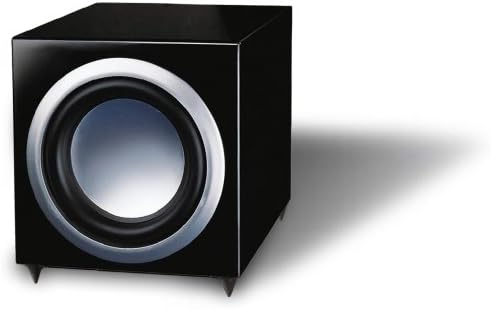
This image displays the Pure Acoustics SL W10 10-Inch Active Subwoofer. It features a sleek, high-gloss black cabinet with a prominent 10-inch speaker cone on the front, surrounded by a silver trim. The subwoofer is designed for powerful bass output.
2. Safety Instructions
- Read all instructions before operating the subwoofer.
- Keep this manual for future reference.
- Do not expose the subwoofer to rain or moisture.
- Do not block any ventilation openings. Install in accordance with the manufacturer's instructions.
- Do not install near any heat sources such as radiators, heat registers, stoves, or other apparatus (including amplifiers) that produce heat.
- Protect the power cord from being walked on or pinched, particularly at plugs, convenience receptacles, and the point where they exit from the apparatus.
- Only use attachments/accessories specified by the manufacturer.
- Unplug this apparatus during lightning storms or when unused for long periods of time.
- Refer all servicing to qualified service personnel. Servicing is required when the apparatus has been damaged in any way, such as power-supply cord or plug is damaged, liquid has been spilled or objects have fallen into the apparatus, the apparatus has been exposed to rain or moisture, does not operate normally, or has been dropped.
3. Package Contents
Please check the package contents to ensure all items are present and undamaged:
- Pure Acoustics SL W10 10-Inch Active Subwoofer
- Power Cord
- User Manual (this document)
4. Setup
4.1 Placement
The placement of your subwoofer can significantly impact its performance. Experiment with different locations to find the best bass response for your room. Generally, placing the subwoofer in a corner can enhance bass output, but may also lead to boomy sound. Placing it along a wall can provide a more balanced sound. Avoid placing it directly against a wall or in a cabinet that restricts airflow.
4.2 Connections
Follow these steps to connect your subwoofer to your audio system:
- Power Off: Ensure all audio components, including your receiver/amplifier and the subwoofer, are turned off before making any connections.
- Audio Input: Connect an RCA cable from the subwoofer output (LFE or Subwoofer Out) of your receiver/amplifier to the Line Input (RCA) on the back of the SL W10 subwoofer. If your receiver has only one subwoofer output, connect it to the L/Mono input on the subwoofer.
- Power Connection: Plug the power cord into the AC inlet on the back of the subwoofer, then plug the other end into a suitable wall outlet.
- Power On: Turn on your receiver/amplifier first, then turn on the subwoofer.
5. Operating Your Subwoofer
5.1 Power On/Off
The subwoofer has a power switch, typically located on the rear panel. Flip the switch to the 'ON' position to power on the unit. For optimal system performance and to prevent pops, always power on your subwoofer after your receiver/amplifier and power off your subwoofer before your receiver/amplifier.
5.2 Volume Control
The 'Volume' knob on the rear panel controls the output level of the subwoofer. Start with the volume at a low setting and gradually increase it until the bass blends seamlessly with your main speakers. Avoid setting the volume too high, as this can lead to distorted sound.
5.3 Frequency Adjustment (Crossover)
The 'Crossover' or 'Frequency' knob allows you to adjust the upper frequency limit of the subwoofer, typically from 35Hz to 150Hz. This control determines where the subwoofer takes over from your main speakers. Set the crossover frequency based on the low-frequency capabilities of your main speakers. For smaller bookshelf speakers, a higher crossover (e.g., 80-100Hz) may be appropriate. For larger floor-standing speakers, a lower crossover (e.g., 60-80Hz) might be suitable. Adjust this setting for the smoothest transition between your subwoofer and main speakers.
6. Maintenance
Proper maintenance will ensure the longevity and performance of your subwoofer:
- Cleaning: Use a soft, dry cloth to clean the cabinet. For high-gloss finishes, a slightly damp cloth followed by a dry one can be used to remove fingerprints. Avoid using harsh chemicals, solvents, or abrasive cleaners, as they can damage the finish.
- Ventilation: Ensure that the ventilation openings on the subwoofer are not blocked. Adequate airflow is crucial to prevent overheating.
- Dust: Regularly dust the subwoofer to prevent dust buildup, especially around the speaker cone and ventilation areas.
- Storage: If storing the subwoofer for an extended period, place it in its original packaging or a protective cover in a cool, dry place.
7. Troubleshooting
If you encounter issues with your subwoofer, refer to the following table for common problems and solutions:
| Problem | Possible Cause | Solution |
|---|---|---|
| No sound from subwoofer | Subwoofer not powered on Volume too low Incorrect input connection Receiver/amplifier settings | Ensure power switch is ON Increase volume knob Check RCA cable connection to Line In Verify subwoofer output is enabled on your receiver |
| Distorted or boomy bass | Volume too high Incorrect crossover setting Poor placement | Decrease volume Adjust crossover frequency Try different placement in the room |
| Humming or buzzing noise | Ground loop Loose cable connection Interference from other electronics | Try plugging subwoofer into a different outlet Ensure all cables are securely connected Move subwoofer away from other electronic devices |
| Subwoofer turns off unexpectedly | Overheating Power saving mode Faulty power connection | Ensure proper ventilation Check if auto-standby is enabled (if applicable) Verify power cord is secure and outlet is functional |
8. Specifications
The following are the technical specifications for the Pure Acoustics SL W10 Active Subwoofer:
| Feature | Specification |
|---|---|
| Model Number | SL W10 |
| Speaker Type | Active Subwoofer |
| Subwoofer Diameter | 10 Inches |
| Maximum Speaker Output Power | 120 Watts |
| Frequency Response | Adjustable 35-150Hz |
| Control Type | Volume Control |
| Color | Black (High-Gloss) |
| Product Dimensions (L x W x H) | 32.51 x 32 x 32.51 cm (12.8 x 12.6 x 12.8 inches) |
| Product Weight | 10.98 kg (24.2 lbs) |
9. Warranty and Support
Pure Acoustics products are manufactured to the highest quality standards. For information regarding warranty coverage, technical support, or service, please refer to the warranty card included with your product or visit the official Pure Acoustics website. Please retain your proof of purchase for any warranty claims.
Ask a question about this manual
Ask about setup, troubleshooting, compatibility, parts, safety, or missing instructions. Manuals+ will review the question and use this page’s manual context to help answer it.